[Tool] ChromIQ – a macOS and Windows GUI for ArgyllCMS printer profiling (v3.13.0-beta)

itsab1989

Fan of Printing
Joined
Feb 11, 2026
Messages
215
Reaction score
95
Points
60
Printer Model
Epson ET 8550, Canon Pro 300
@itsab1989 : I am downloading like crazy the last few days :lol: . Unfortunately I am not so fast als Claude in analyzing and testing the software, just a person of blood and flesh .😜
Sorry for that. This is because of the back and forth between me and Knut. He gives feedback, I try to fix / implement it, make a new beta, he tests it, gives feedback again…
So the cycles are very short 😅
 

mavtop

Fan of Printing
Joined
Nov 14, 2021
Messages
96
Reaction score
25
Points
50
Printer Model
Epson XP 15000
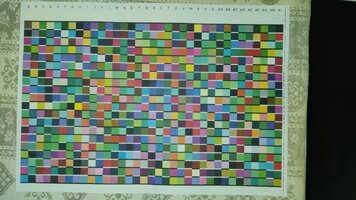
@pharmacist i used chromiq layout engine to generate this profile automatically,

but i would like to have some hints about optimizing it t have a neutral profile (if i will print BW images)

give a look to the patch size in Chromiq screenshoot and if it's good enough for my i1pro1 devices, i printed the patch chart, and i see bigger patches from my last printed and profiled, so maybe i can squeeze them more, also the blank white space from strip label to first patch is bigger than the white space at the end of the strips, maybe i can get some more patches

I have some colors over other on the edges, specially red with blu or green, but some patches have some vertical line darker, i don't know if it is an alignment problem on my Epson XP 15000, i did it the last time i changed the refillable kit, but it is not so easy to choose the best block for the alignment, they are too similar

let me know what do you think
mav_top
 

Attachments

  • Screenshot 2026-07-05 at 17.02.38.png
    Screenshot 2026-07-05 at 17.02.38.png
    374.4 KB · Views: 22
  • WhatsApp Image 2026-07-05 at 17.05.50.jpeg
    WhatsApp Image 2026-07-05 at 17.05.50.jpeg
    137.5 KB · Views: 17
Last edited:

mavtop

Fan of Printing
Joined
Nov 14, 2021
Messages
96
Reaction score
25
Points
50
Printer Model
Epson XP 15000
Sorry for that. This is because of the back and forth between me and Knut. He gives feedback, I try to fix / implement it, make a new beta, he tests it, gives feedback again…
So the cycles are very short 😅
don;t sorry for that, it is a fanstastic work you are doing
 

pharmacist

Printer VIP
Platinum Printer Member
Joined
May 29, 2007
Messages
3,212
Reaction score
1,841
Points
333
Location
Ghent, Belgium
Printer Model
SC-900 ET-8550 WF-7840 TS705
Hi @mavtop, I believe you are using my 3D printed scanning jig that has a row scanning length of about 235 mm, enough for about 28 patches of 7,7-8 mm width (+ space bars). About 25 rows possible in landscape scanning mode (no entry form and extra text). You should be able to put 25x28= 700 patches on a single sheet of A4.

700 patches with the ChromIQ patch generator you can have a very good sampling around the neutral axis:

1783273827591.png


1783273943727.png


Use these settings to get 700 patches in total. A lot of grey steps (32) and near neutral greys (6x26). So you will good neutral grey printing.
 
Last edited:

mavtop

Fan of Printing
Joined
Nov 14, 2021
Messages
96
Reaction score
25
Points
50
Printer Model
Epson XP 15000
Hi @mavtop, I believe you are using my 3D printed scanning jig that has a row scanning length of about 235 mm, enough for about 28 patches of 7,7-8 mm width (+ space bars). About 25 rows possible in landscape scanning mode (no entry form and extra text). You should be able to put 25x28= 700 patches on a single sheet of A4.

700 patches with the ChromIQ patch generator you can have a very good sampling around the neutral axis:

View attachment 18999

View attachment 19000

Use these settings to get 700 patches in total. A lot of grey steps (32) and near neutral greys (6x26). So you will good neutral grey printing.
Thank you @pharmacist, i will try it as soon as possible.

I would like to know if someone has tried with Chromiq to use an initial chart (for example an A5 chart filled with the maximum number of patches possible) and then use it like a preconditiong profile to generate another A5 chart to optimize it and compare the final profile against an A4 single pass chart filled with the maximum number of patches possible.

I always was curios to understand if a smaller profile and a following refinement profile would give a better one than a single pass (with higher number of patches inside).
 

mavtop

Fan of Printing
Joined
Nov 14, 2021
Messages
96
Reaction score
25
Points
50
Printer Model
Epson XP 15000
I don't understand if i can use a scanner to generate a profile for a printer (like PrintPrism) with Chromiq

if possible someone can explain how to do it, i could generate profiles faster and could use more patches in a single sheet (against i1pro1 patch size)
 

pharmacist

Printer VIP
Platinum Printer Member
Joined
May 29, 2007
Messages
3,212
Reaction score
1,841
Points
333
Location
Ghent, Belgium
Printer Model
SC-900 ET-8550 WF-7840 TS705
At this moment: a short NO. Not possible. However you can profile your scanner with a spectro, but not the other way round, as we do not know the spectral behaviour of each brand of scanner.

Most modern printers (like the XP15000) will do fine with about 700-1000 patches to be a good profile even in printing greys (emphasizing patch selection of the neutral and near neutral axis).
 

mavtop

Fan of Printing
Joined
Nov 14, 2021
Messages
96
Reaction score
25
Points
50
Printer Model
Epson XP 15000
At this moment: a short NO. Not possible. However you can profile your scanner with a spectro, but not the other way round, as we do not know the spectral behaviour of each brand of scanner.

Most modern printers (like the XP15000) will do fine with about 700-1000 patches to be a good profile even in printing greys (emphasizing patch selection of the neutral and near neutral axis).
ok good to know, i will try with 700 just to use your ruler and to see if i can read them easily than before with my wrong ruler :)

anyway i will have to solve before the banding on the edges of red/blue/green patches, i discovered that the red channel was not working at all, when i printed my first chart, then i cleaned the nozzle and it was firing good, so i printed the chart again, but still some color over another on the edge mainly with Red (patches) close to Green/Blue patches, you can see it on the printed sheet screenshoot.

I hope it is not an alignment problem, i don't understand because it is done with only the blue color, on plain paper it seems all the same, it is really hard to find differences
 

mavtop

Fan of Printing
Joined
Nov 14, 2021
Messages
96
Reaction score
25
Points
50
Printer Model
Epson XP 15000
@pharmacist what about preprofiling with Chromiq ?

did you test it ?

interesting would be a basic chart (A5 i suppose with 300-350 or more patches if possible) with the main patches (to use with all papers to build an initial setup) then another A5 chart (again 300-350 or more) to specialize the setup using the first one like precondition

if i will have time i will try to check with the plain paper before going with the real paper
 

pharmacist

Printer VIP
Platinum Printer Member
Joined
May 29, 2007
Messages
3,212
Reaction score
1,841
Points
333
Location
Ghent, Belgium
Printer Model
SC-900 ET-8550 WF-7840 TS705
I have done the preprofiling, but I am not so impressed. I have better results with a large target with about 3 sheets (2160 patches) of A4 and easier: otherwise you have to print the first target wait 24 hours scan, generate the secondary target, print again, wait 24 hours again and scan and be ready after 2-3 days. Too complicated and time consuming for me.
 
Top