[Tool] ChromIQ – a macOS and Windows GUI for ArgyllCMS printer profiling (v3.13.0-beta)

itsab1989

Fan of Printing
Joined
Feb 11, 2026
Messages
213
Reaction score
95
Points
60
Printer Model
Epson ET 8550, Canon Pro 300
@itsab1989 : I am downloading like crazy the last few days :lol: . Unfortunately I am not so fast als Claude in analyzing and testing the software, just a person of blood and flesh .😜
Sorry for that. This is because of the back and forth between me and Knut. He gives feedback, I try to fix / implement it, make a new beta, he tests it, gives feedback again…
So the cycles are very short 😅
 

mavtop

Getting Fingers Dirty
Joined
Nov 14, 2021
Messages
88
Reaction score
25
Points
40
Printer Model
Epson XP 15000
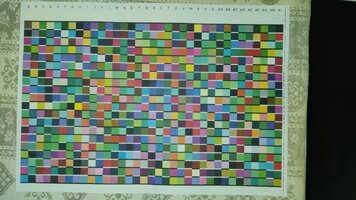
@pharmacist i used chromiq layout engine to generate this profile automatically,

but i would like to have some hints about optimizing it t have a neutral profile (if i will print BW images)

give a look to the patch size in Chromiq screenshoot and if it's good enough for my i1pro1 devices, i printed the patch chart, and i see bigger patches from my last printed and profiled, so maybe i can squeeze them more, also the blank white space from strip label to first patch is bigger than the white space at the end of the strips, maybe i can get some more patches

I have some colors over other on the edges, specially red with blu or green, but some patches have some vertical line darker, i don't know if it is an alignment problem on my Epson XP 15000, i did it the last time i changed the refillable kit, but it is not so easy to choose the best block for the alignment, they are too similar

let me know what do you think
mav_top
 

Attachments

  • Screenshot 2026-07-05 at 17.02.38.png
    Screenshot 2026-07-05 at 17.02.38.png
    374.4 KB · Views: 10
  • WhatsApp Image 2026-07-05 at 17.05.50.jpeg
    WhatsApp Image 2026-07-05 at 17.05.50.jpeg
    137.5 KB · Views: 11
Last edited:

mavtop

Getting Fingers Dirty
Joined
Nov 14, 2021
Messages
88
Reaction score
25
Points
40
Printer Model
Epson XP 15000
Sorry for that. This is because of the back and forth between me and Knut. He gives feedback, I try to fix / implement it, make a new beta, he tests it, gives feedback again…
So the cycles are very short 😅
don;t sorry for that, it is a fanstastic work you are doing
 

pharmacist

Printer VIP
Platinum Printer Member
Joined
May 29, 2007
Messages
3,209
Reaction score
1,841
Points
333
Location
Ghent, Belgium
Printer Model
SC-900 ET-8550 WF-7840 TS705
Hi @mavtop, I believe you are using my 3D printed scanning jig that has a row scanning length of about 235 mm, enough for about 28 patches of 7,7-8 mm width (+ space bars). About 25 rows possible in landscape scanning mode (no entry form and extra text). You should be able to put 25x28= 700 patches on a single sheet of A4.

700 patches with the ChromIQ patch generator you can have a very good sampling around the neutral axis:

1783273827591.png


1783273943727.png


Use these settings to get 700 patches in total. A lot of grey steps (32) and near neutral greys (6x26). So you will good neutral grey printing.
 
Last edited:
Top