ghwellsjr said:
I just have a few suggestions for your excellent summary on nozzle cleaning steps:
Truth be told, the majority of what I wrote was summarizing info I've gotten from posts you've written. My impression is that "you da man" on de-clogging. But any flaws are my responsibility.
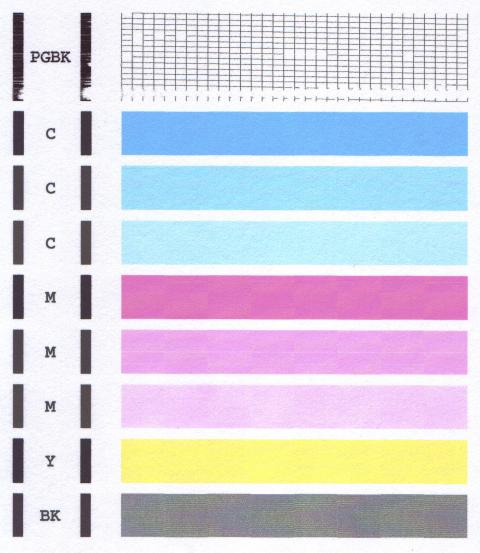
1) Start off with a clear warning not to print anything except nozzles checks until all nozzles are unclogged since extensive printing with no ink flowing can overheat and burn out the heating elements.
I don't disagree, but I would hope you would be willing to write-up a better "HowTo" and see if Rob L. would make it a "Sticky". I consider my attempt as just a draft to hopefully bring about further discussion. And also, I would rate myself as having little or no legitimate creditability on de-clogging, as I don't have all that much experience at it.
2) On your second and third bullets you use the phrase "print driver" which should be "print head".
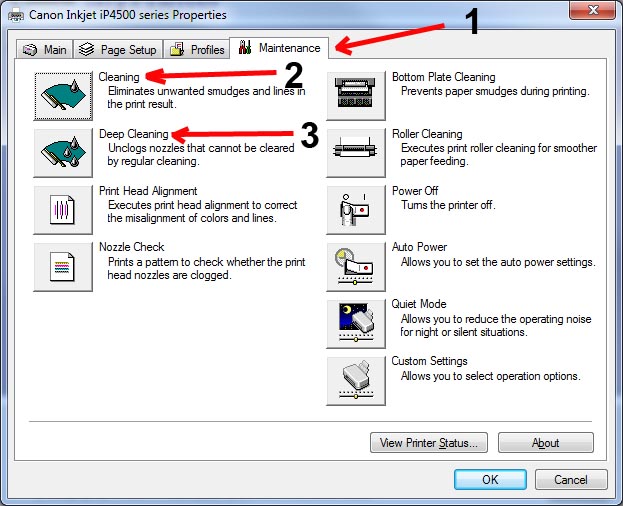
That was intended. I wanted to be specific and unambiguous that this is a regular cleaning and then a deep cleaning from within the print-driver. I only have experience with Win-7 controlling my Pro 9000-2 and ip4500, which don't have any LCD screen, and have essentially no user interface. Other printers, especially all-in-ones may have an LCD and can be stand-alone without being connected to a computer. Also, our nomenclature may be inconsistent.
3) I would suggest that people only do normal print head cleanings unless they are using a specially prepared cleaning cartriges. They should be made aware that just a few deep print head cleanings can use up all the ink in a cartridge.
4) I would suggest that a cleaning cartridge have at least a little ink in it, just so that you can tell if the cleaning is working.
Good points. I was surprised the first time I put some ink into distilled water ... even when greatly diluted, the color of the ink was pretty obvious. Something that isn't clear from the "HowTo" is how time consuming it can be ... declogging can stretch out over days and days. Patience is essential. At some point, your time is more valuable than the cost of just getting a replacement print-head.
It also isn't clear that once you get to swapping in cleaning carts for real ink carts, you may need to intersperse with extra cleaning cycles so the ink can work its way from the nozzle inlet to the actual spray nozzles that put the ink on the paper. I don't have an awareness of how much ink there is in the channels leading from the nozzle inlets to the actual individual nozzles. I think it is possible that the clog could be cleared, but it doesn't seem like it because cleaning solution is being sprayed. Your suggestion about having some ink in the cleaning solution would help with this.
Another point to perhaps mention ... print-heads are delicate, high precision devices. Handle with care!
[Edit] And don't even think about taking the print-head apart, or loosening the screws that attach it to the base (as recommended on a webpage I encountered).
5) For people who are not yet into refilling but need a cleaning cartridge, they can make one easily by taking a cartridge that is almost empty (assuming they don't have a resetter), turning it upside down and dribbling window cleaner into the outlet port.
Agree ... but I think of this as possibly a separate step to be taken somewhat early in the "flow chart" of steps. It might go along with putting a few drops of cleaning solution into the nozzle inlets.
And obviously, the problem with any generic "HowTo" is "it depends" on the specific situation. There are so many variables ... what printer ... what does the nozzle check look like ... other symptoms ... age of printer ... what's changed ... type of ink ... type of cartridge ... German vs top-filling ... intermediate results from declogging steps .... etc. etc. etc.