DovahkiinFD
Print Lurker
- Joined
- Jan 21, 2026
- Messages
- 4
- Reaction score
- 0
- Points
- 1
- Printer Model
- Canon Pixma IX4000
Hi. I have a Canon Pixma IX4000 that i got used and left without use for a long time. It had oem cartriges that had some ink left. I tested the printer with many prints until it ran out of ink and the colors were fine.
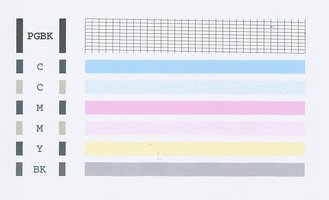
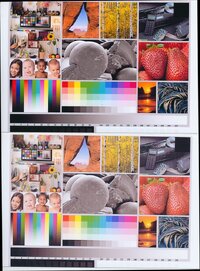
A couple of months ago i run out of CMY ink and ordered some Precision Colors inks. Some days ago i got to flush and dry the cartriges and after refilling them, the colors were desaturated. I did two thorough cleans of the printhead and left it to dry, both times the colors didnt change. The prints come out with only a few streaks that i dont mind that much.
PC inks are recomended in this forum so i guess they are not the issue. I tryed reinstalling drivers on my computer but didnt work either (i read that the drivers could give issues sometimes). The carts are not leaking and apear to be properly soaked in ink; ran many clean cycles so i had to refill them again.
Do i need to change the printhead and carts? Or can something be done to salvage them?
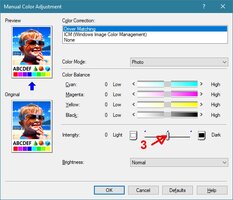
I leave images as reference. Printed on high quality glossy photo paper, same i used with the old oem ink.
Thanks for the help!
Edit: I dont know if this is the right section of the forum to post on, maybe it would be better to post it on the Canon section. It doesn't allow me to delete. Sorry if this doesnt go here.


A couple of months ago i run out of CMY ink and ordered some Precision Colors inks. Some days ago i got to flush and dry the cartriges and after refilling them, the colors were desaturated. I did two thorough cleans of the printhead and left it to dry, both times the colors didnt change. The prints come out with only a few streaks that i dont mind that much.
PC inks are recomended in this forum so i guess they are not the issue. I tryed reinstalling drivers on my computer but didnt work either (i read that the drivers could give issues sometimes). The carts are not leaking and apear to be properly soaked in ink; ran many clean cycles so i had to refill them again.
Do i need to change the printhead and carts? Or can something be done to salvage them?
I leave images as reference. Printed on high quality glossy photo paper, same i used with the old oem ink.
Thanks for the help!
Edit: I dont know if this is the right section of the forum to post on, maybe it would be better to post it on the Canon section. It doesn't allow me to delete. Sorry if this doesnt go here.
Last edited: