Having truble with color intensity after cleaning and ink refill. Canon Pixma IX4000

DovahkiinFD

Print Lurker
Joined
Jan 21, 2026
Messages
3
Reaction score
0
Points
1
Printer Model
Canon Pixma IX4000
Hi. I have a Canon Pixma IX4000 that i got used and left without use for a long time. It had oem cartriges that had some ink left. I tested the printer with many prints until it ran out of ink and the colors were fine.

A couple of months ago i run out of CMY ink and ordered some Precision Colors inks. Some days ago i got to flush and dry the cartriges and after refilling them, the colors were desaturated. I did two thorough cleans of the printhead and left it to dry, both times the colors didnt change. The prints come out with only a few streaks that i dont mind that much.

PC inks are recomended in this forum so i guess they are not the issue. I tryed reinstalling drivers on my computer but didnt work either (i read that the drivers could give issues sometimes). The carts are not leaking and apear to be properly soaked in ink; ran many clean cycles so i had to refill them again.

Do i need to change the printhead and carts? Or can something be done to salvage them?

I leave images as reference. Printed on high quality glossy photo paper, same i used with the old oem ink.

Thanks for the help!

Edit: I dont know if this is the right section of the forum to post on, maybe it would be better to post it on the Canon section. It doesn't allow me to delete. Sorry if this doesnt go here.

1000023451.jpg
1000023450.jpg
 
Last edited:

DovahkiinFD

Print Lurker
Joined
Jan 21, 2026
Messages
3
Reaction score
0
Points
1
Printer Model
Canon Pixma IX4000
This is a nozzle test done on plain photocopy paper
1000023453.jpg
 

PeterBJ

Printer VIP
Platinum Printer Member
Joined
Nov 27, 2010
Messages
5,235
Reaction score
5,135
Points
373
Location
Copenhagen Denmark
Printer Model
Canon MP990
I guess the used inks from Precision Colors are these? I use the same inks and I think they are a very good colour match to Canon OEM inks.

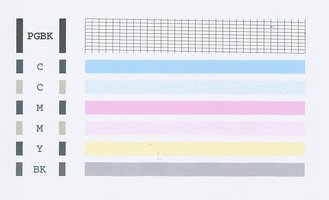
To me your nozzle check looks perfectly normal, but that might be a bit difficult to determine, as the light, contrast and saturation depends on camera or scanner settings. Here is a scan of a Canon MP500 nozzle check. The printhead is similar to the one used in the iX4000 except for an added photo (dye) black, click to enlarge:

MP500 Nozzle check.jpg

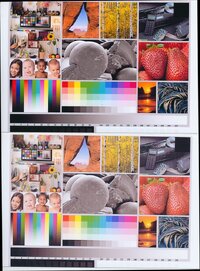
Here is a test image printed on a Canon MP500 printer refilled with the same IS inks recommended for refilling your printer, the top image is printed on a Sihl photo paper with the media setting Photo Paper Plus Glossy and the bottom is printed on the same photo paper but with the media setting Plain Paper. Notice the less saturation, click to enlarge:

MP500 media setttings.jpg

So could your photos accidentally be printed with a wrong media setting?
 

DovahkiinFD

Print Lurker
Joined
Jan 21, 2026
Messages
3
Reaction score
0
Points
1
Printer Model
Canon Pixma IX4000
I guess the used inks from Precision Colors are these? I use the same inks and I think they are a very good colour match to Canon OEM inks.

To me your nozzle check looks perfectly normal, but that might be a bit difficult to determine, as the light, contrast and saturation depends on camera or scanner settings. Here is a scan of a Canon MP500 nozzle check. The printhead is similar to the one used in the iX4000 except for an added photo (dye) black, click to enlarge:

View attachment 18222

Here is a test image printed on a Canon MP500 printer refilled with the same IS inks recommended for refilling your printer, the top image is printed on a Sihl photo paper with the media setting Photo Paper Plus Glossy and the bottom is printed on the same photo paper but with the media setting Plain Paper. Notice the less saturation, click to enlarge:

View attachment 18223

So could your photos accidentally be printed with a wrong media setting?
1000023473.jpg
1000023474.jpg
1000023475.jpg
1000023476.jpg


Thanks for your time! These are prints of the test image (at the bottom the exact file I used). Used two different paper settings, Photo paper plugs glossy (top) and high resolution paper (bottom). There is also another nozzle test. All of them next to a window with natural sunlight. Tryed to scan them on another printer but they came out too washed, if needed I'll post them also of course, but the photos came out pretty close to the prints.

I've tried messing around with the colors setting but haven't managed to figure out how to get closer to what they should be.


Edit: The inks you liked are the ones I bought yes, so I guess those are not the issue. Could the flow in the carts be obstructed and cause this issue? I made sure that they were dry so the air intakes should not have any water in them.
 
Last edited:

PeterBJ

Printer VIP
Platinum Printer Member
Joined
Nov 27, 2010
Messages
5,235
Reaction score
5,135
Points
373
Location
Copenhagen Denmark
Printer Model
Canon MP990
If the carts were not properly dried after the flushing so the inks were diluted, I think it is very unlikely that all inks were diluted the same amount, so a colour cast should be the result. I see no colour cast so I think the cartridges were properly dried before refill.

Ink starvation produces wedge shaped areas of missing ink like what is seen here and here, so ink starvation is also ruled out. I don't think the printhead has failed as it is very unlikely that all colours should fail in the same way at the same time.

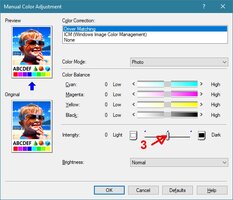
Printer, ink and paper work together as a system and changing one might affect the print result, so maybe changing the printer's colour settings will do the job. As the grey looks neutral grey I think only the saturation should be increased, the balance between the colours should not be changed.

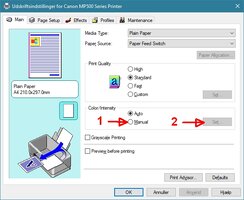
This is the print quality settings for the MP500. I think it is similar for your printer, click to enlarge:

Settings MP500.jpg

1 first click "Manual" , 2 then click "Set"

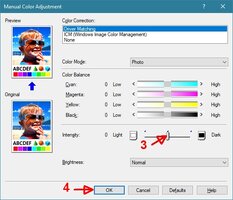
Settings MP500-1.jpg

3 Push the slider towards "Dark" 4 Click "OK".

If there is a colour cast after getting the saturation OK, then see this.

I hope this helps.
 

Attachments

  • Settings MP500-1.jpg
    Settings MP500-1.jpg
    104.4 KB · Views: 3
Last edited:
Top