The impact of quality levels onto the gamut size are small - the driver is most likely switching to a smaller ink droplet size so the printhead needs more passes to put the same amount of ink onto the paper .
Here is an example with a budget level glossy paper Action 210 , the gamut displayed with the quality settings standard - high - best for the ultraglossy selected in the driver.
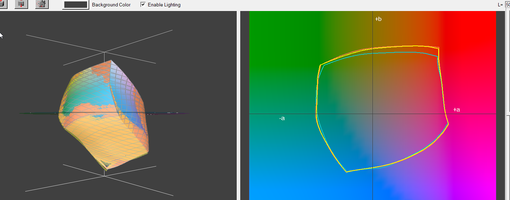
The blue border line covers the gamut with the standard setting - red for high qluality - and yellow for best quality.
The differences are small and even smaller more most of the luminance range, it's just at the dark end at the bottom of the gamut volumes that the red gamut - high quality - shows some more coverage than the blue gamut. But that's all not really exciting differences, and they may be a little bit smaller or wider with another paper - paper coating. The Ultraglossy driver just runs with the dye black, the matte pigment black would not adhere to the surface - you can wipe it off. Pigment black inks only adhere to matte - plain paper like coatings.

Let me now compare the profiles with the VFA driver setting - blue - and the plain paper settings - quality high - red - and plain paper - best - this on the Brilliant matte paper. The driver this time prints with the matte black - with the VFA setting and the plain paper setting
These are the profiles at mid luminance L*=50
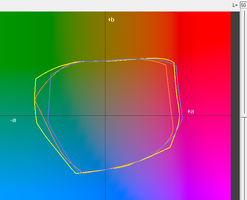
The gamut volumes are pretty similar, no gumut has an outstanding size
And this at the darker range

The gamuts are here rather similar again - with a slight benefit of the plain paper quality high setting.
When I look to all these plots the specifc VFA setting in the driver appears to me more like a convenience entry for the user than a driver with some secret and additional performance or functionality.




