

Canon PRO-100 or PRO-100s Waste Ink Pads full?

Well I've finally got the warning on one of mine. It says the pads are almost full and to contact the service center. I've had it since 2014 and the nozzle check reports it at a little over 30,000 pages. The large majority being borderless 4x6 and 5x7's. I have an even older one from 2013 which is probably next.

Any estimation as to how long until it stops me from printing? Any guides on resetting and installing a waste tank? I've done it on Epson's in the past, but not Canon.

Worst case scenario, I have 2 more brand new in boxes that I got on Craigslist for profit after selling the ink, but I would love to keep them all if possible
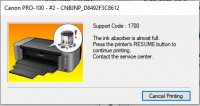
 

Attachments

  • canon-error---ink-absorber-almost-full.jpg
    canon-error---ink-absorber-almost-full.jpg
    30.3 KB · Views: 1,418
Any guides on resetting and installing a waste tank?
The local recycle bin is your only option, you can fit a waste tank but it will do you no good because you can’t reset the ink counter, sorry….
 
Maybe the printer can be resat using Canon Service tool v5204? The seller claims that this service tool works with the Pro models. I think it is worth trying. And if you buy the service tool and tries it, please report your results as this would be a great addition to the forum knowledge.

The use of service tools older than the v5204 (lower version number for instance v3400) will almost certainly cause loss of access to service mode.
 
I love your optimism @PeterBJ… :D but it's still a no...:(
Aye Mr-Party-Pooper but have you actually tried it?

I have a Pro-100 to take apart and figure out the waste ink process but it's a bit... well... kna*$%£ed so not sure how complete the guide would be...
 
Hopefully it works, but the result of your test will be valuable info whether positive or negative.
 
Hey PeterBJ, just wanted to say thanks for the link. A second printer started showing the message last month and the first one finally stopped working today, it refused to do anything and to contact a service center. I went ahead and purchased the software on ebay, I received the link and registered version within an hour or so. Refunds were allowed so I had nothing to lose. Long story short, within 2 minutes I was able to reset both printers successfully. I reset them to 50% to remind me to do something about the pads soon.

So yes, Canon Service tool v5204 does work on the pro-100 afterall
 
Thank you very much for the report. That's good news for owners of the Pro printers. :thumbsup
 
Thanks for the info Richie. That's good to know !. Possibly it works also for the Pro10 ?.
I suspect that it wouldn’t be any good in my case. In all likelihood service mode of my Pro10 is locked, after messing in vain with a previous version of that reset tool.

Anyway 30K pages of smallish prints in borderless mode possibly translates to more than 20K DINA4 sized pages in normal mode?. Good enough for a number of years, with my printing rate. I wish the printhead would last that long.:rolleyes:
 
Last edited:
Back
Top