SELPHY CP1500 Custom Profiles: Best Measurement Conditions?

Printing Profiling Charts on Windows 10

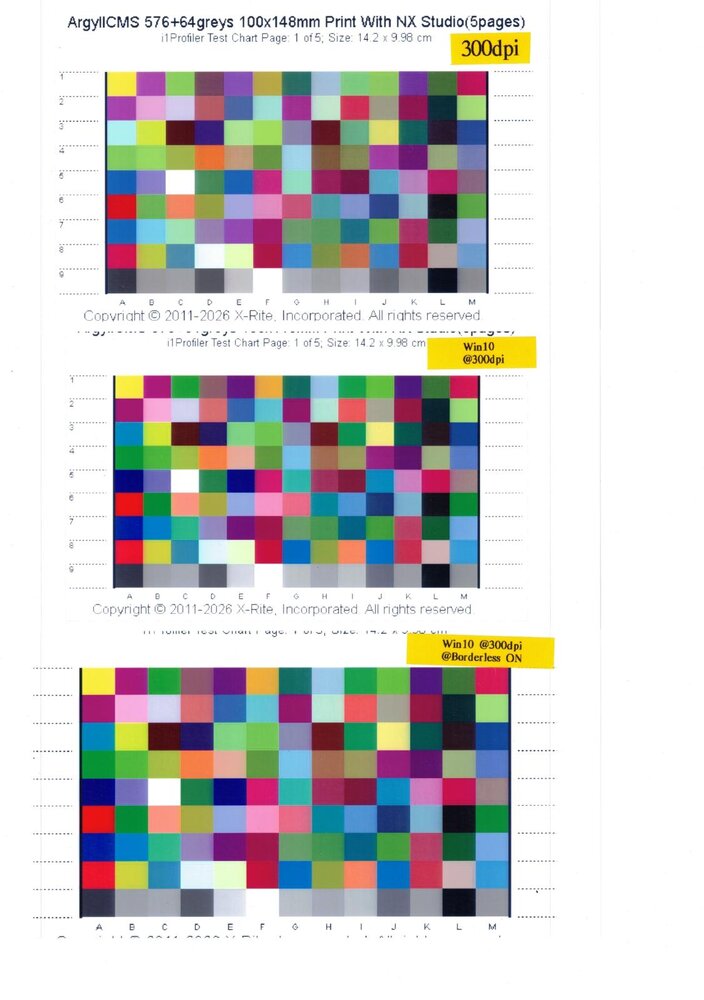
The problematic chart was printed on Windows 11 25H2.
I reprinted the same chart on Windows 10, both with and without Borderless enabled.

Although the scanned image was sent at a low resolution, the differences in the colors of the patches were clearly visible.
From top to bottom:

1st image: Crop to fit — Windows 11
2nd image: No scaling — Windows 10
3rd image: Borderless, Crop to fit — Windows 10
color issue.jpg
 
Comparing ColorChecker24 Measurement Discrepancies: i1Profiler vs. ChromIQ

I restored Windows 11 from a backup before installing the CP1300 driver, and everything seems to be back on track.

Two ColorChecker24 TIFF files were created: one using i1Profiler and the other using ChromIQ.

The patches used in ChromIQ were derived from the i1Profiler ColorChecker24.pxf file. Before importing the file into ChromIQ, the patches were rotated and mirrored in PatchTool to ensure that the two layouts were similar, differing only in orientation.

The resolution of the TIFF file from i1Profiler was increased from 100 ppi to 300 ppi, ensuring that both TIFF files have the same resolution of 300 ppi.

Both TIFF files were printed using Nikon NX Studio with the existing CP800_i1P163.icc profile. This profile was created using ColorPort with 420 patches measured by a DTP41 spectrophotometer, and the final ICC profile was generated using i1Profiler 1.6.3.

The printed charts were measured using their respective applications under M1 measurement conditions.


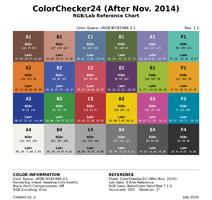
Reference Data CC24
CC24RS_sRGB_Rev1.png


Summary of Measured Color Differences
1. Comparing i1Profiler Measurement Data Against the ColorChecker24 Reference
2. Comparing ChromIQ Measurement Data Against the ColorChecker24 Reference
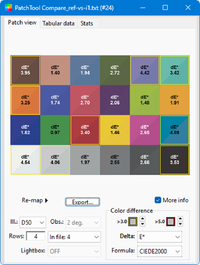
3. Comparing Measurement Data Between i1Profiler and ChromIQ

CC24 vs ColorChecker24_i1Profiler
PatchTool Compare-ref-vs-i1_labeled copy.png


CC24 vs ColorChecker24_ChromeIQ
PatchTool Compare_ref-vs-ChromIQ_labeled copy.png


ColorChecker24_i1Profiler vs ColorChecker24_ChromeIQ
PatchTool Compare_i1-vs-ChromIQ_labeled copy.png


/update cc24 reference chart
 

Attachments

  • PatchTool Compare_i1-vs-ChromIQ_labeled.png
    PatchTool Compare_i1-vs-ChromIQ_labeled.png
    201.8 KB · Views: 54
  • PatchTool Compare_ref-vs-ChromIQ_labeled.png
    PatchTool Compare_ref-vs-ChromIQ_labeled.png
    207.5 KB · Views: 50
  • PatchTool Compare-ref-vs-i1_labeled.png
    PatchTool Compare-ref-vs-i1_labeled.png
    206.9 KB · Views: 52
  • CC24RS_sRGB_Rev1.1x2_png.png
    CC24RS_sRGB_Rev1.1x2_png.png
    307.7 KB · Views: 85
Last edited:
Comparison of the Same ColorChecker24 Print Measured Using i1Profiler and ChromIQ

The previous comparison may not accurately reflect the measurement discrepancies, as different prints were used for the comparison.

Based on the same ColorChecker24_ChromIQ print:
A. ChromIQ – First Measurement (same data as the previous measurement)
B. ChromIQ – Second Measurement
C. i1Profiler – First Measurement
D. i1Profiler – Second Measurement

Results

1. Compare measurements from ChromIQ (A) and (B).
sshot-1.png


2. Compare measurements from i1Profiler (C) and (D).
sshot-2.png


3. Compare the average measurements of ChromIQ (A and B) with those of i1Profiler (C and D).
sshot-3.png


Conclusion
The results indicate a high degree of correlation between the measurements obtained from both applications.
 
CP1500: NCM Color Variations Across Applications Using the ColorChecker Classic 24-Color Chart - Part 1

The objective is to document color differences when printing with NCM (No Color Management) across different printing methods.

Four Charts for Printing and Comparison
1. Direct printing using i1Profiler (reference chart)
2. Direct printing using ChromIQ
3. Printing from a TIFF file generated by i1Profiler via Adobe ACPU
4. Printing from a TIFF file generated by ChromIQ via Adobe ACPU

Care Is Taken in Preparing the Charts
. The RGB values of the TIFF files were extracted using PatchTool and verified to be identical.
. The patch sizes differ between the printed charts: i1Profiler uses the maximum supported size of 12 × 12 mm, whereas ChromIQ is configured to use 18 × 18 mm patches.
. The resolution of the TIFF file generated by i1Profiler was increased to 300 ppi, from 100 ppi.
. All four charts were printed at 100% scale, with the only difference being their print orientations.

Measurement and Comparison
1. All printed charts were measured using i1Profiler.
2. Color differences were analyzed in PatchTool, using the chart printed directly from i1Profiler as the reference.


.../To Be Continued
 
CP1500: NCM Color Variations Across Applications Using the ColorChecker Classic 24-Color Chart - Part 2

(Reserved)
 
Back
Top