

- Thread starter
- #11
jctay
Printing Apprentice
- Joined
- Sep 18, 2026
- Messages
- 20
- Reaction score
- 9
- Points
- 10
- Printer Model
- Canon Selphy CP1500
Printing Profiling Charts on Windows 10
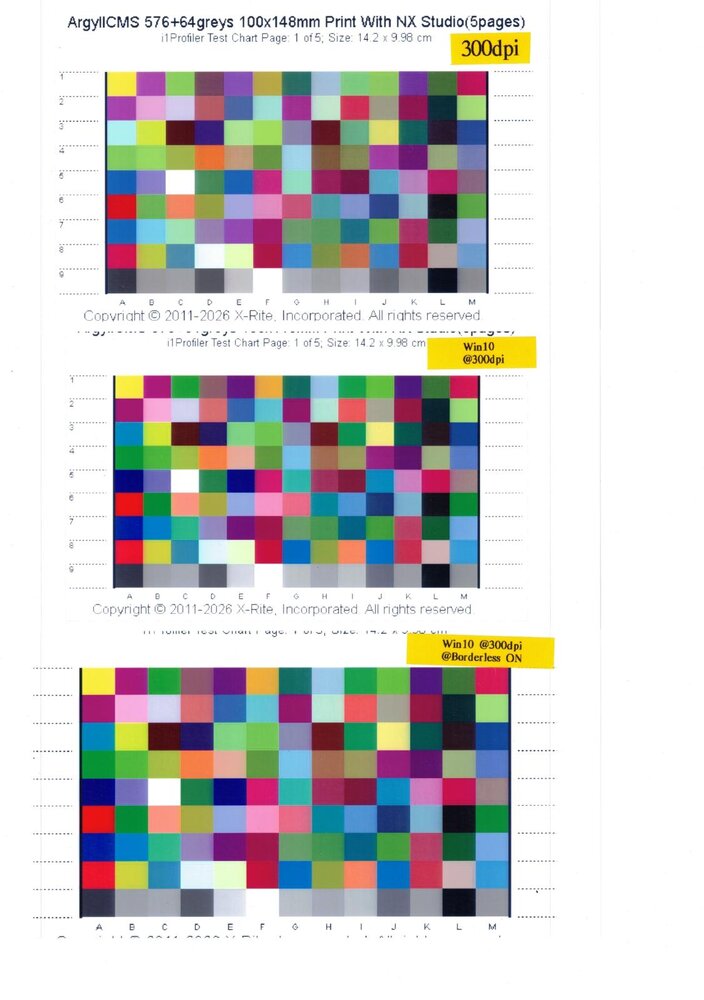
The problematic chart was printed on Windows 11 25H2.
I reprinted the same chart on Windows 10, both with and without Borderless enabled.
Although the scanned image was sent at a low resolution, the differences in the colors of the patches were clearly visible.
From top to bottom:
1st image: Crop to fit — Windows 11
2nd image: No scaling — Windows 10
3rd image: Borderless, Crop to fit — Windows 10
The problematic chart was printed on Windows 11 25H2.
I reprinted the same chart on Windows 10, both with and without Borderless enabled.
Although the scanned image was sent at a low resolution, the differences in the colors of the patches were clearly visible.
From top to bottom:
1st image: Crop to fit — Windows 11
2nd image: No scaling — Windows 10
3rd image: Borderless, Crop to fit — Windows 10

