YAAW - Yet Another Argyll Wrapper

riclin

Getting Fingers Dirty
Joined
Oct 17, 2025
Messages
71
Reaction score
26
Points
45
Location
Melbourne, Australia
Printer Model
Canon Pro-10S, Canon iP8760
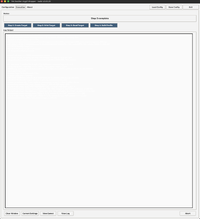
Measuring works again, but I got no log output. Not on screen and also the "View Log" button shows nothing - only a blank window. Logging into the log file was done. The X3DOM button works normally.
Are you sure Ron? Was there in fact log data to display? (although you did say that there was ....but it is necessary to do some work for log data to be generated.) I have tested under both Linux and inside the macOS VM and both instances are working fine here with the caveat that I am unable to view the X3DOM output inside the macOS VM - but that's a VM issue and nothing to do with YAAW. Under linux all functions work as expected.

EDIT:
I've tested now YAAW under linux, inside a macOS VM and finally on a real mac - it worked flawlessly on all so I'm a little perplexed by your report. One possible cause however is white or very pale text on YAAW’s light background caused by macOS dark mode or a different Tcl/Tk build inheriting the foreground colour differently. A quick test would be:
  1. Click inside the apparently blank output area.
  2. Press ⌘A, then ⌘C.
  3. Paste into TextEdit.
If the text appears when pasted, it is definitely a foreground/background rendering matter. Temporarily switching macOS Appearance from Dark to Light would be another useful confirmation - or dragging across the blank pane - selected text may become visible under the selection highlight.

Let me know and if this is indeed why you can't read the text, I'll change the code to stop relying on the platform’s inherited foreground and set both explicitly on the execution text widget - but I'll await your report first.

EDIT 2:
Rather than wait for feedback across timezones, the passive Execution and About text panes now set explicit foreground, background, cursor, and selection colours to avoid platform/theme contrast mismatches that may occur due to unexpected system settings.

And another cheap win since the X3DOM display now required the use of a html browser anyway - Gamut Viewer now asks iccgamut which was already generating the static gamut view info to also generate an independent X3DOM gamut model, now viewable via a new 3D Gamut browser button within the Profile Metrics panel.

V3.40.21 at git
 
Last edited:

rjanowsky

Getting Fingers Dirty
Joined
Jul 1, 2026
Messages
44
Reaction score
15
Points
25
Location
Germany - Northern Ruhr Area
Printer Model
Epson SC-P600, HP Envy 4525
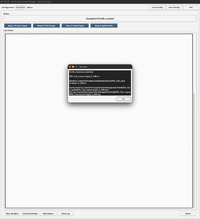
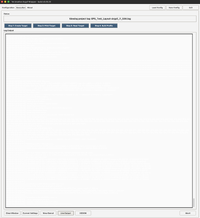
Did just another run for Step 3 and Step 4. Nothing in the Live Log and also nothing from the log file.
 

Attachments

  • Bildschirmfoto 2026-07-23 um 10.56.17.png
    Bildschirmfoto 2026-07-23 um 10.56.17.png
    79.8 KB · Views: 12
  • Bildschirmfoto 2026-07-23 um 10.57.11.png
    Bildschirmfoto 2026-07-23 um 10.57.11.png
    179.2 KB · Views: 7
  • Bildschirmfoto 2026-07-23 um 10.57.41.png
    Bildschirmfoto 2026-07-23 um 10.57.41.png
    165.5 KB · Views: 10
  • log-2026-07-23.txt
    12.5 KB · Views: 7

riclin

Getting Fingers Dirty
Joined
Oct 17, 2025
Messages
71
Reaction score
26
Points
45
Location
Melbourne, Australia
Printer Model
Canon Pro-10S, Canon iP8760
Please download 3.40.22 to be certain you have the most up-to-date version - I had a version management glitch. The only change that should have impacted macOS users in 3.40.21 was to do with the rendering of foreground and background colours which are now hard wired instead of assuming that the OS plays nicely with tkinter. V3.40.21 went through several steps as it was finalized and I think that a development version may inadvertently have been uploaded at one stage so to be safe, please download 3,.40.22. You will also see a number of other changes in this version.

r/
 
Last edited:

rjanowsky

Getting Fingers Dirty
Joined
Jul 1, 2026
Messages
44
Reaction score
15
Points
25
Location
Germany - Northern Ruhr Area
Printer Model
Epson SC-P600, HP Envy 4525
Please download 3.40.22 to be certain you have the most up-to-date version - I had a version management glitch. The only change that should have impacted macOS users in 3.40.21 was to do with the rendering of foreground and background colours which are now hard wired instead of assuming that the OS plays nicely with tkinter. V3.40.21 went through several steps as it was finalized and I think that a development version may inadvertently have been uploaded at one stage so to be safe, please download 3,.40.22. You will also see a number of other changes in this version.

r/
Downloaded and test run executed. Everything is working correctly for me. The Details in the Build Profile window with the Gamut Viewer and especially the big 3D Gamut View in the browser are very useful.
 

riclin

Getting Fingers Dirty
Joined
Oct 17, 2025
Messages
71
Reaction score
26
Points
45
Location
Melbourne, Australia
Printer Model
Canon Pro-10S, Canon iP8760
Downloaded and test run executed. Everything is working correctly for me. The Details in the Build Profile window with the Gamut Viewer and especially the big 3D Gamut View in the browser are very useful.
To be honest I reckon the 3D gamut view is just eye candy - the static view provides much more useful info. But did you also notice the 3d error map? - I thought that was a real win. A bit cryptic on first viewing but once you know how to read it, it shows the locations and extents of profile errors. Both the html views were cheap from a code point of view.
 
Last edited:

rjanowsky

Getting Fingers Dirty
Joined
Jul 1, 2026
Messages
44
Reaction score
15
Points
25
Location
Germany - Northern Ruhr Area
Printer Model
Epson SC-P600, HP Envy 4525
To be honest I reckon the 3D gamut view is just eye candy - the static view provides much more useful info. But did you also notice the 3d error map? - I thought that was a real win. A bit cryptic on first viewing but once you know how to read it, it shows the locations and extents of profile errors. Both the html views were cheap from a code point of view.
For a first check the 3D Gamut View is much easier to read. But additionally I alway check the error map - at least I take a quick look at it. For me to be helpful in getting a complete picture of the profile the target set must have lots of samples. A profile with let say 500 samples gives some info about the errors, but not so much about the distribution of the targets. With nearly 2000 patches it's becoming really clearer. In the screenshot it's the same printer, same paper, but 506 vs 1944 samples.
 

Attachments

  • Bildschirmfoto 2026-07-23 um 18.47.35.png
    Bildschirmfoto 2026-07-23 um 18.47.35.png
    70.4 KB · Views: 10

riclin

Getting Fingers Dirty
Joined
Oct 17, 2025
Messages
71
Reaction score
26
Points
45
Location
Melbourne, Australia
Printer Model
Canon Pro-10S, Canon iP8760
For a first check the 3D Gamut View is much easier to read. But additionally I alway check the error map - at least I take a quick look at it. For me to be helpful in getting a complete picture of the profile the target set must have lots of samples. A profile with let say 500 samples gives some info about the errors, but not so much about the distribution of the targets. With nearly 2000 patches it's becoming really clearer. In the screenshot it's the same printer, same paper, but 506 vs 1944 samples.
The useful information to me is the length of the vector lines which indicate differences between measured and target ΔE values. If the profile was perfect, the image would render as a cloud of points since each of the two values would be coincident. The vector lines portray the differences between measured and target values and where they occur - the longer the vector, the greater the discrepancy. Personally, I find that to be a quick and helpful indicator of profile quality irrespective of the number of patches actually measured.

Testing last night exposed a glitch where, when loading a new config json: the Details display didn't update to the new loaded values. Quite a bit of boolean testing required. Fixed in 3.40.23.

https://github.com/riclin-au/YAAW-Yet-Another-ArgyllCMS-Wrapper-Workflow

Hopefully the last change for a while.

EDIT:
Famous last words eh? - removed "Ink Limit" field from targen configuration options since this is redundant with additive devices (i.e. - RGB printers).

Targen manpage notes: "...although it doesn't make much sense, this parameter has an effect on additive device spaces (such as RGB), but should not normally be used with such devices."

In the unlikely even that it is in fact required, add it via the "Additional targen Args" field.

Current version: 3.40.24
 
Last edited:

Ink stained Fingers

Printer VIP
Platinum Printer Member
Joined
Dec 27, 2014
Messages
6,368
Reaction score
7,589
Points
373
Location
Germany
Printer Model
L805, WF2010, ET8550, T3100X
may I add the 3D display tools - profiles and such - which I'm using.


I'm using the Monaco GamutWorks program since a long time which is quite flexible and allows you to
display pixel clouds of .tif files (uncompressed - no LZW) and *.icm files as well, and overlaying multiple files, this in the Lab color space. some unofficial version may still be found on the internet, the Monaco profiling program dates back to the millenium, the successor was the Profile Manager until XRite with the i-xx programs took over then. But a graphics program like this Gamutworks version was not continued anymore.

Screen Shot.PNG


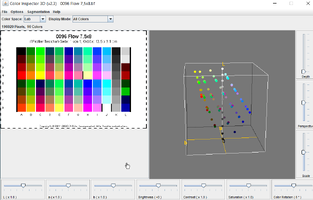
There is another little Java program which let you display tiff files in about 10 different color spaces, which helps to compare the distribution of color patches in the RGB vs. the Lab space

Screen Shot 001.PNG


https://imagej.net/ij/plugins/color-inspector.html

This Java program is pretty old already, but it helps in some cases, it does not support multiple files.
 

Attachments

  • Screen Shot 002.PNG
    Screen Shot 002.PNG
    46.2 KB · Views: 4
Last edited:
Top