I have success with not dilluted Windex. I fill a shallow saucer until I reach a column of 1 or 1.5 mm above the bottom of printerhead. Leave it for 60 minutes, while droping around 1cc of Windex through ink inlet. Then reinstall it into the printer and do 2 or 3 cleaning cycles. Do it preventively every 2 or 3 months. Printerhead remains like new. I use OCP inks.spikey said:I recently got an old IP4500 printer. When I first used it with fresh compatible cartridges it produced a perfect nozzle check print.
As the print head was very dirty with old dried ink and also wanted to switch ink type so I flushed the head with hot water first on the head side followed by the inlet. I did this until no ink appeared from it and it looked clean. I left it for a day for it to dry before refitting it.
With the nozzle print, now I get streaks across the cyan and magenta colour bands. No matter what I do, like leaving it soaking it in Pharmacist solution or using the same solution in ink cartridges.
I hope I haven't damaged the print head as I read many guides on using tap water to clean it.
Can't afford a new print head costing 60+. Please help?


Navigation
Install the app
How to install the app on iOS
Follow along with the video below to see how to install our site as a web app on your home screen.
Note: This feature may not be available in some browsers.
More options
You are using an out of date browser. It may not display this or other websites correctly.
You should upgrade or use an alternative browser.
You should upgrade or use an alternative browser.
Water killed my print head
- Thread starter spikey
- Start date
Sorry, I did not read your whole post. I agree that it was probably a tip appeared on this forum before.stratman said:I am a little surprised you didn't suggest 10 ml Ammonia to 1 liter water. You were the one I mentioned in my post above having success with that formula most recently.
- Thread starter
- #13
That sounds like a good routine to keep the printer in good shape. I don't print many pages so chances of clogging would be quite high.BrightGuy said:I have success with not dilluted Windex. I fill a shallow saucer until I reach a column of 1 or 1.5 mm above the bottom of printerhead. Leave it for 60 minutes, while droping around 1cc of Windex through ink inlet. Then reinstall it into the printer and do 2 or 3 cleaning cycles. Do it preventively every 2 or 3 months. Printerhead remains like new. I use OCP inks.
After soaking in Windex, do you rinse off the Windex and dry the head before reinstall into printer.
- Thread starter
- #14
They are still clogged a little for the same reason. Don't push them to print too soon. Two days of soaking should help. I would only allow them print anything only the streaking becomes hard to see. I would print lightly initially and make sure the streaking does not get worse. It will clear up eventually. I won't print photos until maybe a day or two later visualizing that it does not get worse.spikey said:One thing that has puzzled me, from the nozzle test, all the colours have streaks but only the pigment black remains perfect. Is it because the nozzles are larger or what?

- Joined
- Sep 10, 2007
- Messages
- 1,570
- Reaction score
- 1,462
- Points
- 293
- Location
- Laramie, Wyoming
- Printer Model
- Canon i960, Canon i9900
Yes, the color nozzles ARE smaller than the pigment black nozzles.
You might want to try a short (1/2 hour) soak in warm white vinegar to dissolve any potential mineral deposits remaining in the nozzles, followed by a distilled water rinse. Do this at your own risk, however....
Wayne
You might want to try a short (1/2 hour) soak in warm white vinegar to dissolve any potential mineral deposits remaining in the nozzles, followed by a distilled water rinse. Do this at your own risk, however....
Wayne

rodbam
Printer Master
- Joined
- Mar 9, 2011
- Messages
- 773
- Reaction score
- 173
- Points
- 213
- Location
- Australia
- Printer Model
- Canon Pro 9000 mk2 & Pro 9500
I know you don't want to waste paper but it makes it difficult to see the prints with the colours coming through from the back. Why don't you do your nozzel checks on one side only & then you can use them in the toilet to save wastage

- Joined
- Apr 19, 2007
- Messages
- 8,706
- Reaction score
- 7,183
- Points
- 393
- Location
- USA
- Printer Model
- Canon MB5120, Pencil
I've heard Aussies are tough but copy paper for latrine duty is asking too much to believe.rodbam said:Why don't you do your nozzel checks on one side only & then you can use them in the toilet to save wastage
Have you been peeing on electric fences again?

Agree about the nozzle check, though.
- Thread starter
- #19
The 2 days of soaking turned into 6. Unfortunately had to go away for a few days. At least it had plenty of time the clean any clogs, but it seems it has not made any difference.
These are the latest nozzle output:-
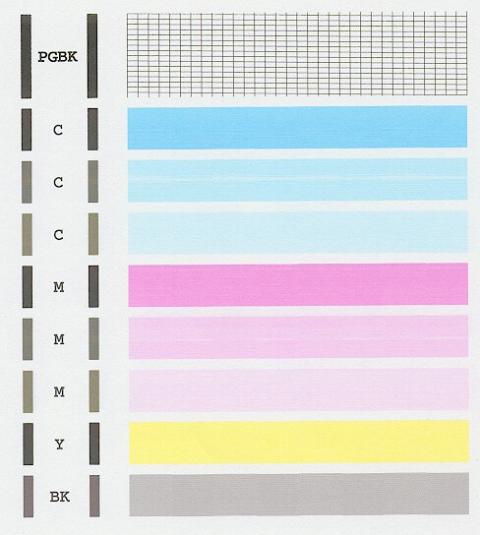
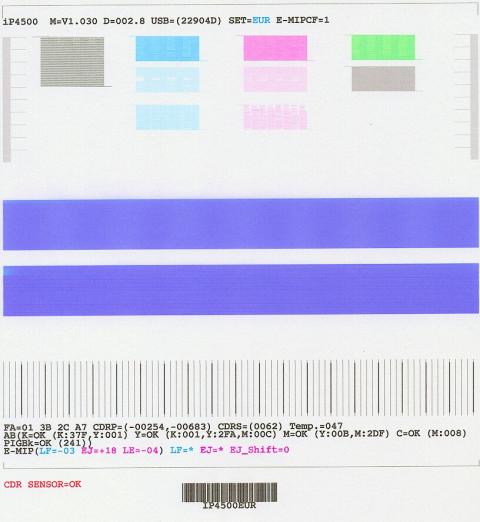
I can't understand how rinsing in warm water has ruined a good print head. Is mineral deposit still the most likely cause, and if so is there something more potent solution to get rid of this.
These are the latest nozzle output:-
I can't understand how rinsing in warm water has ruined a good print head. Is mineral deposit still the most likely cause, and if so is there something more potent solution to get rid of this.
- Joined
- Apr 19, 2007
- Messages
- 8,706
- Reaction score
- 7,183
- Points
- 393
- Location
- USA
- Printer Model
- Canon MB5120, Pencil
What solution were you using to soak? How were you soaking the print head?
Did you try the vinegar solution turbguy suggested to rid hard water deposits?
Is the nozzle check NO different after all the soaking?
Do I detect a checkerboard pattern in the small color squares as well as the tow long horizontal stripes in the second image, or is this artifact from compressing to a JPG and/or posting on the forum?
Did you try the vinegar solution turbguy suggested to rid hard water deposits?
Is the nozzle check NO different after all the soaking?
Do I detect a checkerboard pattern in the small color squares as well as the tow long horizontal stripes in the second image, or is this artifact from compressing to a JPG and/or posting on the forum?

