[Tool] ChromIQ – a macOS and Windows GUI for ArgyllCMS printer profiling (v3.13.0-beta)

rjanowsky

Printing Apprentice
Joined
Jul 1, 2026
Messages
21
Reaction score
8
Points
15
Location
Germany - Northern Ruhr Area
Printer Model
Epson SC-P600, HP Envy 4525
10m ago i discovered that my new mac has only USB-C ports so i can't use my i1pro1 to scan the patches (argggggggg i was so excited to try chromiq and the @pharmacist ruler), i will have to wait for the USB-C->USB A female adapter and hope it will work with i1pro1 devices.
I'm using a M4 Mac mini with a i1pro1 connected to a usb-c to usb-a adapter. No problems at all. Should work for you.
 

mavtop

Printing Ninja
Joined
Nov 14, 2021
Messages
112
Reaction score
33
Points
90
Printer Model
Epson XP 15000
I'm using a M4 Mac mini with a i1pro1 connected to a usb-c to usb-a adapter. No problems at all. Should work for you.
Perfect i hope it will be here in 2 days,

for @pharmacist the gap is like on your image i can see the top/bottom spacers but no adiacent (upper/lower) row
 

itsab1989

Fan of Printing
Joined
Feb 11, 2026
Messages
226
Reaction score
101
Points
70
Printer Model
Epson ET 8550, Canon Pro 300
Hi all and thanks for the hints you gave me, for now i will try with the 700 patch target (by @pharmacist) and i will compare against a 800 more patch target i created the first time with argyll cms manually.

For @itsab1989 i don't know if it is a feature, but if i reload a ti2 file to continue a project, it will reset the patches number to the default one 4xx (i don't remember the value), like if in the project specifications was not written all the information (or maybe in the load it will not read or set the values correctly), so i need to set the patch size, the colored/bw spacers and all the values that i have set when i generated the chart initially, also the chart notes are blank, while i had filled them.

Maybe i need to tell Chromiq to save the settings in some way ?

10m ago i discovered that my new mac has only USB-C ports so i can't use my i1pro1 to scan the patches (argggggggg i was so excited to try chromiq and the @pharmacist ruler), i will have to wait for the USB-C->USB A female adapter and hope it will work with i1pro1 devices.

Attached is the load of a 700 chart patches with path size 8mm and 95% patch height (now defaults), with chart notes (now not present), i had removed stamp targen and layout engine (now active), paper say Portrait but it is landscape and it shows landscape, clip border was off (and it is off from preview) but say on, instrument margin are the default i had changed them, it has a fixed seed 142 and it now says random and no seed selected with number 0 (but the chart shown in preview is correct).

All the modified options for that chart layout are lost in the interface but the preview seems corrected.

View attachment 19021
Thanks for the report! I will have a look at it later :)
 

itsab1989

Fan of Printing
Joined
Feb 11, 2026
Messages
226
Reaction score
101
Points
70
Printer Model
Epson ET 8550, Canon Pro 300
Last edited:

mavtop

Printing Ninja
Joined
Nov 14, 2021
Messages
112
Reaction score
33
Points
90
Printer Model
Epson XP 15000
Hi, please have a look at this and tell me if this behaves like what you had in mind:

https://github.com/itsab1989/ChromIQ/releases/tag/v3.13.4-beta.8

Edit: Knut finished his testing so we made it final and you should get an update notification when opening the app :)
Hi again @itsab1989, now some values are loaded correctly, but

- Stamp targen and layout engine checkbox value is not recovered (maybe it is not saved)

- also Chart notes value (string) is not recovered (maybe not saved)

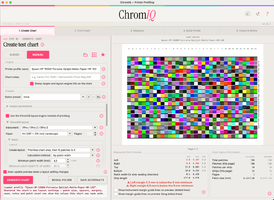
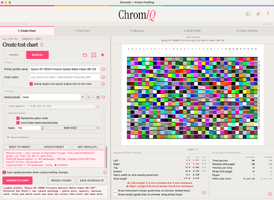
I tried to insert again these two values (checkbox and string) after loading the json, then pressed generate the chart patches (that would save the files and the new values) then exited from chromiq, opened it again, reloaded the .json and again they are off, i attached one screenshoot with original chart layout values, two screenshoots after reloading to show you the values off and those are correct, these screenshoots are before I press generate chart again (read next issue).

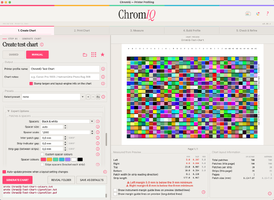
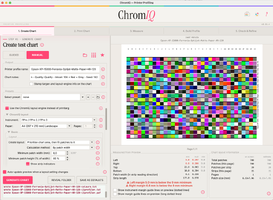
This is unwanted behavior and drawback: if i created the chart from the Edit/Create patch set (that i did), when I reload the json file it shows the Chart preview correctly (you can see it in the reloaded screenshoots), the seed number is correct and all seems correct, but, if i press Generate Chart again (it would not change anything in the chart patches or generate the same chart layout) it generates a new chart with different patch colors set like if it is not using the patch set created previously (maybe this information is not saved, you find it in the regenerated screenshoot) but it uses the default patch set how when you create a new Chart Layout from the main window in manual mode, infact i attached a screenshoot showing a new chart layout created from the main menu in manual mode with the same seed (I set the same seed how if it was read from the json file) and it generated the same chart generated pressing Generate Chart after reloading a project file (instead of using the Patches set created previously).

Hope it will be clear for you, else let me know

Anyway take your time, i just report the issues :)
 

Attachments

  • original chart layout.png
    original chart layout.png
    403.9 KB · Views: 10
  • reloaded chart layout 1.png
    reloaded chart layout 1.png
    397.7 KB · Views: 9
  • reloaded chart layout 2.png
    reloaded chart layout 2.png
    402 KB · Views: 6
  • regenerated chart layout after reload a project.png
    regenerated chart layout after reload a project.png
    406.3 KB · Views: 11
  • new chart in manual mode seed 142.png
    new chart in manual mode seed 142.png
    370.4 KB · Views: 12
Last edited:

pharmacist

Printer VIP
Platinum Printer Member
Joined
May 29, 2007
Messages
3,215
Reaction score
1,843
Points
333
Location
Ghent, Belgium
Printer Model
SC-900 ET-8550 WF-7840 TS705
Actually I don't have this problem: I have tested with different fixed seed this is with seed value: 25

1783847453727.png


Now changing to seed: 625:

1783847489723.png


changing back to fixed seed 25:

1783847543616.png


exactly the same patch layout as previous.
 

mavtop

Printing Ninja
Joined
Nov 14, 2021
Messages
112
Reaction score
33
Points
90
Printer Model
Epson XP 15000
Actually I don't have this problem: I have tested with different fixed seed this is with seed value: 25

View attachment 19034

Now changing to seed: 625:

View attachment 19035

changing back to fixed seed 25:

View attachment 19036

exactly the same patch layout as previous.
The problem is loading a prebuild project json, from an your own created patch set,

exit chromiq, and reopen it, then load the json, all the settings written are correct (but no the checkbox for targen and the chart notes, that are the default ones) and also the preview is correct, the seed setting and the seed number are correct, but if you press generate chart again, the chart layout will change using the default engine for the patches instead of the previous created patch set (maybe is it normal, but if i created using my personal patch set and reload it from the project, i would like to maintain the original created patch set, then if i want to change it, i will edit/create a new patch set).
 
Last edited:

mavtop

Printing Ninja
Joined
Nov 14, 2021
Messages
112
Reaction score
33
Points
90
Printer Model
Epson XP 15000
I try to explain it better,

in screenshoots you will find my "original chart layout" built from a create patch set using @pharmacist grey and neutral grey setups, you can see the Chart notes inserted and the checkbox for targen unchecked.

Now I quit Chromiq and relaunch it, i go in manual and load the previous chart (saved) using the json file.

The screenshot "new reload chart", shows all the settings are correct (but no Chart notes and no uncheck for targen), also the layout is correct (with the correct patches i chosen before, for the seed number).

Now "if i press Generate Chart", it should not change the chart layout since the seed is set correctly and it should recognize that i used a particular patch set (built when i created and saved the first layout).

Instead it completely rebuilt a new layout using its engine for the seed number, ignoring my choosen patch set, see screenshoot "after generate chart".

Maybe it is intended to work this way, but I have to be careful: if I change the seed, the system will use its internal engine and patches based on that new seed, rather than combining my chosen patch set with the selected seed.

I hope this makes it easier to test.
 

Attachments

  • original chart layout.png
    original chart layout.png
    403.9 KB · Views: 6
  • new reloaded chart.png
    new reloaded chart.png
    406.9 KB · Views: 6
  • after generate chart.png
    after generate chart.png
    407.3 KB · Views: 6
Last edited:
Top