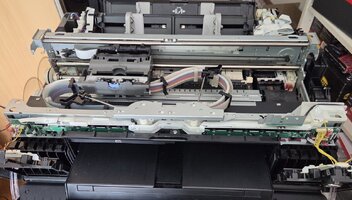
Saving a Canon pro 1 printer, one day at a time

Cassiop38

Printing Apprentice
Joined
Dec 17, 2025
Messages
41
Reaction score
7
Points
13
Printer Model
Epson, Canon, HP.
So... I have now enough ink to try a rescue on a Canon pro 1.

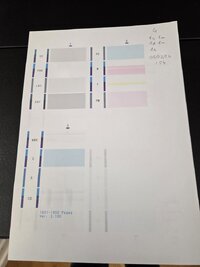
Symptoms : print blank pages /nozzle checks, no errors.

Current plan : power up the printer, unplug it so the printhead move freely, rube the printhead over a octoink cleaning solution for canon soaked towel paper.
Replug the printer, do a simple head cleaning cycle, try a nozzle check.

Worth to be noted : i removed the 12 cartridges to feed pgi-72s and i'm a tiny bit worried that ink could have clogged the ink inlet. The tiny tube that goes inside the pgi-29s to suck ink. I could probably reach them with IPA soaked... Thing stick you put in your ears, cant remember the name. Should i ?

All suggestions are welcome,
Thanks !
 

Cassiop38

Printing Apprentice
Joined
Dec 17, 2025
Messages
41
Reaction score
7
Points
13
Printer Model
Epson, Canon, HP.
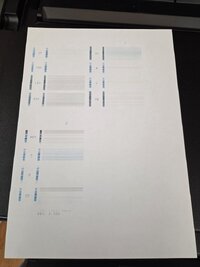
Eeeeehhhhh much better !!!! Agreed, still suboptimal.
 

Attachments

  • 20260305_115019.jpg
    20260305_115019.jpg
    57.4 KB · Views: 31

Cassiop38

Printing Apprentice
Joined
Dec 17, 2025
Messages
41
Reaction score
7
Points
13
Printer Model
Epson, Canon, HP.
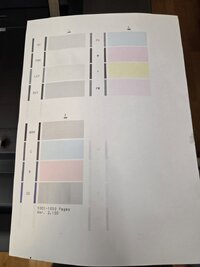
Small update after this sequence
1 small clean, 1 manual clean, 1 deep clea , 1 manual clean, 1 small clean

Now, we wait.

Manual clean was rubbing the printhead over towel paper soaked in IPA and octoinkjet thermal printhead cleaning solution. R, PBK and MBK are very dead but as was M and Y not so long ago. I'll come back tomorow.
 

Attachments

  • 20260305_142317.jpg
    20260305_142317.jpg
    59.8 KB · Views: 33

Cassiop38

Printing Apprentice
Joined
Dec 17, 2025
Messages
41
Reaction score
7
Points
13
Printer Model
Epson, Canon, HP.
2nd update.

I removed the printhead from the printer to soak it into cleaning solution. i'll skip forward doing that 2 times and ran a bunch of cleaning in between. So everything is starting to looks good except PBK.

I tried rubbing the nozzle group good, tried to force push ink into the PBK's inlet of the printhead (and ended up a small ink explosion that stained my desk and me. (i was feeling stupid wearing gloves and a chemistery jacket. i'm glad i did ! next time i put safety glasses too.)) but i wasn't able to push ink throught the nozzle that way. I didn't tried to do that with another color but i will. Just to see if it is possible or not. (And since the head is pressurized while printing, that would makes sense that it is not possible.)

Anyway, if you guys have suggestions, i'll be glad to ear them !
 

Attachments

  • 20260306_132237.jpg
    20260306_132237.jpg
    52.8 KB · Views: 23
Last edited:

Cassiop38

Printing Apprentice
Joined
Dec 17, 2025
Messages
41
Reaction score
7
Points
13
Printer Model
Epson, Canon, HP.
Thrid update

So the PBK Wasn't printing.

20260312_122459.jpg

Well, that was why.

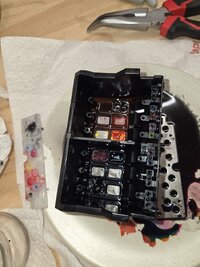
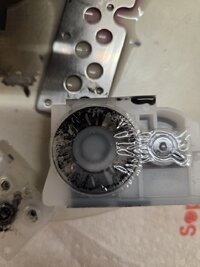
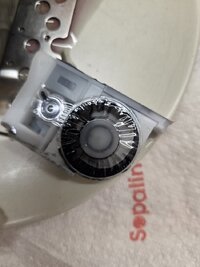
So i took the head apart for sport and found why the pbk wasn't working. It roughly clogged everywhere possible. I took a bunch of pictures of what is inside. Quite interresting that there is basically cartridges inside the printhead and that the feeding channeks look like, in the end, our regular cartridge based printer's.

Here is a pic of the small double cartridge. On this side it is PBK, you can see partickes everywhere that are responsible for the clog. On the other side it is DGY (i believe) which us liquid..

20260312_115551.jpg

20260312_115601.jpg
 
Last edited:
Top