Print layout engine for Linux. Fully ICC aware

The Hat

Printer VIP
Platinum Printer Member
Joined
Jan 18, 2010
Messages
16,204
Reaction score
9,142
Points
453
Location
Residing in Wicklow Ireland
Printer Model
Now have 3 Ender-3 V3 Plus SE/
but some things are just in inches, and there's nothing we can do about it.
I totally agree with @ThrillaMozilla, hell would have to freeze, before the current administration would consider changing to the IS system..

Hieroglyphs were once fashionable…
 

riclin

Getting Fingers Dirty
Joined
Oct 17, 2025
Messages
23
Reaction score
14
Points
28
Location
Melbourne, Australia
Printer Model
Canon Pro-10S, Canon iP8760
I totally agree with @ThrillaMozilla, hell would have to freeze, before the current administration would consider changing to the IS system..
Certainly not the case around these parts - or any of the various countries I've visited or lived in (except the USA - and the UK that seems to use that weird hybrid mix of imperial and metric ;))
 

crenedecotret

Print Addict
Joined
Oct 5, 2006
Messages
227
Reaction score
92
Points
163
Allright it's done :) If you pull from git and recompile, you should find an option to switch to metric in the preferences menu. This is found in the "hamburger" icon above the folder browser
1779141077845.png


The option switches all the print sizes from US sizes to the "A" standard. It will also switch the paper border option to millimeters.
1779141312310.png


The previer ruler also changed to metric
1779141376993.png


One hint I never thought of giving here. If you pick A6 paper in your driver, it is technically NOT POSSIBLE to select A6 in the image properties. This is normal and the reason is that your actual printable area is smaller than your selection. Use "fit to page" in this scenario. I wasent sure how to handle this scenario. Qimage will let you select any size and tells you it's too large to fit (or auto-crops). I prefered only allowing images sizes that actually fit. Here is an example with A4 paper in the driver. A4 is grayed out
1779141867940.png


I hope you enjoy the changes :) I might eventually figure out some hybrid method for people like me in canuckland (US paper sizes but a preference for cm and mm for everything else)
 

crenedecotret

Print Addict
Joined
Oct 5, 2006
Messages
227
Reaction score
92
Points
163
OK, we know that large format printers and the paper for them are in inches. We also just had confirmation that the OP -- the software developer -- is Canadian, and that Canadian paper sizes are in inches. We also know that users may encounter either metric sizes, inches, or both, and that it's easy for software to deal with the problem.

Now, are we all agreed on that? Good.
I'm not sure I would call myself a developper but thank you! It wasn't too hard adding the extra sizes. What took some time I'd changing every other box where the user has a possibility of entering a value

For the weird Canadian scenario, and perhaps other locations, I'm thinking of options where the user would be able to enter something like "8.5i" when the software is in metric mode and simply having the software doing the conversion on the fly. (and vice versa.. Say 10m or 10mm if the software is in non-metric mode)

Any thoughts on the idea?
 
Last edited:

ThrillaMozilla

Printer Master
Joined
Jan 18, 2011
Messages
1,253
Reaction score
377
Points
253
OK, I think I owe you some better comments instead of just describing my Linux printing problems. Thank you so much for doing this. I am really looking forward to using this, and I love the simplicity and clarity of your interface.

Unfortunately, I can't try the program right now, for various reasons. Just from looking at your screen shots I do have some comments. I hope you find some of them helpful. They are not necessarily listed in order of importance.

1. About the 8.5i syntax. That's a nice, economical little idea, and it looks like it won't clutter the interface.


2. Some print programs fail to distinguish between page size and image size. Some of them also reset the image size or position without the user knowing it. I assume you have solved both problems.


3. I assume the page size and margin are from the Printer Settings. I assume the dashed blue line is the margin set by the driver, unless the margin is set larger by the user. I assume the solid blue lines are the "Print Size", as selected from your menu. I guess that feature is for placing multiple prints on one page. I see that you offer custom sizes, but I really need to be able to position and size the print area anywhere on the page with a mouse. Surely this can be done??


4. Depending on how you have it set up, the ability to select only a single margin parameter could cause problems.

a. With the Epson ET-8550, printing from the rear slot adds an extra nonprintable area at the end of the paper, so the margins may be asymmetrical. I would expect to be able to use as much of the page as the printer will allow. On the other hand, I might want the image centered on the whole page, or I might want some other layout. So I might want the image centered on the page, or not. I see you have a check box to center on page. Does that check box cover all the possibilities?

b. There are times when I might want to add a margin for binding. Is this possible?

c. I hope that borderless prints are possible.

d. Some programs have more centering options: center left-right, center top-bottom, center both, or not centered to page.


5. I really like the file picker, with the thumbnails. I hope it is easy to also browse the files by filename and to view even long file names. And perhaps I can drag and drop files onto the page??


6. It looks like you may have solved the dreaded double-profiling problem. I hope so.


7. I don't know what the "Border" option is for. Hopefully it is WYSIWYG when you select an option.


8. Processing Engine. Doesn't the driver not take care of the interpolation and the DPI? Can I select Nothing as an option? And I don't want to resize my print, especially knowing that if I make the wrong choice -- or even if I make the right choice -- the printer driver will do it again. I see 300 DPI. Gosh, I think my printer typically does 1440 or something. Isn't that just a print quality setting in the driver???


9. Epson Print Layout gives me an autoselect option for the ICC profile. That's how I can print test photos in odd color spaces for which I may not have a profile. The driver simply selects the profile from the paper type setting and the color space embedded in the image.
 
Last edited:

crenedecotret

Print Addict
Joined
Oct 5, 2006
Messages
227
Reaction score
92
Points
163
@ThrillaMozilla It dosent really matter to me if you are printing from Linux these days or not. The only way I can improve this thing is through feedback. You have very good points :) Let's go one by one

1. I'll probably get this done at some point but I suspect I might be the only one to ever use it. (but hey, if my program is usefull to ME, of course i'll do it lol)

2. Paper size and image size are two separate things. Paper size will come from the driver. For the image size, I offer preselections and custom size. As an example, the layout engine will let you place two A6 sized images on a single sheet of A4. The idea here is to be able to take say a dozen snapshots and print them on standard size sheets. This is similar to what Qimage does. If you want print an image and fill up an A6 sheet, A6 is not the correct image size. "Fit to page" would be the correct option (because hardware margins will not allow it, even borderless might not allow it if the driver reports something a bit off from A6)

3. You are correct on all counts. The paper size and margins are pulled from the CUPS drivers. The hardware margins are the dashed blue lines. You are allowed a manual border value that is higer than the hardware margin but not lower. The solid blue lines is the cell where you image will fit when you select the image print size. None of these lines appear on the actual print or TIFF export.

4abc. By popular demand, the program as of 15 minutes ago allows four individual borders. I was already pulling the information from CUPS but for simplicity, I was using the highest of all values all around the page. For the handful of printers I was testing with, it was fine and it was a good place to start. This should allow to set a border for whatever needs you have be it special image placement, binding, etc. combined with "fit to page" and the crop editor, you can probably come up with the exact layout you need
1779248194195.png

Borderless prints are handled by the CUPS driver. You'll typically see sizes where "Borderless" is indicated. When that happens, CUPS will simply return 0 mm hardware margins
1779248325503.png

4d. Currently, the center option will exclude an image from mecanism that can place multiple images on a page. It will give the image it's own sheet of paper and print it centered at what size you specified in the image properties. What I think you refering to would be some sort of anchor points for centering. fully centered, on top or bottom but horizontally centered, left or right but vertically centered. I'm not what the use case is but i'm sure it could be done. This was part of your #3 but I want to eventually add a freehand placement option using the mouse. I would probably isolate the image to it's own page to make this happen like I do for the center option.

5. Drag and drop dosent work. you can highlight the image and double click or press "insert". It could be a cool idea and I think it would be easy. Drag and drop could probably add the image the queue and the layout engine would handle the rest.

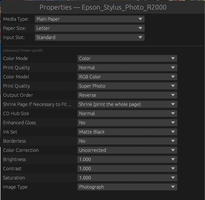
6. I havent really had any issues since switching back to linux from Windows 11. I didn't really have any problems either when I was running Linux between 2010-2016. I might have stumbled with CUPS initially because I have an old turboprint licence. If it helps, this is how I'm doing it now, using Guttenprint drivers. First you choose your media type and print quality. Unrelated is the "Shrink page" settings. It always needs to be set to "preserve dimensions". Your software is supposed to send output that fits and does not get cropped (gimp does this, vibeprint does as well). This is super important. If your print output is off, it's probably because the driver is allowed to scale.
1779249202206.png

Color correction needs to be Uncorrected. Anything else will skew the output
1779249281812.png

This can also be done in vibeprint itself
1779253866042.png

Of course, your profile needs to be built with these exact same settings. Vibeprint currently does NOT have a target printing mode because it needs to bring in multiple images into a common color space (I use a linear version of Prophoto RGB which is basically what lightroom does). I just print targets like this after settings defaults lp -d Epson-Stylus-Photo-R2000 -o scaling=100 -o cm-calibration=1 target.tiff the "cm-calibration=1" is KEY to an uncolormanged print. This is basically how I defeated double profiling.. Vibeprint applies the profile and all steps from there to the paper are neutral and modify none of the RGB values in the image. There is one situation where things might not be perfect. If there is no guttenprint driver, the CUPS will install it as driverless. This is a mode where CUPS will just send some standard commands to the printer and all color is managed by the printer itself. Linux calls it IPP, Apple calls Airprint but it's exactly the same under different names. You can't really profile in uncorrected mode but you can still create a profile for the "blackbox" that it is. I'm almost certain that the Epson ET-8550 falls into this category on Linux (unless you use Turboprint). The profile will probably just a marginal improvement but it still helps. I'm doing this for my brother MFC and it did correctly compensate for my third party catridges. Keith Cooper does something similar with a Canon on MAC

7. The paper borders are WYSIWYG (dotted blue line). The per-image border is decorative and optional. "Outer" will expand the image cell (A6 + outer border becomes a bit more than A6). An inner border will preserve the selected cell size but the image will become slightly smaller to accomodate the border. Here is an exagerated border so you can see what it does. Currently it's always black but I eventually plan to add a color picker.
1779250800728.png


8. There is no way around this. Say you bring in a 800x600 image at A6 size and another one at 3000x4000 in the same print queue, then print it, there has to be some resizing done. When you send a job through vibeprint, CUPS is informed to not alter colors or size... The exact number of pixels needed to have proper image size, placement and exact border is calculated, then each image is upsized to fit. Then it's sent to the print driver (there is where I wasted countless sheets of paper during development, often chasing thing like a missing millimeter).
I could of chosen an arbitrary value like 180 dpi to make things fast but I wanted to build something that might rival (or at least be close) to Qimage in terms of quality. Epson printer firmware will internally rescale if it dosent receive a multiple of 360. Canon will do the same if not 300 or 600 dpi. It's been known for a few years that resizing the output rather than letting the printer firmware handle it increases the output quality a little bit. I dont think the concept originated with Qimage but Mike Channey did publish some information here https://ddisoftware.com/tech-archive/articles/july-2011-restless-natives/ If you choose the wrong value, you'll just get a print. It'll probably even be good. If you choose the correct value, in theory you'll get a better print. The important is that your printer's native resolution is a multiple of what we are sending or the firmware might introduce artifacts. I just typically send 360dpi for anything that not 13x19 and 720dpi for the bigger sizes. You shouldnt really need a 1440dpi option but I could always add it later (processing will be slooowwww). My eyes cant see the difference but I CAN spot a non upsized print with not output sharpening from something like GIMP. For the interpolation methods, I wanted to offer more than one but Mitchell-EWA is a good all rounder. I wouldnt recommend using anything else unless you have a specific reason for choosing something else. I didnt invest these models, the math is out there.

9. I havent used EPL but Vibeprint reads the color space embedded in your images even if you dont have the profile installed on your system. As mentionned earlier, internally everything gets converted to a pretty large color space so that images with different embeded profiles can be printed on a single sheet of paper. All you do is select your images and sizes, set your printer profile and print

Sorry.. super long reply but I figured the info would be useful to everyone not only the both of us
 

Attachments

  • 1779253461707.png
    1779253461707.png
    77.8 KB · Views: 7
Last edited:

ThrillaMozilla

Printer Master
Joined
Jan 18, 2011
Messages
1,253
Reaction score
377
Points
253
Wow! Great reply! About #1: I suspect I wouldn't use it much either. If it's not worth doing at all, maybe it's not worth doing well. :)
 

itsab1989

Getting Fingers Dirty
Joined
Feb 11, 2026
Messages
48
Reaction score
21
Points
23
Printer Model
Epson ET 8550, Canon Pro 300
There is one situation where things might not be perfect. If there is no guttenprint driver, the CUPS will install it as driverless. This is a mode where CUPS will just send some standard commands to the printer and all color is managed by the printer itself. Linux calls it IPP, Apple calls Airprint but it's exactly the same under different names. You can't really profile in uncorrected mode but you can still create a profile for the "blackbox" that it is. I'm almost certain that the Epson ET-8550 falls into this category on Linux (unless you use Turboprint). The profile will probably just a marginal improvement but it still helps. I'm doing this for my brother MFC and it did correctly compensate for my third party catridges. Keith Cooper does something similar with a Canon on MAC
I noticed that you mentioned the ET 8550 here. I am working on a GUI for Argylls printer profiling part and wanted it to be able to print the necessary test charts. So for the printing implementation on my Mac I did quite a lot of testing with my 8550. i printed the same test chart with various different settings to compare it with my own apps printing implementation. To my surprise no matter how I printed it (my own apps two different printing implementations, Adobe Color Print Utility, Apples ColorSync Utility as a target, in Preview with Colormanagement disabled in the printer driver or in Preview with Epsons default Epson vivid setting!!!) they all turned out to be the same. I only have a Colormunki (so no i1Pro) but I made multiple Spotreadings on the same patches on different charts and they were indistinguishable.

The photos are obviously not the best way to compare the targets because they are not evenly lit. But while the targets are pretty similar you can hopefully see a difference in the photo I have printed. With Epsons default settings it has a magenta cast. With an ICC profile I created it looks more neutral.
 

Attachments

  • IMG_0287.jpeg
    IMG_0287.jpeg
    205.8 KB · Views: 2
  • IMG_0286.jpeg
    IMG_0286.jpeg
    277.5 KB · Views: 2
Last edited:

pharmacist

Printer VIP
Platinum Printer Member
Joined
May 29, 2007
Messages
3,066
Reaction score
1,787
Points
333
Location
Ghent, Belgium
Printer Model
SC-900 ET-8550 WF-7840 TS705
I just installed your latest versions:

something small need to be corrected:

1779362870295.png
\

-g30 suddenly instead of the previous -g32
 
Top