Print layout engine for Linux. Fully ICC aware

The Hat

Printer VIP
Platinum Printer Member
Joined
Jan 18, 2010
Messages
16,202
Reaction score
9,141
Points
453
Location
Residing in Wicklow Ireland
Printer Model
Now have 3 Ender-3 V3 Plus SE/
but some things are just in inches, and there's nothing we can do about it.
I totally agree with @ThrillaMozilla, hell would have to freeze, before the current administration would consider changing to the IS system..

Hieroglyphs were once fashionable…
 

riclin

Getting Fingers Dirty
Joined
Oct 17, 2025
Messages
23
Reaction score
14
Points
28
Location
Melbourne, Australia
Printer Model
Canon Pro-10S, Canon iP8760
I totally agree with @ThrillaMozilla, hell would have to freeze, before the current administration would consider changing to the IS system..
Certainly not the case around these parts - or any of the various countries I've visited or lived in (except the USA - and the UK that seems to use that weird hybrid mix of imperial and metric ;))
 

crenedecotret

Print Addict
Joined
Oct 5, 2006
Messages
226
Reaction score
92
Points
163
Allright it's done :) If you pull from git and recompile, you should find an option to switch to metric in the preferences menu. This is found in the "hamburger" icon above the folder browser
1779141077845.png


The option switches all the print sizes from US sizes to the "A" standard. It will also switch the paper border option to millimeters.
1779141312310.png


The previer ruler also changed to metric
1779141376993.png


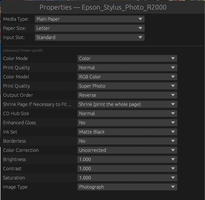
One hint I never thought of giving here. If you pick A6 paper in your driver, it is technically NOT POSSIBLE to select A6 in the image properties. This is normal and the reason is that your actual printable area is smaller than your selection. Use "fit to page" in this scenario. I wasent sure how to handle this scenario. Qimage will let you select any size and tells you it's too large to fit (or auto-crops). I prefered only allowing images sizes that actually fit. Here is an example with A4 paper in the driver. A4 is grayed out
1779141867940.png


I hope you enjoy the changes :) I might eventually figure out some hybrid method for people like me in canuckland (US paper sizes but a preference for cm and mm for everything else)
 

crenedecotret

Print Addict
Joined
Oct 5, 2006
Messages
226
Reaction score
92
Points
163
OK, we know that large format printers and the paper for them are in inches. We also just had confirmation that the OP -- the software developer -- is Canadian, and that Canadian paper sizes are in inches. We also know that users may encounter either metric sizes, inches, or both, and that it's easy for software to deal with the problem.

Now, are we all agreed on that? Good.
I'm not sure I would call myself a developper but thank you! It wasn't too hard adding the extra sizes. What took some time I'd changing every other box where the user has a possibility of entering a value

For the weird Canadian scenario, and perhaps other locations, I'm thinking of options where the user would be able to enter something like "8.5i" when the software is in metric mode and simply having the software doing the conversion on the fly. (and vice versa.. Say 10m or 10mm if the software is in non-metric mode)

Any thoughts on the idea?
 
Last edited:

ThrillaMozilla

Printer Master
Joined
Jan 18, 2011
Messages
1,252
Reaction score
377
Points
253
OK, I think I owe you some better comments instead of just describing my Linux printing problems. Thank you so much for doing this. I am really looking forward to using this, and I love the simplicity and clarity of your interface.

Unfortunately, I can't try the program right now, for various reasons. Just from looking at your screen shots I do have some comments. I hope you find some of them helpful. They are not necessarily listed in order of importance.

1. About the 8.5i syntax. That's a nice, economical little idea, and it looks like it won't clutter the interface.


2. Some print programs fail to distinguish between page size and image size. Some of them also reset the image size or position without the user knowing it. I assume you have solved both problems.


3. I assume the page size and margin are from the Printer Settings. I assume the dashed blue line is the margin set by the driver, unless the margin is set larger by the user. I assume the solid blue lines are the "Print Size", as selected from your menu. I guess that feature is for placing multiple prints on one page. I see that you offer custom sizes, but I really need to be able to position and size the print area anywhere on the page with a mouse. Surely this can be done??


4. Depending on how you have it set up, the ability to select only a single margin parameter could cause problems.

a. With the Epson ET-8550, printing from the rear slot adds an extra nonprintable area at the end of the paper, so the margins may be asymmetrical. I would expect to be able to use as much of the page as the printer will allow. On the other hand, I might want the image centered on the whole page, or I might want some other layout. So I might want the image centered on the page, or not. I see you have a check box to center on page. Does that check box cover all the possibilities?

b. There are times when I might want to add a margin for binding. Is this possible?

c. I hope that borderless prints are possible.

d. Some programs have more centering options: center left-right, center top-bottom, center both, or not centered to page.


5. I really like the file picker, with the thumbnails. I hope it is easy to also browse the files by filename and to view even long file names. And perhaps I can drag and drop files onto the page??


6. It looks like you may have solved the dreaded double-profiling problem. I hope so.


7. I don't know what the "Border" option is for. Hopefully it is WYSIWYG when you select an option.


8. Processing Engine. Doesn't the driver not take care of the interpolation and the DPI? Can I select Nothing as an option? And I don't want to resize my print, especially knowing that if I make the wrong choice -- or even if I make the right choice -- the printer driver will do it again. I see 300 DPI. Gosh, I think my printer typically does 1440 or something. Isn't that just a print quality setting in the driver???


9. Epson Print Layout gives me an autoselect option for the ICC profile. That's how I can print test photos in odd color spaces for which I may not have a profile. The driver simply selects the profile from the paper type setting and the color space embedded in the image.
 
Last edited:
Top