

itsab1989
Printing Ninja
- Joined
- Feb 11, 2026
- Messages
- 324
- Reaction score
- 162
- Points
- 80
- Printer Model
- Epson ET 8550, Canon Pro 300
This whole app is vibe coded with the help of AI. I personally lack the technical knowledge to understand exactly how things are working under the hood. When I started this I let it analyse Adobes Color Print Utility and Apples ColorSync and tried to figure out how those apps are handling thing to learn from it - basically as you suggested. I have printed many pages on my Epson ET 8550 (because the ink costs for it are lower) and measured them with the AI agent judging them and at some point it seemed to work. Also the results were the same like when comparing them with other apps.
Then sone time later I wanted to create a profile for my Canon Pro 300 and had similar issues like you. The gamut analysis in the check and refine tool showed a very small gamut volume that could not be true for the printer paper combination. I tried to find the cause but got conflicting information. Also someone reported printing was working for him on macOS Tahoe. This left me confused.
But since then I have at least learned to handle the AI agent a little better so maybe another research on this might help. On discord I read a post from a person who created a mac app that is also related to printing with Canon and I asked him how he handled things to make sure the settings are really respected. He shared some information and a script that he made that checks the print job that is sent to the printer through the macOS printer dialog.
My thought was to maybe use this for ChromIQ as well. As you saw by changing the settings in preferences I had a similar thought before - just for the other route. But for whatever reason it does not seem to help…
Edit: I am looking into this now. I have just set up my Pro 300 and my fresh system (macOS 27 Golden Gate).
1. there is a new driver online from September 2026
2. a new firmware for the printer is also available
3. in Photoshop it now seems to not show this misbehaviour anymore where clicking cancel in the dialog unlocks settings which is good in itself
Edit 2:
On the new macOS things stay locked in ChromIQ as well. Though this does not mean the printer gets the correct information it is clearly a nice thing. On another MacBook with Sequoia and the same driver it still unlocks.
Edit 3:
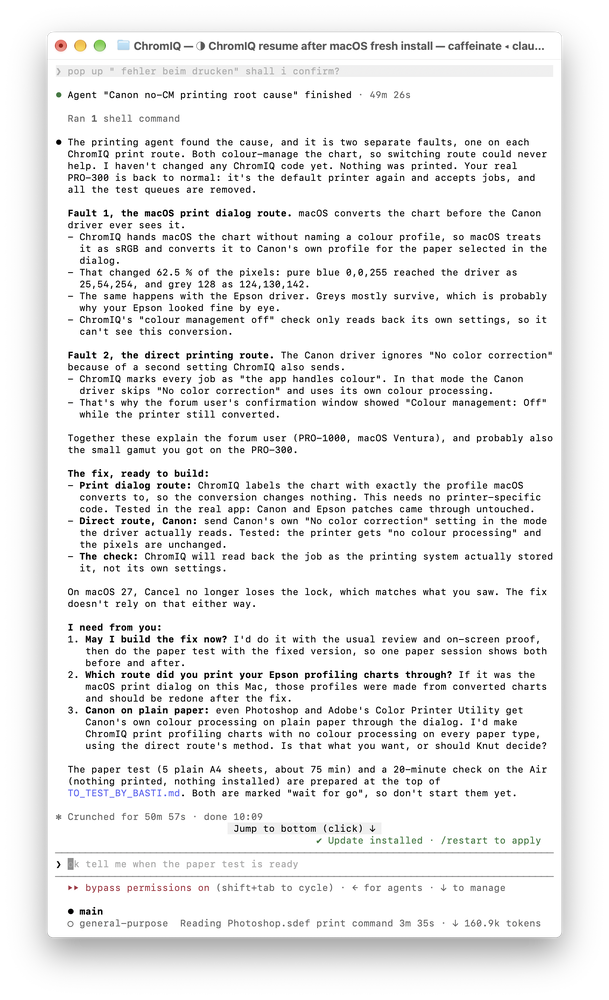
Maybe some progress:
Then sone time later I wanted to create a profile for my Canon Pro 300 and had similar issues like you. The gamut analysis in the check and refine tool showed a very small gamut volume that could not be true for the printer paper combination. I tried to find the cause but got conflicting information. Also someone reported printing was working for him on macOS Tahoe. This left me confused.
But since then I have at least learned to handle the AI agent a little better so maybe another research on this might help. On discord I read a post from a person who created a mac app that is also related to printing with Canon and I asked him how he handled things to make sure the settings are really respected. He shared some information and a script that he made that checks the print job that is sent to the printer through the macOS printer dialog.
My thought was to maybe use this for ChromIQ as well. As you saw by changing the settings in preferences I had a similar thought before - just for the other route. But for whatever reason it does not seem to help…
Edit: I am looking into this now. I have just set up my Pro 300 and my fresh system (macOS 27 Golden Gate).
1. there is a new driver online from September 2026
2. a new firmware for the printer is also available
3. in Photoshop it now seems to not show this misbehaviour anymore where clicking cancel in the dialog unlocks settings which is good in itself
Edit 2:
On the new macOS things stay locked in ChromIQ as well. Though this does not mean the printer gets the correct information it is clearly a nice thing. On another MacBook with Sequoia and the same driver it still unlocks.
Edit 3:
Maybe some progress:
Last edited:


