Refill Ink for IP8700 Series Printer

nertog

Print Addict
Joined
Jun 30, 2009
Messages
160
Reaction score
84
Points
161
Location
Regensburg, Germany
Printer Model
Epson R3000 - PX720 - P50
Hi Wim - I'm happy to share the profiles for comparative purposes but I strongly doubt that they'll be of any use for actual printing. I use TurboPrint which uses it's own colour mapping - different from (I would contend better than) that used by Canon. The profiles work fine in that environment, but I recently discovered for example that using a genuine Canon ICC profile as an Argyll preconditioning profile results in significant read failures with the Argyll chartread tool. I attribute this to the probability that the Canon and TurboPrint drivers map their colour generation in different ways and that the Canon profile was incompatible wiith the TurboPrint colour logic - & v.v. Replacing the Canon profile with a local TurboPrint generated profile for preconditioning completely resolved the issue. So while profiles generated using Argyll and TurboPrint work well for me, I doubt that they will provide optimal print results for a generic Canon setup.

If all you want to do is examine the CLI-651 and GI-63 profiles using a gamut viewing tool (gamutview for example) then I'm happy to upload them here. In fact I could zip up the full suite of Argyll files generated for each of the 2 inks - (ti1, ti2, ti3, ps, icc and the logfiles generated by my scripting wrapper) for you to look at. But it would need to be with the understanding that they are for comparison and not for actual use.

Let me know eh?

Cheers,

Richard (riclin)

EDIT: - I have queried the gurus at Zedo about my hypothesis regarding the apparent incompatibility of the Canon profiles with those prepared within the TurboPrint ecosystem and will report back here once I receive a reply. If on the other hand you happen to use TurboPrint or PrintFab, then my profiles should work perfectly.
Hi Richard,

I did use Printfab in the past while it was still under development to linearize some custom inksets for my Epson R3000. Anyway, I would like to have a look at the greyscale linearity of your printer/ink/combination...because the ICC profiles I find online from paper suppliers don't look too good.

Thanks,
W.
 

riclin

Getting Fingers Dirty
Joined
Oct 17, 2025
Messages
75
Reaction score
28
Points
45
Location
Melbourne, Australia
Printer Model
Canon Pro-10S, Canon iP8760
Hi Richard,

I did use Printfab in the past while it was still under development to linearize some custom inksets for my Epson R3000. Anyway, I would like to have a look at the greyscale linearity of your printer/ink/combination...because the ICC profiles I find online from paper suppliers don't look too good.

Thanks,
W.

Hi Wim - I have prepared a zipfile containing 3 examples of profiles that were prepared using Turboprint, ArgyllCMS and my YAAW profiling wrapper. The zipfile also includes the runtime logs etc for each mediatype so you can explore them further. You can download it at:

https://drive.google.com/file/d/1U9XPrs9L90P-34ba0P9_OTd9jKGOK5TC/view?usp=sharing

Zedo has confirmed that these profiles will be unsuitable for use in a generic Canon system. The have advised:

"You are right, the high ΔE are probably caused by the fact that ICC profiles cannot be interchanged between the genuine Canon driver and TurboPrint. The reason is that color reproduction is dependent not only on paper and ink but also on the driver / RIP software: different printer drivers have different color output, depending on halftoning algorithm, linearisation, use of light (photo) inks vs. regular inks, black generation etc."

On that basis, although they may assist with your investigations, please do not expect these profiles to work satisfactorily when used with generic Canon drivers. They should however work well with Printfab should you choose to use them with that.

Good luck - I'll be interested to read how you go.

Cheers,

r/
 
Last edited:

riclin

Getting Fingers Dirty
Joined
Oct 17, 2025
Messages
75
Reaction score
28
Points
45
Location
Melbourne, Australia
Printer Model
Canon Pro-10S, Canon iP8760
Hi Wim - I have prepared a zipfile containing 3 examples of profiles that were prepared using Turboprint, ArgyllCMS and my YAAW profiling wrapper. The zipfile also includes the runtime logs etc for each mediatype so you can explore them further. You can download it at:

https://drive.google.com/file/d/1U9XPrs9L90P-34ba0P9_OTd9jKGOK5TC/view?usp=sharing

Zedo has confirmed that these profiles will be unsuitable for use in a generic Canon system. The have advised:

"You are right, the high ΔE are probably caused by the fact that ICC profiles cannot be interchanged between the genuine Canon driver and TurboPrint. The reason is that color reproduction is dependent not only on paper and ink but also on the driver / RIP software: different printer drivers have different color output, depending on halftoning algorithm, linearisation, use of light (photo) inks vs. regular inks, black generation etc."

On that basis, although they may assist with your investigations, please do not expect these profiles to work satisfactorily when used with generic Canon drivers. They should however work well with Printfab should you choose to use them with that.

Good luck - I'll be interested to read how you go.

Cheers,

r/
Did the profiles I provided help you with your evaluation Wim?
 

nertog

Print Addict
Joined
Jun 30, 2009
Messages
160
Reaction score
84
Points
161
Location
Regensburg, Germany
Printer Model
Epson R3000 - PX720 - P50
Hi Richard,

Sorry it took me so long to get back to you. My goal was to see whether it is worth it to pay quite a bit more for the Epson ET18100, or to go with the cheaper IP8700 + GI-53 refills. The plots below show the greyscale linearity and dmax of both combinations for the colorimetric rendering intent. Bonus: Epson R3000, my good old workhorse with custom-made pigment inks.

ET18100.png

ET18100

IP8700.png

IP8700

R3000.png

R3000

Both dye printers have a rather weak black point, but the difference between the Epson ET18100 and Canon IP8700 is small enough to make me go with the cheaper one. Greyscale neutrality is surprisingly decent on both. I'll report back when I receive my new toy and find some time to profile a few papers.

Cheers,
W.
 

The Hat

Printer VIP
Platinum Printer Member
Joined
Jan 18, 2010
Messages
16,240
Reaction score
9,172
Points
453
Location
Residing in Wicklow Ireland
Printer Model
Now have 3 Ender-3 V3 Plus SE/
Both dye printers have a rather weak black point, but the difference between the Epson ET18100 and Canon IP8700 is small enough to make me go with the cheaper one. Greyscale neutrality is surprisingly decent on both.
I don’t know why anyone would spend time profiling dye inks, because they fade so fast, which is very noticeable, but if you use pigment inks they tend to fade a lot slower and your eyes don’t notice the scuttle changes.. My two cent worth..
 

nertog

Print Addict
Joined
Jun 30, 2009
Messages
160
Reaction score
84
Points
161
Location
Regensburg, Germany
Printer Model
Epson R3000 - PX720 - P50
I don’t know why anyone would spend time profiling dye inks, because they fade so fast, which is very noticeable, but if you use pigment inks they tend to fade a lot slower and your eyes don’t notice the scuttle changes.. My two cent worth..
Any OEM dye-based inkset exceeds the permanence of RA-4 chromogenic prints. Good enough in my book and definitely worth a quick profiling session.
 

pharmacist

Printer VIP
Platinum Printer Member
Joined
May 29, 2007
Messages
3,234
Reaction score
1,848
Points
333
Location
Ghent, Belgium
Printer Model
SC-900 ET-8550 +18100 WF-7840
Any OEM dye-based inkset exceeds the permanence of RA-4 chromogenic prints. Good enough in my book and definitely worth a quick profiling session.

Not sure you have already taken notice of the new graphical user interface for ArgyllCMS that Sebastian and Knut are working on: ChromIQ (with help of Alan Goldhammer and me). It is a fantastic graphical shell on top of ArgyllCMS with a few new features especially the new patch generator that is far superior to i1Profiler and even ArgyllCMS patch generator. It can make targets for both ArgyllCMS (ChromIQ) but also for i1Profiler with optimized patch selection to sample the very important neutral/near neutral axis (important for neutral greys with good separation) which is not possible with the built-in "smart" patch generator by i1Profiler.

1785608585589.png


Above a simple example to generate a 874 patch target that emphasize the neutral axis to correct for the serpentine behaviour of some printer/ink/paper combination in printing greys.

Have a look at it and is free software.
 

riclin

Getting Fingers Dirty
Joined
Oct 17, 2025
Messages
75
Reaction score
28
Points
45
Location
Melbourne, Australia
Printer Model
Canon Pro-10S, Canon iP8760
Not sure you have already taken notice of the new graphical user interface for ArgyllCMS that Sebastian and Knut are working on: ChromIQ (with help of Alan Goldhammer and me). It is a fantastic graphical shell on top of ArgyllCMS with a few new features especially the new patch generator that is far superior to i1Profiler and even ArgyllCMS patch generator. It can make targets for both ArgyllCMS (ChromIQ) but also for i1Profiler with optimized patch selection to sample the very important neutral/near neutral axis (important for neutral greys with good separation) which is not possible with the built-in "smart" patch generator by i1Profiler.

View attachment 19150

Above a simple example to generate a 874 patch target that emphasize the neutral axis to correct for the serpentine behaviour of some printer/ink/paper combination in printing greys.

Have a look at it and is free software.

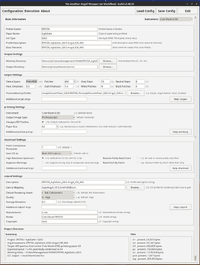
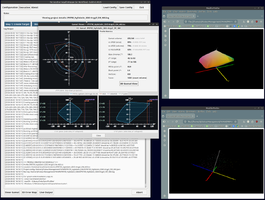
I’d also like to self-promote my somewhat less glamorous but fully featured approach to the profiling process: YAAW — Yet Another Argyll Wrapper (or Workflow). YAAW is a KISS application written entirely in Python 3 and tkinter, and tested under both Linux and macOS. It provides a robust front end to ArgyllCMS with (in no particular order): transparent operation; automatic field, filename and folder population; persistent logfiles; separate working directories for each printer/paper/ink combination; saved JSON configuration files for each profile; crash recovery; split-stage processing allowing multiple targets to be printed and later measured once dried; profile validation; support for preconditioning and gamut-mapping profiles; multipage and condensed-target workflows; static and X3DOM gamut plots; and integrated ArgyllCMS documentation.

It is deliberately simple and performs no colour management in its own right. Instead, it provides a logical, auditable, consistent and reproducible interface to the ArgyllCMS command-line tools.

Available for free download at github:

https://github.com/riclin-au/YAAW-Yet-Another-ArgyllCMS-Wrapper-Workflow

The github README file provides all the news that's fit to print ;)


riclin
 

Attachments

  • Screenshot from 2026-08-02 16-51-50.png
    Screenshot from 2026-08-02 16-51-50.png
    333.7 KB · Views: 6
  • Screenshot from 2026-08-02 16-29-08.png
    Screenshot from 2026-08-02 16-29-08.png
    657 KB · Views: 6
Last edited:
Top