TI1, TI2, CSV and printtarg target files for SpyderPrint Targets

knowing

Printing Apprentice
Joined
Oct 24, 2025
Messages
30
Reaction score
6
Points
13
Printer Model
HP CLJ5550, Brother MFC-9460
What I am concerned is the strange green empty patches on the second page (row on the right: bottom green patches). Normally I should get white patches when generating those empty patches. Not sure how this will interfere with the chartread command (will it be registered as empty patch or as real colour ?). Maybe I should PS to color those patches into true white. Another strange thing: the -b (black and white) argument should only give black and white space bars between patches and I see now greenish and black space bars....There is something very strange happening.
Hi again,
I have gone deeper into the issue and finally found that I used some wrong data for generating the extreme density values table for the ti1 file. The table for DENSITY_EXTREME_VALUES are used for colors for the spacers by printtarg. I have now implemented the table to be much more what targen does.

I have updated the Example files and corrected the bug in the code and released version 1.5.5.

Down load again here:
https://soul-traveller.github.io/read_image_patch_colors/

The resulting printarg output is now definitely fixed:

A4-Expert Target Plus Grays (2 pages - 989 patches)-i1_01.jpg
A4-Expert Target Plus Grays (2 pages - 989 patches)-i1_02.jpg

A4-Expert Target Plus Grays (2 pages - 989 patches)-i1_01
A4-Expert Target Plus Grays (2 pages - 989 patches)-i1_02

A4-High Quality Target Plus Grays (1 page - 483 patches)-i1.jpg

A4-High Quality Target Plus Grays (1 page - 483 patches)-i1


Now I hope you finally can make it work for you and test it. Sorry about the bugs... Let me know how it works out :)

Cheers,
K
 

pharmacist

Printer VIP
Platinum Printer Member
Joined
May 29, 2007
Messages
2,982
Reaction score
1,714
Points
313
Location
Ghent, Belgium
Printer Model
SC-900 ET-8550 WF-7840 TS705
So I did some work with manipulating the 975 patch target over 2 sheets of A4. I will give it a try this weekend if it works:

1764965589313.png
 

knowing

Printing Apprentice
Joined
Oct 24, 2025
Messages
30
Reaction score
6
Points
13
Printer Model
HP CLJ5550, Brother MFC-9460
So I did some work with manipulating the 975 patch target over 2 sheets of A4. I will give it a try this weekend if it works:

View attachment 17970
Sounds great... The colors on your images seem much more dull than the images I posted earlier. Is there any reason for that?
 

pharmacist

Printer VIP
Platinum Printer Member
Joined
May 29, 2007
Messages
2,982
Reaction score
1,714
Points
313
Location
Ghent, Belgium
Printer Model
SC-900 ET-8550 WF-7840 TS705
Sounds great... The colors on your images seem much more dull than the images I posted earlier. Is there any reason for that?

The reason for that it is a printscreen, colors are ok.
 

pharmacist

Printer VIP
Platinum Printer Member
Joined
May 29, 2007
Messages
2,982
Reaction score
1,714
Points
313
Location
Ghent, Belgium
Printer Model
SC-900 ET-8550 WF-7840 TS705
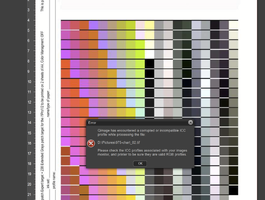
OK, I tried to scan the targets but unfortunately the same error happens:

1765014864006.png


I will try to read every row and save the file and see how the profile is generated.
 

Attachments

  • 1765014973141.png
    1765014973141.png
    505.3 KB · Views: 11

pharmacist

Printer VIP
Platinum Printer Member
Joined
May 29, 2007
Messages
2,982
Reaction score
1,714
Points
313
Location
Ghent, Belgium
Printer Model
SC-900 ET-8550 WF-7840 TS705
Actually it is terrible to read:

1765015871803.png


I will try to randomize the patches.
 

pharmacist

Printer VIP
Platinum Printer Member
Joined
May 29, 2007
Messages
2,982
Reaction score
1,714
Points
313
Location
Ghent, Belgium
Printer Model
SC-900 ET-8550 WF-7840 TS705
Even after randomising (to make the adjacent patch to be totally different patch color) I get this continously:

1765020564172.png
 

pharmacist

Printer VIP
Platinum Printer Member
Joined
May 29, 2007
Messages
2,982
Reaction score
1,714
Points
313
Location
Ghent, Belgium
Printer Model
SC-900 ET-8550 WF-7840 TS705
Anyhow the resulting profile looks ok to me:

1765022476864.png


Maybe I should loose my setting -T0.4 in order to get rid of those error messages from the chartread command.

Edit: I tried -T5 and without the -H argument, but the error messages persist. So I think there is problem with the ti1 file generation concerning the conversion. It is very annoying to get the message continously reading every row.
 
Last edited:

pharmacist

Printer VIP
Platinum Printer Member
Joined
May 29, 2007
Messages
2,982
Reaction score
1,714
Points
313
Location
Ghent, Belgium
Printer Model
SC-900 ET-8550 WF-7840 TS705
I just one of my own targen generated targets with ArgyllCMS and no errors concerning unexpected response (DeltaE .....), so there must be something with the AI generated ti1 files.
 

knowing

Printing Apprentice
Joined
Oct 24, 2025
Messages
30
Reaction score
6
Points
13
Printer Model
HP CLJ5550, Brother MFC-9460
Even after randomising (to make the adjacent patch to be totally different patch color) I get this continously:

View attachment 17974
Sorry to hear that. I suspect it might be the XYZ values that are created with ArgyllCMS xicclu using argument -ia for absolute colormetic intent.

I will study more how targen is calculating XYZ values from RGB, because this likely means I cannot use the xicclu tool to calculate XYZ and LAB values. Will come back to you when I have more info.

Thanks for your effort, because I do not have a scanner like you do to verify that things work.

Cheers,
K
 
Last edited:
Top