YAAW - Yet Another Argyll Wrapper

riclin

Getting Fingers Dirty
Joined
Oct 17, 2025
Messages
17
Reaction score
10
Points
28
Location
Melbourne, Australia
Printer Model
Canon Pro-10S, Canon iP8760
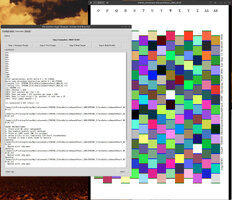
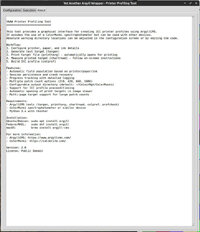
At the expense of jumping on the bandwagon, Claude and I have written yet another wrapper to simplify the process of preparing printer profiles with Argyll CMS. There are several of these around but none really suited my requirements. Anyway - take a look and see whether this may be of use. It's written in Python so should be fairly portable and is available for your viewing pleasure at:

https://drive.google.com/file/d/1kGeeNQ0dPzOaBl6ALWpYmKdM-XUIdDNZ/view?usp=drive_link

Feel free to hack/modify/bin as you see fit.
 

Attachments
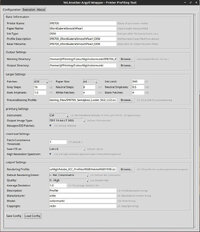
  • Config.jpg
    Config.jpg
    156.7 KB · Views: 50
  • Execution.jpg
    Execution.jpg
    218.5 KB · Views: 36
  • About.jpg
    About.jpg
    142.5 KB · Views: 36
Last edited:

itsab1989

Printing Apprentice
Joined
Feb 11, 2026
Messages
16
Reaction score
5
Points
13
Printer Model
Epson ET 8550, Canon Pro 300
It is kind of funny to see that multiple people tackled the same project at a similar time. What was your main focus when developing the app? What did you need that others do not offer?

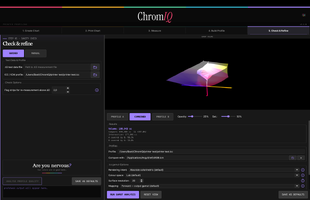
Here is my approach. Last night I added a 3D gamut viewer to the list of features. Even with AI it is a lot of work. But I hope I can implement everything that is necessary :)

https://github.com/itsab1989/ChromIQ
 

riclin

Getting Fingers Dirty
Joined
Oct 17, 2025
Messages
17
Reaction score
10
Points
28
Location
Melbourne, Australia
Printer Model
Canon Pro-10S, Canon iP8760
Yes - it is a little weird isn't it? I suspect that several of us had persevered with Argyll longhand, then via various shell scripts etc, before realizing that AI and python could help to transform our scripts into a proper UI - and from there, all bets were off. At least that was my journey. The other Argyll based implementations that I'd explored either seemed overkill for my needs - or were a bit basic and didn't easily include the settings and switches that I needed - or didn't include a provision to save and revisit a profiling session at a later time. So YAAW was born. It was written to be light and portable, and deliberately provides only simple- although hopefully informative, graphics. With YAAW and a colormunki it takes only a little longer to prepare a new profile than it does using a scanner based profiling tool, and the resulting profiles generate prints that seem to align better with the screen image than the alternative. YMMV. :)
 
Last edited:

itsab1989

Printing Apprentice
Joined
Feb 11, 2026
Messages
16
Reaction score
5
Points
13
Printer Model
Epson ET 8550, Canon Pro 300
When I replied to you here in this thread your posts with the gamut viewer were not yet published. I just saw them right now. Looks really nice!
I guess in the future people have some options if they want to create profiles for their printer. It should be a lot easier now!
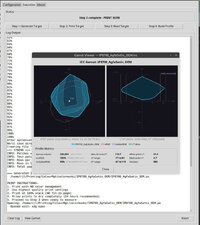
Here is my approach for the gamut viewer attached:
 

Attachments

  • Bildschirmfoto 2026-05-13 um 15.53.01.png
    Bildschirmfoto 2026-05-13 um 15.53.01.png
    175.6 KB · Views: 18

riclin

Getting Fingers Dirty
Joined
Oct 17, 2025
Messages
17
Reaction score
10
Points
28
Location
Melbourne, Australia
Printer Model
Canon Pro-10S, Canon iP8760
ChromIQ looks really good - much easier on the eye than yaaw. Congratulations!! I managed to build it under linux - the only real glitch was the use of the sips and iconutil tools in your build step 3 that are specific to macOS. For a debian based linux install and with a little AI assistance, I used commands from the imagemagick and icnsutils packages:

_____

#!/usr/bin/env bash
set -e

ICON_SRC="assets/app_icon.png"
ICONSET="/tmp/chromiq_icon.iconset"
OUT="assets/app_icon.icns"

if command -v magick >/dev/null 2>&1; then
IM="magick"
else
IM="convert"
fi

mkdir -p "$ICONSET"
rm -f "$ICONSET"/*.png

for size in 16 32 128 256 512; do
"$IM" "$ICON_SRC" -resize "${size}x${size}!" \
"$ICONSET/icon_${size}x${size}.png"

"$IM" "$ICON_SRC" -resize "$((size*2))x$((size*2))!" \
"$ICONSET/icon_${size}x${size}@2x.png"
done

icnsutil -c icns "$ICONSET" -o "$OUT"

_____

... which seemd to work. icnsutil complained with:

"Could not open '/tmp/chromiq_icon.iconset/icon_64x64.png' for reading: No such file or directory" and "Duplicate icon element of type 'ic07' detected (/tmp/chromiq_icon.iconset/icon_128x128.png)"

Not sure why it even looked for the 64x64 icons - but just ignored the diagnostic and all seemed to work OK.

Anyway - will play further - haven't printed a target yet but will do so and report further once I have.

Good job!!

r/
 
Last edited:

itsab1989

Printing Apprentice
Joined
Feb 11, 2026
Messages
16
Reaction score
5
Points
13
Printer Model
Epson ET 8550, Canon Pro 300
Thanks for this information. I have no knowledge about coding at all but I gave Calude your feedback and asked it to add Linux compatibility. I can't test this myself but if you want to give it a try you can download it here:

https://github.com/itsab1989/ChromIQ/releases
 

riclin

Getting Fingers Dirty
Joined
Oct 17, 2025
Messages
17
Reaction score
10
Points
28
Location
Melbourne, Australia
Printer Model
Canon Pro-10S, Canon iP8760
Thanks for this information. I have no knowledge about coding at all but I gave Calude your feedback and asked it to add Linux compatibility. I can't test this myself but if you want to give it a try you can download it here:

https://github.com/itsab1989/ChromIQ/releases
Hmm - is late here and I need to sleep - but the bad news is that the update broke the Linux port - which previously was working OK. Note that the HOW_TO_BUILD needs updating - it still refers to the macOS commands - but notwithstanding that, I managed to get a successful build, but it wasn't a happy puppy:

_____
./ChromIQ
qt.qpa.plugin: From 6.5.0, xcb-cursor0 or libxcb-cursor0 is needed to load the Qt xcb platform plugin.
qt.qpa.plugin: Could not load the Qt platform plugin "xcb" in "" even though it was found.
This application failed to start because no Qt platform plugin could be initialized. Reinstalling the application may fix this problem.

Available platform plugins are: linuxfb, wayland-brcm, wayland-egl, wayland, minimalegl, minimal, vkkhrdisplay, offscreen, eglfs, xcb, vnc.

Aborted (core dumped)
_____

I'll look again tomorrow afternoon (eastern Australia time) but you may wish to chat with Claude first. Meantime, perhaps move this discussion to your ChromIQ thread.

r/
 

itsab1989

Printing Apprentice
Joined
Feb 11, 2026
Messages
16
Reaction score
5
Points
13
Printer Model
Epson ET 8550, Canon Pro 300
I wrote a reply in the ChromIQ thread. Thanks a lot for your effort
 
Top