YAAW - Yet Another Argyll Wrapper

riclin

Getting Fingers Dirty
Joined
Oct 17, 2025
Messages
15
Reaction score
9
Points
28
Location
Melbourne, Australia
Printer Model
Canon Pro-10S, Canon iP8760
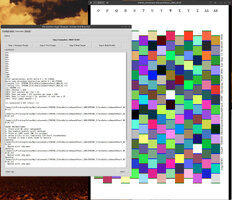
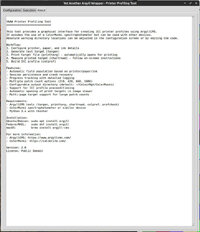
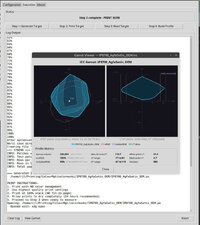
At the expense of jumping on the bandwagon, Claude and I have written yet another wrapper to simplify the process of preparing printer profiles with Argyll CMS. There are several of these around but none really suited my requirements. Anyway - take a look and see whether this may be of use. It's written in Python so should be fairly portable and is available for your viewing pleasure at:

https://drive.google.com/file/d/1kGeeNQ0dPzOaBl6ALWpYmKdM-XUIdDNZ/view?usp=drive_link

Feel free to hack/modify/bin as you see fit.
 

Attachments
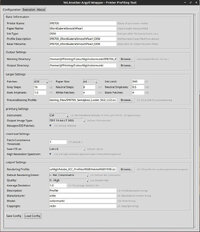
  • Config.jpg
    Config.jpg
    156.7 KB · Views: 44
  • Execution.jpg
    Execution.jpg
    218.5 KB · Views: 33
  • About.jpg
    About.jpg
    142.5 KB · Views: 33
Last edited:

itsab1989

Printing Apprentice
Joined
Feb 11, 2026
Messages
13
Reaction score
5
Points
13
Printer Model
Epson ET 8550, Canon Pro 300
It is kind of funny to see that multiple people tackled the same project at a similar time. What was your main focus when developing the app? What did you need that others do not offer?

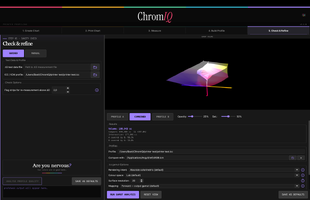
Here is my approach. Last night I added a 3D gamut viewer to the list of features. Even with AI it is a lot of work. But I hope I can implement everything that is necessary :)

https://github.com/itsab1989/ChromIQ
 

riclin

Getting Fingers Dirty
Joined
Oct 17, 2025
Messages
15
Reaction score
9
Points
28
Location
Melbourne, Australia
Printer Model
Canon Pro-10S, Canon iP8760
Yes - it is a little weird isn't it? I suspect that several of us had persevered with Argyll longhand, then via various shell scripts etc, before realizing that AI and python could help to transform our scripts into a proper UI - and from there, all bets were off. At least that was my journey. The other Argyll based implementations that I'd explored either seemed overkill for my needs - or were a bit basic and didn't easily include the settings and switches that I needed - or didn't include a provision to save and revisit a profiling session at a later time. So YAAW was born. It was written to be light and portable, and deliberately provides only simple- although hopefully informative, graphics. With YAAW and a colormunki it takes only a little longer to prepare a new profile than it does using a scanner based profiling tool, and the resulting profiles generate prints that seem to align better with the screen image than the alternative. YMMV. :)
 
Last edited:

itsab1989

Printing Apprentice
Joined
Feb 11, 2026
Messages
13
Reaction score
5
Points
13
Printer Model
Epson ET 8550, Canon Pro 300
When I replied to you here in this thread your posts with the gamut viewer were not yet published. I just saw them right now. Looks really nice!
I guess in the future people have some options if they want to create profiles for their printer. It should be a lot easier now!
Here is my approach for the gamut viewer attached:
 

Attachments

  • Bildschirmfoto 2026-05-13 um 15.53.01.png
    Bildschirmfoto 2026-05-13 um 15.53.01.png
    175.6 KB · Views: 11

riclin

Getting Fingers Dirty
Joined
Oct 17, 2025
Messages
15
Reaction score
9
Points
28
Location
Melbourne, Australia
Printer Model
Canon Pro-10S, Canon iP8760
ChromIQ looks really good - much easier on the eye than yaaw. Congratulations!! I managed to build it under linux - the only real glitch was the use of the sips and iconutil tools in your build step 3 that are specific to macOS. For a debian based linux install and with a little AI assistance, I used commands from the imagemagick and icnsutils packages:

_____

#!/usr/bin/env bash
set -e

ICON_SRC="assets/app_icon.png"
ICONSET="/tmp/chromiq_icon.iconset"
OUT="assets/app_icon.icns"

if command -v magick >/dev/null 2>&1; then
IM="magick"
else
IM="convert"
fi

mkdir -p "$ICONSET"
rm -f "$ICONSET"/*.png

for size in 16 32 128 256 512; do
"$IM" "$ICON_SRC" -resize "${size}x${size}!" \
"$ICONSET/icon_${size}x${size}.png"

"$IM" "$ICON_SRC" -resize "$((size*2))x$((size*2))!" \
"$ICONSET/icon_${size}x${size}@2x.png"
done

icnsutil -c icns "$ICONSET" -o "$OUT"

_____

... which seemd to work. icnsutil complained with:

"Could not open '/tmp/chromiq_icon.iconset/icon_64x64.png' for reading: No such file or directory" and "Duplicate icon element of type 'ic07' detected (/tmp/chromiq_icon.iconset/icon_128x128.png)"

Not sure why it even looked for the 64x64 icons - but just ignored the diagnostic and all seemed to work OK.

Anyway - will play further - haven't printed a target yet but will do so and report further once I have.

Good job!!

r/
 
Last edited:
Top