Which black is used on a Canon 1p4300 when printing different material?

videobruce

Printer Guru
Joined
Nov 8, 2006
Messages
172
Reaction score
21
Points
148
Location
New York State
Printer Model
Canon IP4300 & Panny KX-MB271
FYI, this is one of the 1st series of Canon ink jets with the dreaded 'chip' in the tanks, but unlike the models after these, this are re-settable.

I'm having a problem printing certain documents out regarding using a hi-lighter afterwards on the document.
With some, the text gets smeared terrible with a highlighter (I tried 2 different types) and other prints are fine. It's clearly the Photo black, not the Pigment black that is smearing!

It's never was a problem before and I've had this model printer for probably 10 or so years.
I use 'Precision Colors' bulk ink for a few years now switching from another supplier that closed shop unfortunately. One document will be fine, another will 'smear' terribly.

So, the question is; what determines which 'black' is used;
Is it the type of document; .txt, .doc, .odt (Open Office program which I use all the time), or .pdf?
If it has a photo, picture or drawing, is it the program) itself? Of course smearing w/ a highlighter isn't a issue w/ s photo or similar.

At first, I thought I mixed up the 'blacks' when I refilled the last time, but not so. (I keep a loaded, spare set so when the tanks runs out, all I have to do is swap the empty tanks out then finish printing). I reset the chip, refill that tank, cap it off and put the set back in the desk drawer. Very little downtime and the printer isn't left open more than a few seconds.
 

PeterBJ

Printer VIP
Platinum Printer Member
Joined
Nov 27, 2010
Messages
5,211
Reaction score
5,113
Points
373
Location
Copenhagen Denmark
Printer Model
Canon MP990
The iP4300 and all(?) other Canon printers for home use only use the pigment black PGI-5 PGBK for the media setting plain paper. For all other media settings like photo paper, high resolution paper, and CDs the photo (dye) black is used. IIRC duplex printing on plain paper also uses the photo black.

The black ink used is independent of file type and is only determined by the media setting. There might be an exception to this rule, pdf files sometimes prints a dye gray maybe mixed from C-M-Y inks instead of black, sometimes it prints using pigment black.

Years ago, when the unchipped iP4000 was new, cheap aftermarket cartridges were popular. Some of these cheap pigment black cartridges ruined a lot of iP4000 printheads by clogging. The manufacturers of these cheap cartridges found a solution to the problem. They filled both black cartridges with the same dye ink. Could some manufacturer/seller of refill inks use the same trick?

Even some pigment inks smear, even Canon OEM. See this from a druckerchannel.de test of a Canon iP5300 that uses the same inks as the Ip4300. Some highlighters are better than others. I recommend "Staedtler Textsurfer Classic"

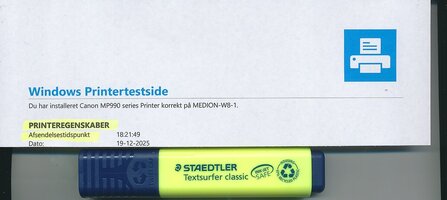
Here is a test print made with my Canon MP990 using the 1128 PGI ink from Image Specialists and a Staedtler highlighter, click to enlarge.

Smear test MP990-1128 PGI-Staedtler.jpg

Excuse me, but are you 100% sure you didn't refill some PGI-5 PGBK cartridges with photo black ink?

You can test the ink in the "big black" cartridge to see if it is pigment or dye. See this post. And here is a "big black cartridge that contains dye ink instead of pigment ink.
 
Last edited:

Ink stained Fingers

Printer VIP
Platinum Printer Member
Joined
Dec 27, 2014
Messages
6,337
Reaction score
7,549
Points
373
Location
Germany
Printer Model
L805, WF2010, ET8550, T3100X
It's as well with borderless printing on copy paper that the printer switches from the pigment black to the dye black ink, this prevents the build-up of pigment residue from overprint at the borders of the paper.
 

videobruce

Printer Guru
Joined
Nov 8, 2006
Messages
172
Reaction score
21
Points
148
Location
New York State
Printer Model
Canon IP4300 & Panny KX-MB271
I've printed one document, then printed a different one just after, one was ok, the other wasn't. Can't make this stuff up. :he

Initially I assumed I switched inks(that would be too easy), but I have ruled it out. I also thought it's a glitch/corrupted something, somewhere, but I'm kind ruling that out. I want to run some more tests, but other priorities come first. I will post back when I can.

BTW, I only have 2 sets, one in the printer, one in a desk drawer (standby).
 
Last edited:

The Hat

Printer VIP
Platinum Printer Member
Joined
Jan 18, 2010
Messages
16,113
Reaction score
9,067
Points
453
Location
Residing in Wicklow Ireland
Printer Model
Canon/3D, CR-10, CR-10S, KP-3
Printing two different documents can in itself cause a change in the printers output.. While Word will print using pigment ink, PDF’s wont, there are lots of other anomaly’s that can cause these changes, this is just one of them .. See Below..
The black ink used is independent of file type and is only determined by the media setting. There might be an exception to this rule, pdf files sometimes prints a dye gray maybe mixed from C-M-Y inks instead of black, sometimes it prints using pigment
 

Ink stained Fingers

Printer VIP
Platinum Printer Member
Joined
Dec 27, 2014
Messages
6,337
Reaction score
7,549
Points
373
Location
Germany
Printer Model
L805, WF2010, ET8550, T3100X
I could assume that there are some hidden parameters in a PDF file which may cause the print this way or another way - e.g. is a text with embedded images may store the complete document in an image format and would not separate images and text, and it could be that a hidden default icc profile is linked to such document - with BPC - black point compensation on. I remember seeing some compression options for a document which may drive the discussed 'phenomenom', and it could be that particular default settings are not specifically displayed to the user.
 

PeterBJ

Printer VIP
Platinum Printer Member
Joined
Nov 27, 2010
Messages
5,211
Reaction score
5,113
Points
373
Location
Copenhagen Denmark
Printer Model
Canon MP990
I also suspect that .pdf files are causing the problems. The problem can also happen in Microsoft Word if a dark grey text color is selected instead of black.

Years ago I had given a colleague an HP PSC 750. It was an AIO using the type 78 tricolor cartridge and the type 15 pigment black cartridge. One day my colleague asked me if I could take a look at the printer as it had begun to print pink text instead of black. The document printed was a .pdf file and the reason for the pink text was that there was no more cyan left in the tricolor cartridge. With a "new" (remanufactured) cartridge from Aldi the printer was OK again. In this case the text was not black but a dark grey mixed from C-M-Y dye inks.

Using my Canon MP990 I have just printed a few .pdf files but all the prints were done with pigment ink, verified with a webcam modified to work in the near infrared.

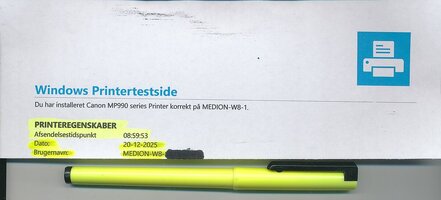
By selecting matte photo paper as the printing medium and printing the Windows test page I got a printout in photo black. But even this print didn't smear when a Staedtler highlighter was used on it. The photo black ink was Image specialists 1109 Photo Black. Another no-name highlighter did smear a bit but not enough to make the text unreadable. So I think the Staedtler Textsurfer Classic and Image Specialists ink is a good combination. I have had much more smearing with some 3rd party cartridges.

Here is a scan of the photo black print and highlighting used both the the Staedtler and the no-name highlighter. The two first highlighted lines are made with the Staedtler highlighter and the two last lines are made with the no-name highlighter. Click to enlarge:

Smear test MP990-1109 PB-No Name.jpg

As some of your prints are OK, the pigment black ink and highlighter combination is OK. I suggest to try the Staedtler highlighter if it is available in the US and the IS ink photo black 1109 from Precision Colors. The company was sold but is still active and is now located in the US. See this. Allowing some drying time before using the highlighter will reduce smearing if photo (dye) black ink was used.
 
Top