
Cassiop38
Printing Apprentice
- Joined
- Dec 17, 2025
- Messages
- 43
- Reaction score
- 7
- Points
- 13
- Printer Model
- Epson, Canon, HP.
Hello,
I printed 4 images and 3 of them was featuring those smear, all in the same places, 2 collumns on the left of the print. (yes... it sound very similar to my other post. but not the same problem !) any ideas ?
Printer : Epson XP-8700
Ink : Epson 378 cartridges refilled with Epson 107 bottles
paper : United Office glossy photo paper (paper sold by Lidl around 2016)
Nozzle check : clean
Printing software : photoshop
Printing settings :
- Borderless
- Photo Paper Glossy / High quality
- Monodirectional printing
- printer manage colors
- perceptual
Color Correction
- Custom
- Color Controls
- Color Mode : Epson Vivid, All 0
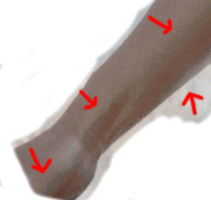
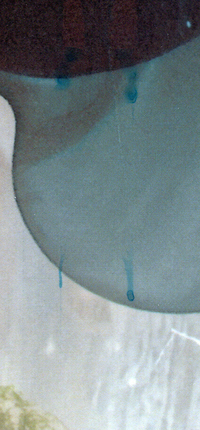
You can see on the "smear XP-8700.png" picture the Cyan or Light Cyan stains the printer is leaving on the paper. I Also have another problem that you can see on the "Gradient hop.png" picture. Somehow, the skin goes from dark beige to darker beige by hoping to a cyan-beige artifact. Might be related... or not. What do you think ?
If usefull : It was the first picture i printed and it is featuring lot of blue/cyan shades.
Thanks !
I printed 4 images and 3 of them was featuring those smear, all in the same places, 2 collumns on the left of the print. (yes... it sound very similar to my other post. but not the same problem !) any ideas ?
Printer : Epson XP-8700
Ink : Epson 378 cartridges refilled with Epson 107 bottles
paper : United Office glossy photo paper (paper sold by Lidl around 2016)
Nozzle check : clean
Printing software : photoshop
Printing settings :
- Borderless
- Photo Paper Glossy / High quality
- Monodirectional printing
- printer manage colors
- perceptual
Color Correction
- Custom
- Color Controls
- Color Mode : Epson Vivid, All 0
You can see on the "smear XP-8700.png" picture the Cyan or Light Cyan stains the printer is leaving on the paper. I Also have another problem that you can see on the "Gradient hop.png" picture. Somehow, the skin goes from dark beige to darker beige by hoping to a cyan-beige artifact. Might be related... or not. What do you think ?
If usefull : It was the first picture i printed and it is featuring lot of blue/cyan shades.
Thanks !
Attachments
Last edited:


