videobruce
Printer Guru
- Joined
- Nov 8, 2006
- Messages
- 177
- Reaction score
- 21
- Points
- 148
- Location
- New York State
- Printer Model
- Canon IP4300 & Panny KX-MB271
FYI, this is one of the 1st series of Canon ink jets with the dreaded 'chip' in the tanks, but unlike the models after these, this are re-settable.
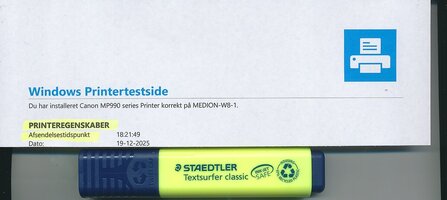
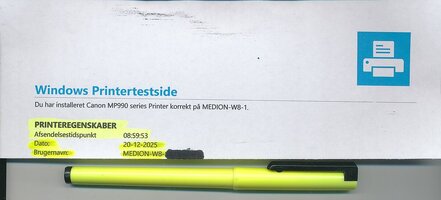
I'm having a problem printing certain documents out regarding using a hi-lighter afterwards on the document.
With some, the text gets smeared terrible with a highlighter (I tried 2 different types) and other prints are fine. It's clearly the Photo black, not the Pigment black that is smearing!
It's never was a problem before and I've had this model printer for probably 10 or so years.
I use 'Precision Colors' bulk ink for a few years now switching from another supplier that closed shop unfortunately. One document will be fine, another will 'smear' terribly.
So, the question is; what determines which 'black' is used;
Is it the type of document; .txt, .doc, .odt (Open Office program which I use all the time), or .pdf?
If it has a photo, picture or drawing, is it the program) itself? Of course smearing w/ a highlighter isn't a issue w/ s photo or similar.
At first, I thought I mixed up the 'blacks' when I refilled the last time, but not so. (I keep a loaded, spare set so when the tanks runs out, all I have to do is swap the empty tanks out then finish printing). I reset the chip, refill that tank, cap it off and put the set back in the desk drawer. Very little downtime and the printer isn't left open more than a few seconds.
I'm having a problem printing certain documents out regarding using a hi-lighter afterwards on the document.
With some, the text gets smeared terrible with a highlighter (I tried 2 different types) and other prints are fine. It's clearly the Photo black, not the Pigment black that is smearing!
It's never was a problem before and I've had this model printer for probably 10 or so years.
I use 'Precision Colors' bulk ink for a few years now switching from another supplier that closed shop unfortunately. One document will be fine, another will 'smear' terribly.
So, the question is; what determines which 'black' is used;
Is it the type of document; .txt, .doc, .odt (Open Office program which I use all the time), or .pdf?
If it has a photo, picture or drawing, is it the program) itself? Of course smearing w/ a highlighter isn't a issue w/ s photo or similar.
At first, I thought I mixed up the 'blacks' when I refilled the last time, but not so. (I keep a loaded, spare set so when the tanks runs out, all I have to do is swap the empty tanks out then finish printing). I reset the chip, refill that tank, cap it off and put the set back in the desk drawer. Very little downtime and the printer isn't left open more than a few seconds.