
[Tool] ChromIQ – a macOS and Windows GUI for ArgyllCMS printer profiling (v3.8.0)

itsab1989

Fan of Printing
Joined
Feb 11, 2026
Messages
111
Reaction score
44
Points
50
Printer Model
Epson ET 8550, Canon Pro 300
@pharmacist:

It is in the latest stable release. Hope that‘s how you imagined it. Have you tried if the scanning highlighter works on those? I hope after the fixes it is now more reliable.
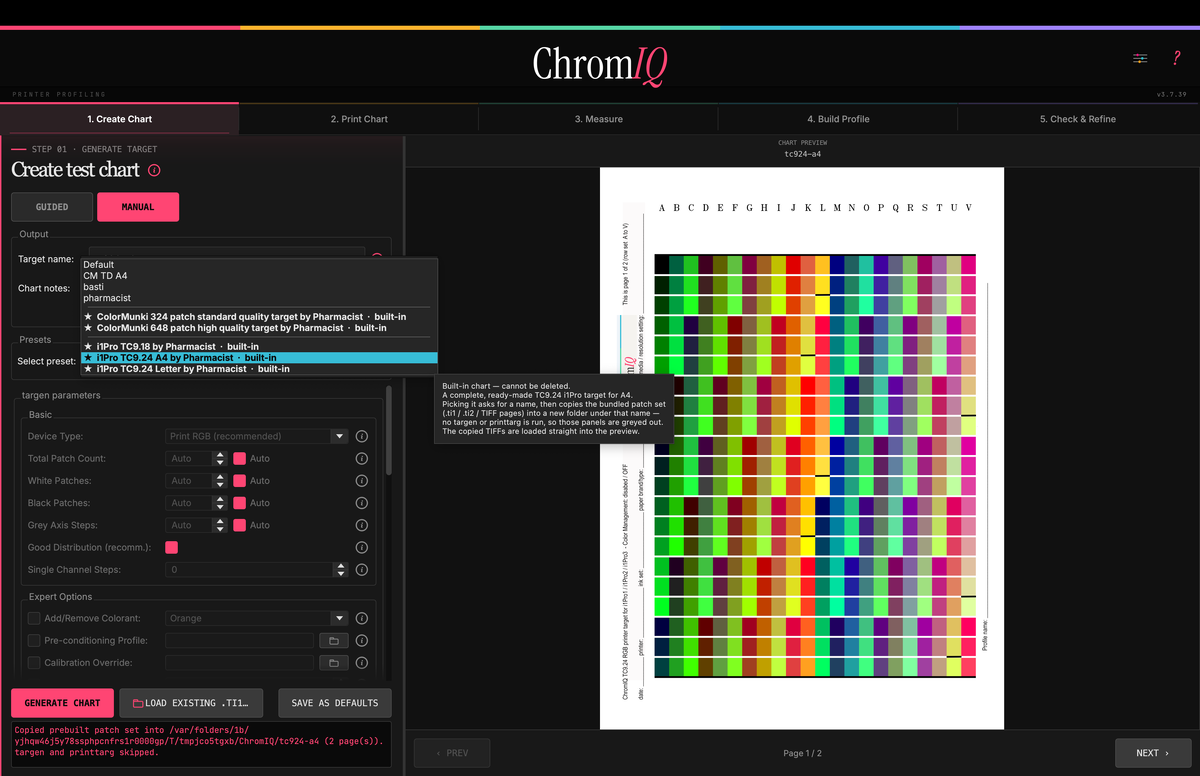
Bildschirmfoto 2026-05-25 um 22.10.05.png


@Alan G :

This one is for you. I put the averaging only in the beta first because I was a little scared that it might break anything. Please have a look and let me know if this is what you imagined and if it works. Is the implementation in the interface good? Maybe the new options are overwhelming for beginner users. Should I hide them behind another option in the settings that is disabled by default? Let me know your thoughts! Looking forward to it! :)

EDIT: maade it an option in beta 6:

https://github.com/itsab1989/ChromIQ/releases/tag/v3.8.0-beta.6
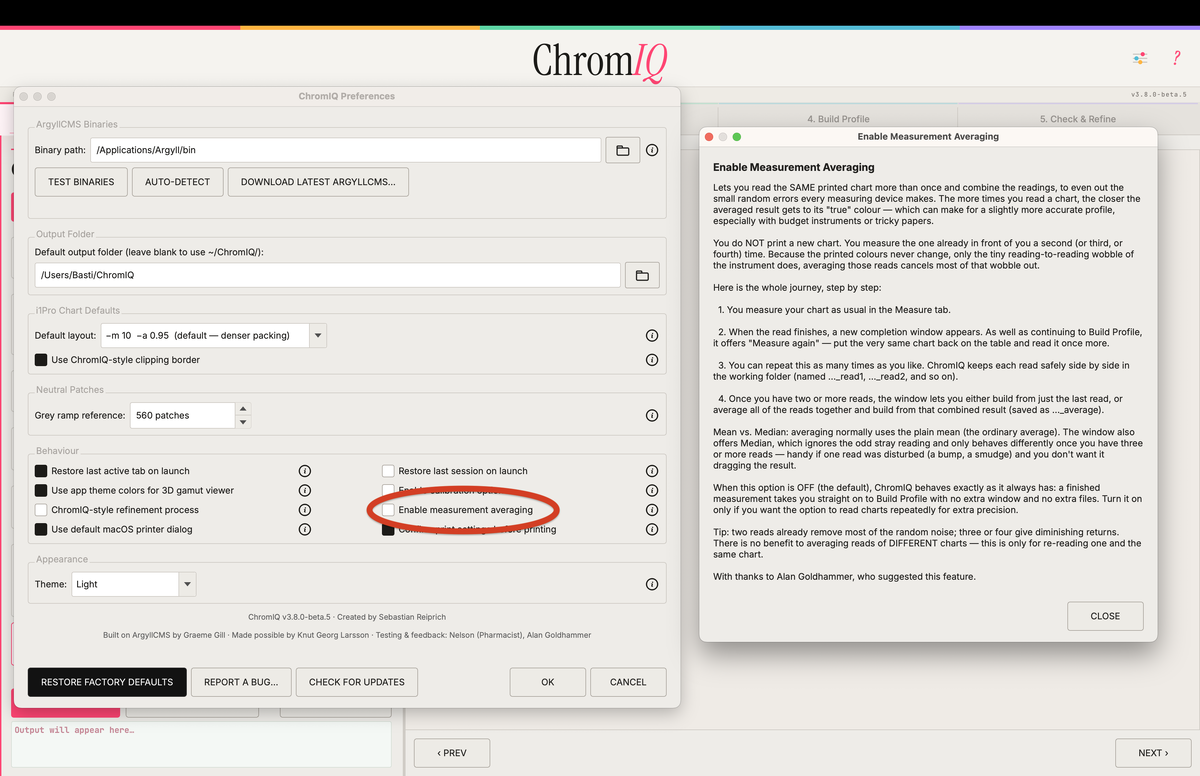
Bildschirmfoto 2026-05-26 um 01.12.33.png
 
Last edited:

itsab1989

Fan of Printing
Joined
Feb 11, 2026
Messages
111
Reaction score
44
Points
50
Printer Model
Epson ET 8550, Canon Pro 300
Here is the proof that the built-in TC9.18 (or my slightly modified TC9.24) is legit:

View attachment 18727

@pharmacist :

Do you remember what you did there? I see that the user interface is somewhat broken there. It should not scroll vertically. So there is something that needs fixing.

EDIT: hopefully already fixed now.
 
Last edited:

pharmacist

Printer VIP
Platinum Printer Member
Joined
May 29, 2007
Messages
3,119
Reaction score
1,808
Points
333
Location
Ghent, Belgium
Printer Model
SC-900 ET-8550 WF-7840 TS705
@pharmacist :

Do you remember what you did there? I see that the user interface is somewhat broken there. It should not scroll vertically. So there is something that needs fixing.

EDIT: hopefully already fixed now.

I just used: load ti1 file and I choosed the tc918.ti and had choosed some custom /paper/patch/spacer sizes (see printtarg arguments) to have those patches arranged in this particular design.

See the printscreen of the ChromIQ argument window
 

pharmacist

Printer VIP
Platinum Printer Member
Joined
May 29, 2007
Messages
3,119
Reaction score
1,808
Points
333
Location
Ghent, Belgium
Printer Model
SC-900 ET-8550 WF-7840 TS705
Not sure what is causing this: maybe the ti1/ti2 file is corrupt, but I get this horrible profile (tested with both ChromIQ and ArgyllCMS command prompt):

1779780292626.png


Best to have the current version as BETA, because it is really not OK for the moment.
 

pharmacist

Printer VIP
Platinum Printer Member
Joined
May 29, 2007
Messages
3,119
Reaction score
1,808
Points
333
Location
Ghent, Belgium
Printer Model
SC-900 ET-8550 WF-7840 TS705
Asking someone with an i1Pro1/2 to check out my built-in TC924 target and report back how it behaves in softproofing ? Just to be sure it is not me, but the workflow itself is faulty.
 

itsab1989

Fan of Printing
Joined
Feb 11, 2026
Messages
111
Reaction score
44
Points
50
Printer Model
Epson ET 8550, Canon Pro 300
Have you tried scanning the target with argyll itself? The files you gave me are in the apps assets folder:

Assets - chart - pharmacist - rgb - i1pro - a4/letter

You should be able to copy them from there. If those give you the same results there is something wrong with the files. If those are fine then something happens when we copy them to our working folder

Edit: sorry, just noticed you have already tried this. Claude is checking it at the moment
 
Last edited:

itsab1989

Fan of Printing
Joined
Feb 11, 2026
Messages
111
Reaction score
44
Points
50
Printer Model
Epson ET 8550, Canon Pro 300
@pharmacist

Here is Claudes analysis:

Bildschirmfoto 2026-05-26 um 16.46.41.png

Bildschirmfoto 2026-05-26 um 16.46.48.png


But I will not put a beta label on it. Our „userbase“ is very small. Probably mostly people from the forum here and the other one. So once you give the word whether I should remove it for now, you adjust it or we should only use the ti1 to let ChromIQ build the profile from this I will make this change. You can have a look at the statistics - there are not many downloads anyway:

https://github.com/itsab1989/github-traffic-downloads-dashboard
 
Last edited:

pharmacist

Printer VIP
Platinum Printer Member
Joined
May 29, 2007
Messages
3,119
Reaction score
1,808
Points
333
Location
Ghent, Belgium
Printer Model
SC-900 ET-8550 WF-7840 TS705
OK thanks for the help with Claude: I have reprinted my TC924 and my TC918 with extende grays again, but this time with randomized patch layout and report back. For the moment I will probably report back this weekend, unless I have some time the next evenings.
 

itsab1989

Fan of Printing
Joined
Feb 11, 2026
Messages
111
Reaction score
44
Points
50
Printer Model
Epson ET 8550, Canon Pro 300
Please don’t rush. Take all the time you need :)
 

pharmacist

Printer VIP
Platinum Printer Member
Joined
May 29, 2007
Messages
3,119
Reaction score
1,808
Points
333
Location
Ghent, Belgium
Printer Model
SC-900 ET-8550 WF-7840 TS705
This morning I had some time. Already better, but still not 100% ok, to be improved (TC924 target):

1779857693662.png


Still banding and strange colour casts in the greys.
 
Top