
[Tool] ChromIQ – a macOS and Windows GUI for ArgyllCMS printer profiling (v3.8.0)

pharmacist

Printer VIP
Platinum Printer Member
Joined
May 29, 2007
Messages
3,134
Reaction score
1,816
Points
333
Location
Ghent, Belgium
Printer Model
SC-900 ET-8550 WF-7840 TS705
OK here it is:
1780905264958.png


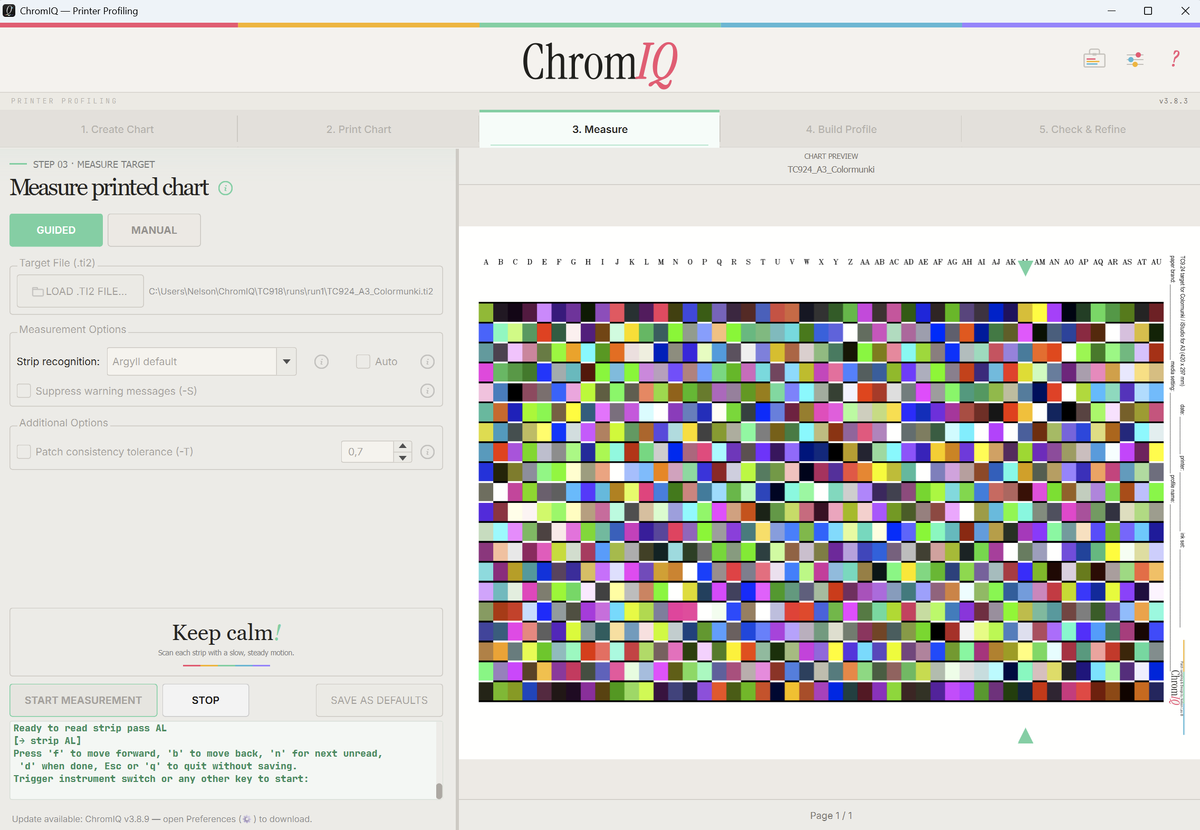
I have compress the whole TC9.24 (slightly modified TC9.18 target with 3 extra blacks + 3 extra whites) on a single sheet of A3. The target can be scanned with both the Colormunki/i1Studio as well as the i1Pro1/2/3 (turn around 90 degrees). Above you can see I have done test printing on normal paper (A3) and see if it can be scanned (no strange arrow deformations). Hopefully it will do a better job than the canned Canon profile you are using now.
 

Attachments

  • TC924_A3_Colormunki.zip
    529.1 KB · Views: 4

itsab1989

Fan of Printing
Joined
Feb 11, 2026
Messages
134
Reaction score
59
Points
60
Printer Model
Epson ET 8550, Canon Pro 300
Wow, that was fast! Thanks a lot!
You think it makes sense in any way to create a seperate target with even more patches for A3+ which is quite a bit larger than regular A3 or would there be no real benefit?
 

pharmacist

Printer VIP
Platinum Printer Member
Joined
May 29, 2007
Messages
3,134
Reaction score
1,816
Points
333
Location
Ghent, Belgium
Printer Model
SC-900 ET-8550 WF-7840 TS705
Actually for modern printers (very linear in behaviour and especially on printers with at least 1 grey ink) it is not necessary to create larger targets: The TC9.18 was already designed to have good neutral grey reproduction on CcMmYK printers (without having a grey ink). I could make a larger A3+ target with those extende greys included if you want, but I would try this target first: probably it will not be necessary.
 
Last edited:

itsab1989

Fan of Printing
Joined
Feb 11, 2026
Messages
134
Reaction score
59
Points
60
Printer Model
Epson ET 8550, Canon Pro 300
I have added it to the app and the update is on its way. Will try it after it is online.
I trust your expertise here. If there is no benefit at all in creating a bigger target then we leave it as it is. Otherwise why not use the additional space of A3+ at least if it does not hurt?
 

pharmacist

Printer VIP
Platinum Printer Member
Joined
May 29, 2007
Messages
3,134
Reaction score
1,816
Points
333
Location
Ghent, Belgium
Printer Model
SC-900 ET-8550 WF-7840 TS705
Something else: would it possible for Claude to have a look at the ArgyllCMS i1Pro driver and compare it with the proprietary i1Pro2 driver (with flashing green lights when a row is down properly, red light when error and double blue light when the wrong patch row is read etc) and write a new ArgyllCMS compatible driver that has the flashing knob fuctionality of the X-Rite driver ?
 
Last edited:

itsab1989

Fan of Printing
Joined
Feb 11, 2026
Messages
134
Reaction score
59
Points
60
Printer Model
Epson ET 8550, Canon Pro 300
IMG_0524.jpeg


Just printed it and will do the measurement once it is dryed. It’s a little embarrassing but this will be the first time I will actually use my own app for a real profile and not just for testing.

Regarding your questing - I will ask Claude about this but I am not sure if this will work. As far as I understand the driver used for Argyll is not directly created by Graeme Gill but is an open one. And you would need and SDK from X-Rite to get things to work. But I may be wrong and will try.
 

itsab1989

Fan of Printing
Joined
Feb 11, 2026
Messages
134
Reaction score
59
Points
60
Printer Model
Epson ET 8550, Canon Pro 300
@pharmacist

Here's an answer you can relay to your user. Short version: it's theoretically possible but it's a large, low-level
project that lives in ArgyllCMS itself — not in ChromIQ — and it carries real reverse-engineering and licensing
hurdles. Claude can help with parts of it, but it can't just "diff the two drivers and emit a new one."

Here's the reasoning, in terms you can forward:

1. ChromIQ never talks to the instrument directly.
ChromIQ is a GUI wrapper. It runs ArgyllCMS's command-line tools (chartread, colprof, etc.) as separate processes and
reads their text output. It has no USB connection to the i1Pro. So the blinking-LED behaviour cannot be added in
ChromIQ's Python code at all — it would have to be added inside ArgyllCMS's C driver, and then ChromIQ would just
benefit from it for free. Any "new driver" is an ArgyllCMS change, not a ChromIQ change.

2. The LED feedback is an i1Pro2 hardware feature, not an i1Pro one.
The original i1Pro (Rev A–D) has no RGB status LED — there's nothing to flash. The green/red/blue indicator is
specific to the i1Pro2 (and i1Pro3). So this request only makes sense on i1Pro2 hardware.

3. The "compare the two drivers" step is the hard, legally sensitive part.
- ArgyllCMS's i1Pro/i1Pro2 driver is open source (Graeme Gill reverse-engineered it; it's GPL/AGPL). So that half is
readable.
- The X-Rite driver is closed and proprietary. There's no source to compare against. Figuring out the exact USB
commands that drive the LED (good strip → green, wrong row → double-blue, error → red) means reverse-engineering
X-Rite's closed driver or capturing live USB traffic. That's slow, error-prone, and on shaky legal ground if the goal
is to copy proprietary behaviour. Claude can't conjure that protocol — without packet captures or existing
documentation, the command set simply isn't available to it.

4. Even with the protocol known, it's a fork-and-recompile job.
You'd be editing ArgyllCMS's C source (the spectro/i1pro* files), wiring LED commands into the strip-read
success/failure path, recompiling Argyll for every platform you ship (macOS/Windows/Linux), and redistributing that
forked Argyll. ArgyllCMS's licence (Graeme Gill's AGPL-based terms) places conditions on redistributing modified
binaries, so that needs checking before shipping.

5. The pragmatic alternative — which ChromIQ already partly does.
You can reproduce the user experience of that feedback at the GUI level without touching the instrument's LED: ChromIQ
already parses chartread's output, does its own stripe detection, and shows on-screen green/red status and "wrong
strip" dialogs. Strengthening that on-screen + audible feedback gives users the same "row read OK / wrong row / error"
signal without a driver rewrite. It just lives on the screen instead of on the device.

Where Claude genuinely helps: reading and explaining Argyll's i1Pro source, writing the C once the LED command bytes
are known, and building the richer on-screen/audible feedback in ChromIQ. Where it can't help by itself: extracting
the proprietary LED protocol from X-Rite's closed driver — that needs real hardware USB captures first, and that
captured-protocol approach is the actual bottleneck, not the coding.

So: not impossible, but it's "fork and extend ArgyllCMS's C driver after reverse-engineering X-Rite's USB LED
commands," not a quick driver swap — and the realistic near-term win is better on-screen feedback in ChromIQ.
 
Last edited:
Top