
[Tool] ChromIQ – a macOS and Windows GUI for ArgyllCMS printer profiling (v3.13.0-beta)

mavtop

Getting Fingers Dirty
Joined
Nov 14, 2021
Messages
83
Reaction score
20
Points
40
Printer Model
Epson XP 15000
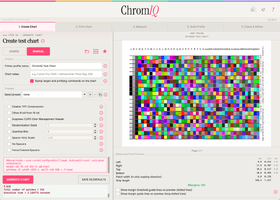
Hi @itsab1989 i would like to use your program, but i would like if possible to remove some of the info printed on the Chart, i attached the screenshoot taken from an earlier screenshoot posted here i would like to print the maximum number of patches in a single A4 portrait or landscape (the one with more patches), but maybe i want to leave some of them.

Is possible to have some toggle buttons to enable/disable each one of them ? o a way to rearrange them ?

Thanks for your work, i'm still trying to understand how to build a good set of patches for my old i1pro.

Would i use the stable or the beta ?

I attach another screenshoot of a target i created, that i mean in the request, i see a lof of white space on the left/right of the A4 Landscape paper, can it be used to add more patches ? is there a way ?

At the right there is argyllcms info, can them be removed ?
 

Attachments

  • Screenshot 2026-07-04 at 14.47.55.png
    Screenshot 2026-07-04 at 14.47.55.png
    429.9 KB · Views: 12
  • Screenshot 2026-07-04 at 15.03.52.png
    Screenshot 2026-07-04 at 15.03.52.png
    353 KB · Views: 8

itsab1989

Fan of Printing
Joined
Feb 11, 2026
Messages
207
Reaction score
89
Points
60
Printer Model
Epson ET 8550, Canon Pro 300
In around 10 minutes beta 96 should be ready. In the beta you used before it did not show the full error report from scanin. If you get the same error in the new beta it should now be easier to figure out what went wrong
 

pharmacist

Printer VIP
Platinum Printer Member
Joined
May 29, 2007
Messages
3,205
Reaction score
1,839
Points
333
Location
Ghent, Belgium
Printer Model
SC-900 ET-8550 WF-7840 TS705
Hi @itsab1989 i would like to use your program, but i would like if possible to remove some of the info printed on the Chart, i attached the screenshoot taken from an earlier screenshoot posted here i would like to print the maximum number of patches in a single A4 portrait or landscape (the one with more patches), but maybe i want to leave some of them.

Is possible to have some toggle buttons to enable/disable each one of them ? o a way to rearrange them ?

Thanks for your work, i'm still trying to understand how to build a good set of patches for my old i1pro.

Would i use the stable or the beta ?

I attach another screenshoot of a target i created, that i mean in the request, i see a lof of white space on the left/right of the A4 Landscape paper, can it be used to add more patches ? is there a way ?

At the right there is argyllcms info, can them be removed ?
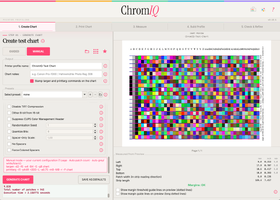
you can remove that label if you want
 

itsab1989

Fan of Printing
Joined
Feb 11, 2026
Messages
207
Reaction score
89
Points
60
Printer Model
Epson ET 8550, Canon Pro 300
Hi @itsab1989 i would like to use your program, but i would like if possible to remove some of the info printed on the Chart, i attached the screenshoot taken from an earlier screenshoot posted here i would like to print the maximum number of patches in a single A4 portrait or landscape (the one with more patches), but maybe i want to leave some of them.

Is possible to have some toggle buttons to enable/disable each one of them ? o a way to rearrange them ?

Thanks for your work, i'm still trying to understand how to build a good set of patches for my old i1pro.

Would i use the stable or the beta ?

I attach another screenshoot of a target i created, that i mean in the request, i see a lof of white space on the left/right of the A4 Landscape paper, can it be used to add more patches ? is there a way ?

At the right there is argyllcms info, can them be removed ?
In the 3.13.0 beta we replaced printtarg with our own ChromIQ layout engine (based on printtarg though). This new engine offers more customizability for what you want to place on the chart. What exactly do you want to have on it / not on it?
 

pharmacist

Printer VIP
Platinum Printer Member
Joined
May 29, 2007
Messages
3,205
Reaction score
1,839
Points
333
Location
Ghent, Belgium
Printer Model
SC-900 ET-8550 WF-7840 TS705
OK same problem but I got this now:


Reading page 1 from the scan…

Input file 'D:\Downloads\img20260704_11231530.tif': w=2484, h=3515, d = 3, bpp = 8
Data input file 'C:\Users\Nelson\ChromIQ\ChromIQ_744_patch_test_target\runs\run1\ChromIQ_744_patch_test_target.cie'

Data output file 'ChromIQ_744_patch_test_target-p1s1-scanner.ti3'

Chart reference file 'C:\Users\Nelson\ChromIQ\ChromIQ_744_patch_test_target\runs\run1\ChromIQ_744_patch_test_target-sample.cht'

About to allocate scanrd_ object

Verbosity = 2, flags = 0x60000

About to read input tiff file and discover groups

adivval = 1.000000

About to calculate edge lines

2011 useful edges out of 4199

About to calculate perspective correction

Perspective correction factors = -0.000001 0.000000 1242.000000 1757.500000

About to calculate rotation

Mean angle = 0.073882

Standard deviation = 0.947177

Robust mean angle = 0.087490 from 1891 lines

About to calculate feature information

About to read reference feature information

Read of chart reference file succeeded

Using manual matching

About to setup value scanrdg boxes

About to read raster values

About to write diag file

Writing output values to file 'ChromIQ_744_patch_test_target-p1s1-scanner.ti3'

Note: some patches had an undefined noise figure; it was set to zero (no effect on the measured colour).

Building the scanner profile…

[ERROR] Building the profile failed. colprof said:

(colprof produced no output)
 

pharmacist

Printer VIP
Platinum Printer Member
Joined
May 29, 2007
Messages
3,205
Reaction score
1,839
Points
333
Location
Ghent, Belgium
Printer Model
SC-900 ET-8550 WF-7840 TS705
Colprof produced no output....maybe there is no target icc defined (e.g. AdobeRGB1988.icc ?)

I have chosen a smaller area to read (35%) from so the chances of touching the space bars is virtually non existing:

1783171907643.png
 
Last edited:

pharmacist

Printer VIP
Platinum Printer Member
Joined
May 29, 2007
Messages
3,205
Reaction score
1,839
Points
333
Location
Ghent, Belgium
Printer Model
SC-900 ET-8550 WF-7840 TS705
OK I have done the test....now where is the profile installed, I have to check:

1783173541840.png
 

mavtop

Getting Fingers Dirty
Joined
Nov 14, 2021
Messages
83
Reaction score
20
Points
40
Printer Model
Epson XP 15000
Ok i downloaded the beta96 and now it seems better, but i don't understand if i can squeeze the patches more i got 756 patches

I used chromiq to choose patches, i don;t know why if i reduce Top margin under 11 it gives a warning while i'm still in the instrument range
 

Attachments

  • Screenshot 2026-07-04 at 15.03.52.png
    Screenshot 2026-07-04 at 15.03.52.png
    353 KB · Views: 10
Top