
[Tool] ChromIQ – a macOS and Windows GUI for ArgyllCMS printer profiling (v3.0.0 beta 10)

pharmacist

Printer VIP
Platinum Printer Member
Joined
May 29, 2007
Messages
3,098
Reaction score
1,801
Points
333
Location
Ghent, Belgium
Printer Model
SC-900 ET-8550 WF-7840 TS705
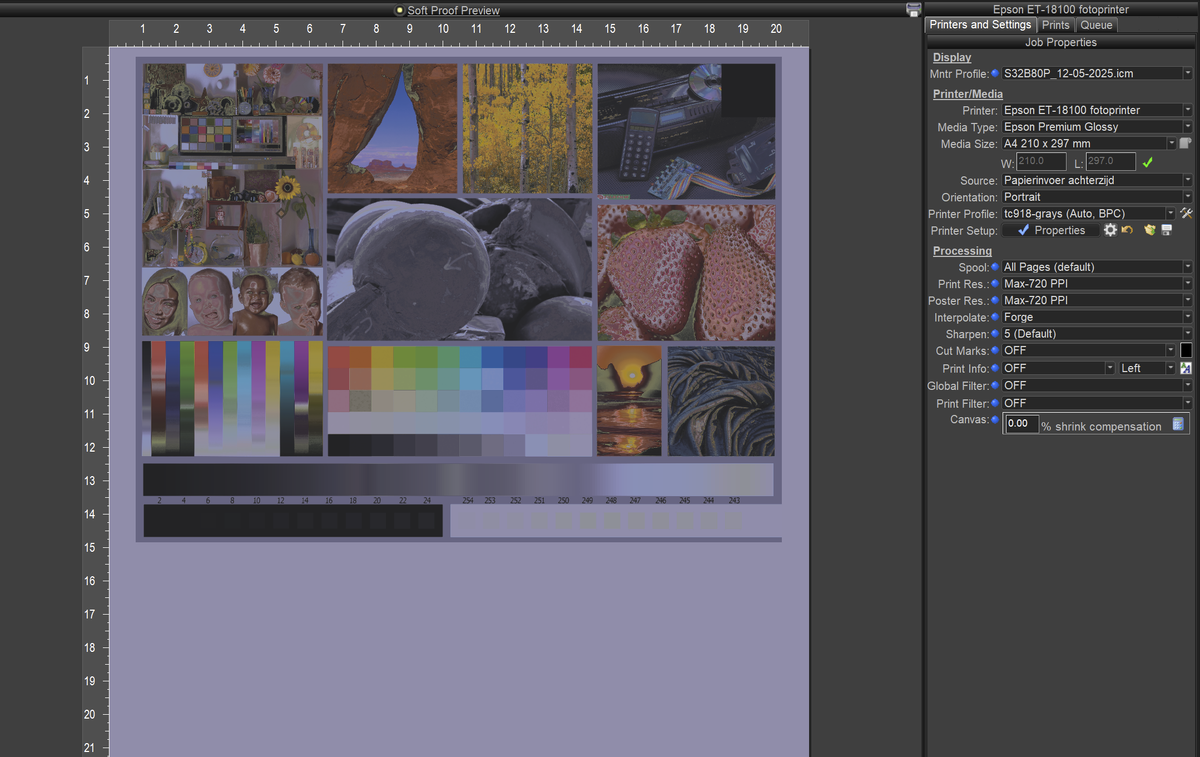
I just repeated the TC9.18 + Extended Grays workflow again to be sure, but there is something serious wrong (probably in the ti1 file itself):

softproof looks horrible and not normal:
1779707047279.png
 

itsab1989

Getting Fingers Dirty
Joined
Feb 11, 2026
Messages
85
Reaction score
36
Points
40
Printer Model
Epson ET 8550, Canon Pro 300
@pharmacist
Fixes for highlighter and TC9.18 coming. Give it a few minutes until they are online.

The highlighter issue was not related to the black and white spacers but to the text that Argyll itself prints next to the patches. In your first chart this was very long and misinterpreted as a strip. But I hope it works more reliable now.
Whenever you find something that does not work it is the best to give me the exact files that gave you the issue so I can reproduce it. This time manually created the exact same chart with the exact same name and I had the same problem. Handed it to Claude and it was solved in a matter of a few minutes. Without this it just guessing.

I don't know if this is because of the ti1. I have now added the new one you gave me to the assets folder. With this presets ChromIQ skips targen completely, uses you ti1 and the printtarg commands you gave me.

https://github.com/itsab1989/ChromIQ/releases/tag/v3.7.39

https://github.com/itsab1989/ChromIQ/releases/tag/v3.8.0-beta.3

By the way the following is making me shake my head:

Fixed​

  • The strip highlighter now follows multi-page charts correctly. On a chart
    that spans more than one page, the green "read this strip" marker could get
    stuck on the last strip of page 1 when it should have moved to the first strip
    of page 2. ChromIQ now reads the exact strips-per-page from the chart's own
    data (the .ti2 file) instead of guessing from the image — printtarg prints a
    rotated title down the right margin that the old guess mistook for an extra
    strip — so the marker lands on the right strip and the right page every time.

Seemingly all this time it tried to extract what it needs for the strip detection completely from the image files themselves although it now figured out that the data is in the ti2 files… Very smart AI…
 
Last edited:

pharmacist

Printer VIP
Platinum Printer Member
Joined
May 29, 2007
Messages
3,098
Reaction score
1,801
Points
333
Location
Ghent, Belgium
Printer Model
SC-900 ET-8550 WF-7840 TS705
I am now trying to make a better standard layout for the TC9.18 target on 2 sheets of A4/Letter with an entry form that can be added to the package for a better scanning experience for the i1Pro scanning board (the paper can be completely inserted into the paper clamp and be aligned on the right border of the scanning board: set and forget and the scanner will automaticall start from paper white and end on paper white and no need to move the paper around on the board for best positioning. The ti1 is slightly modified to add extra black and white points (in total 4 Black and 4 whites as the standard TC9.18 had only 1 white and 1 black patch and ArgyllCMS prefers a bit more for the robustness of the Profile). Maybe I should call it the TC9.24 target as it has 924 patches in total.
 

itsab1989

Getting Fingers Dirty
Joined
Feb 11, 2026
Messages
85
Reaction score
36
Points
40
Printer Model
Epson ET 8550, Canon Pro 300
Very good effort!
Just for information: my weekly token limit on my two Claude accounts is completely used up at the moment. So I am currently not able to make anymore changes. The limits will reset later this day in the night. So don’t expect changes before tomorrow. Sorry for that. But at least I squeezed everything out of this for the money I am paying :)

I also want to add something to the way users can save their own presets in create chart. I want to give the option to add a ti1 file as part of the user presets. This would then be saved together with the preset in the preset folder and for such a preset ChromIQ would behave the same way as it does for our built in ones.
 

Alan G

Fan of Printing
Joined
Jul 15, 2017
Messages
32
Reaction score
30
Points
55
Location
Bethesda, Maryland
Printer Model
Canon Pro-1000
I just finished profiling Canson Platine Fibre Rag using a one-page precondition profile with '-g32' followed by a two-page final patch set with '-n64' I used the compressed setting to have 506 patches per page for the i1Pro rather than the suggested 462 using the '0.95' setting to increase density. I did not have any issues reading patches other than an occasional warning that 'not enough patches read', likely because I was trying to go to fast. The profile came out well with low errors, highest problem patch was 1.4 with the average error at 0.24. this is typical of what I see during the profile creation. I did take a quick look at the softproof of this profile in Lightroom and it's pretty much the same as my much higher patch set profile (924 - precondition & 1848 final profile). I will print some images that I know have interesting colors and gamuts to see how this profile performs. If it does OK, I can change my workflow to only use three sheets of letter paper rather than six.

The feedback in the quality check tab is not particularly useful for me as it only lists the strips with the highest delta E. I routinely put things in Excel so that I can sort things and see where the highest patches lie. The app does save a quality report that can accomplish this. However, that patch may be on a strip that has a low delta E and would not be flagged. If I go back and use the refine/resume to measure the chart it directs me to the strips with the highest delta E rather than a specific row with a high delta E patch. I did not need to use this feature and instead just unchecked that box and used the normal refine/resume to navigate to the specific row to reread.

I don't think you need to modify the app here, just add some language to the help to explain to suers how to re-read a row with a problematic patch.
 

itsab1989

Getting Fingers Dirty
Joined
Feb 11, 2026
Messages
85
Reaction score
36
Points
40
Printer Model
Epson ET 8550, Canon Pro 300
I just finished profiling Canson Platine Fibre Rag using a one-page precondition profile with '-g32' followed by a two-page final patch set with '-n64' I used the compressed setting to have 506 patches per page for the i1Pro rather than the suggested 462 using the '0.95' setting to increase density. I did not have any issues reading patches other than an occasional warning that 'not enough patches read', likely because I was trying to go to fast. The profile came out well with low errors, highest problem patch was 1.4 with the average error at 0.24. this is typical of what I see during the profile creation. I did take a quick look at the softproof of this profile in Lightroom and it's pretty much the same as my much higher patch set profile (924 - precondition & 1848 final profile). I will print some images that I know have interesting colors and gamuts to see how this profile performs. If it does OK, I can change my workflow to only use three sheets of letter paper rather than six.

The feedback in the quality check tab is not particularly useful for me as it only lists the strips with the highest delta E. I routinely put things in Excel so that I can sort things and see where the highest patches lie. The app does save a quality report that can accomplish this. However, that patch may be on a strip that has a low delta E and would not be flagged. If I go back and use the refine/resume to measure the chart it directs me to the strips with the highest delta E rather than a specific row with a high delta E patch. I did not need to use this feature and instead just unchecked that box and used the normal refine/resume to navigate to the specific row to reread.

I don't think you need to modify the app here, just add some language to the help to explain to suers how to re-read a row with a problematic patch.
I agree that I should also add information about the highest delta E patches in this information as well. I put it on my to-do list.

However the strips that are flagged for remeasurement SHOULD be based on the deltaE values of individual patches. Something to check again I guess.
 

Alan G

Fan of Printing
Joined
Jul 15, 2017
Messages
32
Reaction score
30
Points
55
Location
Bethesda, Maryland
Printer Model
Canon Pro-1000
I agree that I should also add information about the highest delta E patches in this information as well. I put it on my to-do list.

However the strips that are flagged for remeasurement SHOULD be based on the deltaE values of individual patches. Something to check again I guess.
I would leave that feature alone. I think it is useful particularly if there is a bad read on a row. My workflow always includes two reads of each patch set and I use the ArgyllCMS 'average' command to get the final patch reading for profile creation. I there is one feature I would like to see it would be the opportunity to do a second reading of a patch set to average. This might address the issue of a row with a higher error. Reading a patch set twice is not that big a deal for me.
 

pharmacist

Printer VIP
Platinum Printer Member
Joined
May 29, 2007
Messages
3,098
Reaction score
1,801
Points
333
Location
Ghent, Belgium
Printer Model
SC-900 ET-8550 WF-7840 TS705
@itsab1989 :

What do you think about these 2 targets I have redesigned for A4: I had to add extra black spacers between two adjacent colours that are so close and sometimes throwing an read error (not enough patches read, as two patches are seen as one patch because of the minimal difference). When ChromIQ will generate these targets based on the ti1 file (preserve Patch Order) those extra contrast spacers I have added to this custom made targets will not be included and you will run into troubles when scanning these targets. So I suggest these targets to be included in the presets and those custom tif-files to be invoked and printed instead of the ArgyllCMS generated target (tif) files: this will resolve the reading problems I have encountered several times.

1779716017028.png


The normal ChromIQ generated tif-files look like this:

1779716091175.png


Especially the second page will cause problems in the very light patches adjacent to another: those will be often be read als one patch and causing chartread to throw an error (not enough patches read).

You will also notice the extra 3 blacks and 3 whites on row AR: I have added these patches to obtain in total -e4 -B4 for the robustness of the final profile (targen.exe standard setting), as the standard TC9.18 target has only 1 white and 1 black patch and it fills up the target perfectly up to 2 sheets of 462 (22 rows of 21 patches) = 924 patches in total.

This is the layout of the original TC9.18 target on a single sheet of A4:

1779716624609.png


These patches are the same as the above adopted TC9.24 patch set.
 

itsab1989

Getting Fingers Dirty
Joined
Feb 11, 2026
Messages
85
Reaction score
36
Points
40
Printer Model
Epson ET 8550, Canon Pro 300
I would leave that feature alone. I think it is useful particularly if there is a bad read on a row. My workflow always includes two reads of each patch set and I use the ArgyllCMS 'average' command to get the final patch reading for profile creation. I there is one feature I would like to see it would be the opportunity to do a second reading of a patch set to average. This might address the issue of a row with a higher error. Reading a patch set twice is not that big a deal for me.
I did not even know that something like this exists. Thanks for pointing this out. For now I would add this to my list and maybe come back to you later for further information because I would like to fix some other issues first. The information about the patches with high deltaE values SHOULD be a simple addition I think.

But for what you suggested I would have to see for myself how it works and how I would fit it in without breaking anything.
 

itsab1989

Getting Fingers Dirty
Joined
Feb 11, 2026
Messages
85
Reaction score
36
Points
40
Printer Model
Epson ET 8550, Canon Pro 300
@itsab1989 :

What do you think about these 2 targets I have redesigned for A4: I had to add extra black spacers between two adjacent colours that are so close and sometimes throwing an read error (not enough patches read, as two patches are seen as one patch because of the minimal difference). When ChromIQ will generate these targets based on the ti1 file (preserve Patch Order) those extra contrast spacers I have added to this custom made targets will not be included and you will run into troubles when scanning these targets. So I suggest these targets to be included in the presets and those custom tif-files to be invoked and printed instead of the ArgyllCMS generated target (tif) files: this will resolve the reading problems I have encountered several times.

View attachment 18723

The normal ChromIQ generated tif-files look like this:

View attachment 18724

Especially the second page will cause problems in the very light patches adjacent to another: those will be often be read als one patch and causing chartread to throw an error (not enough patches read).

You will also notice the extra 3 blacks and 3 whites on row AR: I have added these patches to obtain in total -e4 -B4 for the robustness of the final profile (targen.exe standard setting), as the standard TC9.18 target has only 1 white and 1 black patch and it fills up the target perfectly up to 2 sheets of 462 (22 rows of 21 patches) = 924 patches in total.

This is the layout of the original TC9.18 target on a single sheet of A4:

View attachment 18726

These patches are the same as the above adopted TC9.24 patch set.
Again, I put this on my list because I cannot do this today because of the usage limit.
I THINK, that if you provide the ti2 file and the tiff files files for this I could add this as a preset that completely skips targen and printtarg and only loads your exact tiff files and hands over the ti2 to the next tabs. But don’t take my word for it because I have to try this first before we can be sure.

Presets like this will be very handy but also increase the size of the app a lot.
 
Last edited:
Top