
[Tool] ChromIQ – a macOS and Windows GUI for ArgyllCMS printer profiling (v3.0.0 beta 10)

pharmacist

Printer VIP
Platinum Printer Member
Joined
May 29, 2007
Messages
3,096
Reaction score
1,799
Points
333
Location
Ghent, Belgium
Printer Model
SC-900 ET-8550 WF-7840 TS705
I just repeated the TC9.18 + Extended Grays workflow again to be sure, but there is something serious wrong (probably in the ti1 file itself):

softproof looks horrible and not normal:
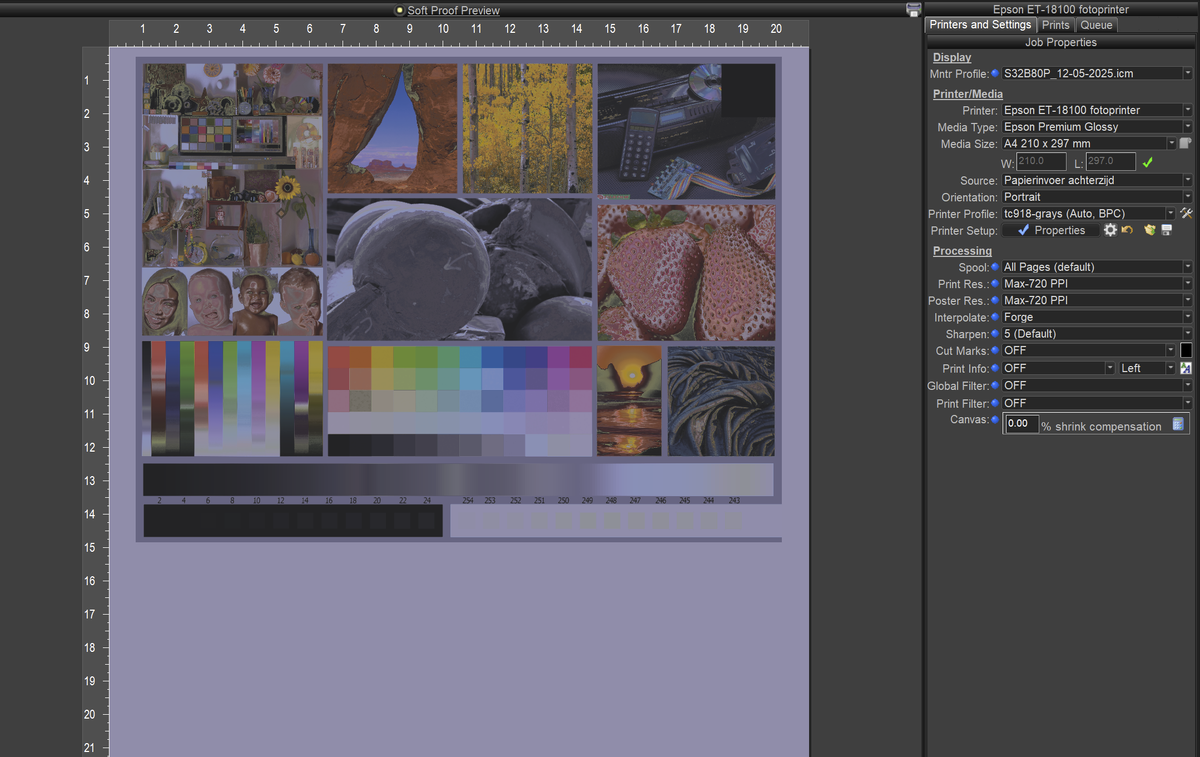
1779707047279.png
 

itsab1989

Getting Fingers Dirty
Joined
Feb 11, 2026
Messages
80
Reaction score
35
Points
40
Printer Model
Epson ET 8550, Canon Pro 300
@pharmacist
Fixes for highlighter and TC9.18 coming. Give it a few minutes until they are online.

I don't know if this is because of the ti1. I have now added the new one you gave me to the assets folder. With this presets ChromIQ skips targen completely, uses you ti1 and the printtarg commands you gave me.

https://github.com/itsab1989/ChromIQ/releases/tag/v3.7.39

https://github.com/itsab1989/ChromIQ/releases/tag/v3.8.0-beta.3

By the way the following is making me shake my head:

Fixed​

  • The strip highlighter now follows multi-page charts correctly. On a chart
    that spans more than one page, the green "read this strip" marker could get
    stuck on the last strip of page 1 when it should have moved to the first strip
    of page 2. ChromIQ now reads the exact strips-per-page from the chart's own
    data (the .ti2 file) instead of guessing from the image — printtarg prints a
    rotated title down the right margin that the old guess mistook for an extra
    strip — so the marker lands on the right strip and the right page every time.

Seemingly all this time it tried to extract what it needs for the strip detection completely from the image files themselves although it now figured out that the data is in the ti2 files… Very smart AI…
 
Last edited:
Top