PRO-1000 - access print head when printer is blocked by B204

phildemanstr

Print Lurker
Joined
May 27, 2025
Messages
3
Reaction score
3
Points
1
Printer Model
Canon imagegraf Pro-1000
Hi Bentley,

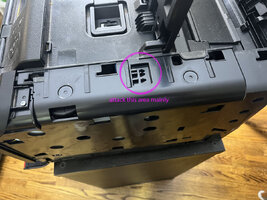
This is great information. However, after removing the 2 screws from the back of the right panal, I am unable to slide the panel out. It's as if there are other screws that are needed to be removed.

Is there something else I should attempt to do to make the panel slide out, without breaking the clips inside the right panel?

Thanks.
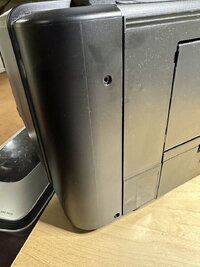
 

Attachments

  • BackPanel.jpeg
    BackPanel.jpeg
    122.4 KB · Views: 190
  • TopSide.jpeg
    TopSide.jpeg
    179 KB · Views: 193

phildemanstr

Print Lurker
Joined
May 27, 2025
Messages
3
Reaction score
3
Points
1
Printer Model
Canon imagegraf Pro-1000
Hi Bentley,

This is great information. However, after removing the 2 screws from the back of the right panal, I am unable to slide the panel out. It's as if there are other screws that are needed to be removed.

Is there something else I should attempt to do to make the panel slide out, without breaking the clips inside the right panel?

Thanks.
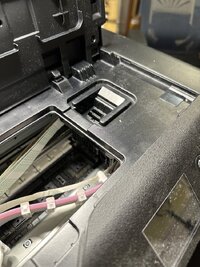
Never mind, I got it opened. I successfully unlocked the print head.

Thanks for the instructions.
 

krakenknowledge

Newbie to Printing
Joined
Feb 23, 2026
Messages
3
Reaction score
1
Points
8
Printer Model
canon pro 200/ canon pro 1000/
So i've got b204 error tonite. going through thread right now.
probably talk to canon first and figure out the next step.


just want to say thank you everyone who has been contributed so far with all the information.
really helped me think over the future steps clear.
 

Bentley

Newbie to Printing
Joined
Sep 26, 2024
Messages
5
Reaction score
7
Points
8
Location
Lille Nord France
Printer Model
Canon Pro 1000
So i've got b204 error tonite. going through thread right now.
probably talk to canon first and figure out the next step.


just want to say thank you everyone who has been contributed so far with all the information.
really helped me think over the future steps clear.
Hello,
you can easily unlock the head yourself, it will take you 10 minutes.
the removal of the right side panel will take the most of your time, it's not very easy to lift up the panel to slide the panel out. (see the pictures in my topic )
I hope you can successfully unlock the head.
Have a nice day
Yves
 
Last edited:

krakenknowledge

Newbie to Printing
Joined
Feb 23, 2026
Messages
3
Reaction score
1
Points
8
Printer Model
canon pro 200/ canon pro 1000/
Hello,
you can easily unlock the head yourself, it will take you 10 minutes.
the removal of the right side panel will take the most of your time, it's not very easy to lift up the panel to slide the panel out. (see the pictures in my topic )
I hope you can successfully unlock the head.
Have a nice day
Yves

Thank you very much for sharing the information.
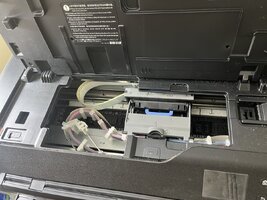
with your screenshots and knowledge I was able to get the printhead out within 5 min.
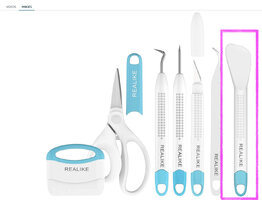
i used flat head plastic spatula for vinyl weeding tool.

now i'm gonna order canon printhead over aliexpress or ebay
see if i could make pro 1000 work again or not.
thanks again Yves and also other community members.
 

Attachments

  • 2026-04-13 09.23.55.jpg
    2026-04-13 09.23.55.jpg
    231.3 KB · Views: 74
  • 2026-04-13 09.24.55.jpg
    2026-04-13 09.24.55.jpg
    239.9 KB · Views: 72
  • Screenshot 2026-04-13 at 9.39.32 AM.JPG
    Screenshot 2026-04-13 at 9.39.32 AM.JPG
    101.3 KB · Views: 67
Last edited:

The Hat

Printer VIP
Platinum Printer Member
Joined
Jan 18, 2010
Messages
16,219
Reaction score
9,151
Points
453
Location
Residing in Wicklow Ireland
Printer Model
Now have 3 Ender-3 V3 Plus SE/
now i'm gonna order canon printhead over aliexpress or ebay
Be advised, don’t buy your print head from EBay or AliExpress, the only place to get one is from an Authorised Canon dealer, all other print heads from any other source are most likely to be second hand and damaged..

Don’t waste your time or money, go the official route and save your hair…
 

krakenknowledge

Newbie to Printing
Joined
Feb 23, 2026
Messages
3
Reaction score
1
Points
8
Printer Model
canon pro 200/ canon pro 1000/
Be advised, don’t buy your print head from EBay or AliExpress, the only place to get one is from an Authorised Canon dealer, all other print heads from any other source are most likely to be second hand and damaged..

Don’t waste your time or money, go the official route and save your hair…

thank you very much for the insight.
I'm in the process of getting a brand new Pro 1100 or a second-hand Pro 1000.

as for this current unit will be turning into more of an everyday printer
using cheap inks and papers. if I can salvage it...:)

I came across Jose Rodriguez's recent video on his Canon printer,
I believe it was about his canon model 9000? Basically, what he said in the clip was that sometimes a printhead issue can lead to a logic board replacement.

Right now I'm going to give it a try with a refurbished printhead first.
if it doesn't work, I will walk away.
 

printgiraffe

New Printer Member
Joined
Jun 6, 2026
Messages
1
Reaction score
1
Points
0
Printer Model
canon pro-1000
Hello,
I have a Pro 1000 with te same Error B204 and the printhead is blocked.
I found to solution to unlock printhead.
at the right side there is a gear to unlock the printhead.
I have removed al the covers, but it isn't necessary,
you need only to remove the right side cover and you can acces to the gear
turn the gear counterclockwise by a screwdriver and it will unlock the printerhead,
you can move it
View attachment 16453

THANK YOU, BENTLY!

I got the dreaded B204 error today, and I actually had an extra new printhead lying around (longer story). But I couldn't figure out how to replace it. I searched high and low online and couldn't find an answer until I found your post and photos.

In about 10 minutes, I was able to replace it and get it up and working again! There's no way I would have been able to figure it out otherwise, and you saved me a LOT of time and effort (or just a lot of money to toss it and buy a new one).

I created an account here just to post and share my appreciation for your work on this.
 
Top