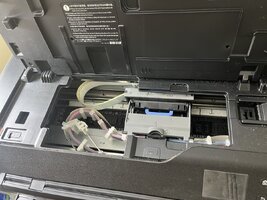
PRO-1000 - access print head when printer is blocked by B204

phildemanstr

Print Lurker
Joined
May 27, 2025
Messages
3
Reaction score
3
Points
1
Printer Model
Canon imagegraf Pro-1000
Hi Bentley,

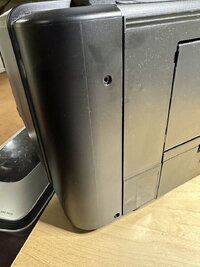
This is great information. However, after removing the 2 screws from the back of the right panal, I am unable to slide the panel out. It's as if there are other screws that are needed to be removed.

Is there something else I should attempt to do to make the panel slide out, without breaking the clips inside the right panel?

Thanks.
 

Attachments

  • BackPanel.jpeg
    BackPanel.jpeg
    122.4 KB · Views: 140
  • TopSide.jpeg
    TopSide.jpeg
    179 KB · Views: 144

phildemanstr

Print Lurker
Joined
May 27, 2025
Messages
3
Reaction score
3
Points
1
Printer Model
Canon imagegraf Pro-1000
Hi Bentley,

This is great information. However, after removing the 2 screws from the back of the right panal, I am unable to slide the panel out. It's as if there are other screws that are needed to be removed.

Is there something else I should attempt to do to make the panel slide out, without breaking the clips inside the right panel?

Thanks.
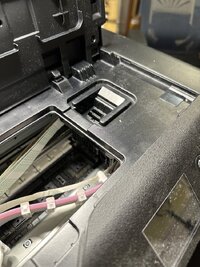
Never mind, I got it opened. I successfully unlocked the print head.

Thanks for the instructions.
 

krakenknowledge

Newbie to Printing
Joined
Feb 23, 2026
Messages
2
Reaction score
1
Points
8
Printer Model
canon pro 200/ canon pro 1000/
So i've got b204 error tonite. going through thread right now.
probably talk to canon first and figure out the next step.


just want to say thank you everyone who has been contributed so far with all the information.
really helped me think over the future steps clear.
 

Bentley

Newbie to Printing
Joined
Sep 26, 2024
Messages
5
Reaction score
7
Points
8
Location
Lille Nord France
Printer Model
Canon Pro 1000
So i've got b204 error tonite. going through thread right now.
probably talk to canon first and figure out the next step.


just want to say thank you everyone who has been contributed so far with all the information.
really helped me think over the future steps clear.
Hello,
you can easily unlock the head yourself, it will take you 10 minutes.
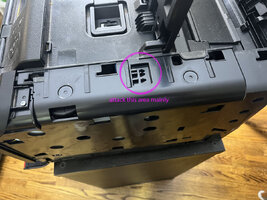
the removal of the right side panel will take the most of your time, it's not very easy to lift up the panel to slide the panel out. (see the pictures in my topic )
I hope you can successfully unlock the head.
Have a nice day
Yves
 
Last edited:

krakenknowledge

Newbie to Printing
Joined
Feb 23, 2026
Messages
2
Reaction score
1
Points
8
Printer Model
canon pro 200/ canon pro 1000/
Hello,
you can easily unlock the head yourself, it will take you 10 minutes.
the removal of the right side panel will take the most of your time, it's not very easy to lift up the panel to slide the panel out. (see the pictures in my topic )
I hope you can successfully unlock the head.
Have a nice day
Yves

Thank you very much for sharing the information.
with your screenshots and knowledge I was able to get the printhead out within 5 min.
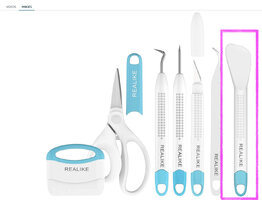
i used flat head plastic spatula for vinyl weeding tool.

now i'm gonna order canon printhead over aliexpress or ebay
see if make pro 1000 work again or not.
thanks again Yves and also other community members.
 

Attachments

  • 2026-04-13 09.23.55.jpg
    2026-04-13 09.23.55.jpg
    231.3 KB · Views: 4
  • 2026-04-13 09.24.55.jpg
    2026-04-13 09.24.55.jpg
    239.9 KB · Views: 4
  • Screenshot 2026-04-13 at 9.39.32 AM.JPG
    Screenshot 2026-04-13 at 9.39.32 AM.JPG
    101.3 KB · Views: 4
Top