Well, this has been an adventure.
When I put the cleaned and blow-dried printhead back in, it had no pgb at all. Colors were barely there.
After 2 purge cycles, I had streaky color, but no black.
At 5 purges I put about 8-10 drops of Windex on the outlet of the PGB cart, which I think may have helped. On the 6th purge, I started to see hints of PGB.

By purge #10, I had all but 4 pgb black segments back.
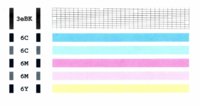
I'm now up to purge #14, with no further improvement. In fact, now I have FIVE missing black segments.

What worries even more is the tiny gap in the light magenta. That wasn't there before I did the manual head cleaning.
Here it is in the service test print.

So far, repeated purges aren't shifting either the pgb or the magenta clogs -- if that's what they are.
I'm at a loss, and now hesitant to use the printer at all, concerned about causing further printhead damage by printing with clogged nozzles.
Any suggestions? Yet another out-of-printer manual cleaning, this time letting it soak a full 24 hours?
If I'm careful to keep the liquid it's sitting in no deeper than 1-2mm, do I dare put the printhead back in the printer without too much drying time? I think that long dry-out may have contributed to the need for so many purges before I started getting output.
Am I likely to lose more than I gain with another manual cleaning?
PS (edit): The magenta seems to have come back.
However, black got worse again. Running a purge got me back to 5 missing segments.
Pharmacist writes here
https://www.printerknowledge.com/threads/cleaning-solution-the-ultimate-test.5296/ of using his solution in cleaning carts, but he's talking about Epson printers. Do you think it would it be safe to use that solution in a BCI3e-BK cart? Or maybe straight Windex? Purging only? Printing or purging?




