How to create accurate colors on foil cards?

Vindara

Newbie to Printing
Joined
Oct 12, 2026
Messages
5
Reaction score
2
Points
3
Printer Model
EP ET2800
I'm super new into the printing world and kinda dived deep in and found myself here.
Long story short, I'm trying to sublimate ontop of acetone wiped foil digimon cards to make proxies and play. I'm able to achieve pretty good results in terms of detail, but when it comes to color I'm always a bit off.

I bought a CR-30 off aliexpress and have been using the ChromIQ software, but I'm unaware on how to calibrate the material on a shiny alumunish reflective surface. Any help would be greatly appreciated.

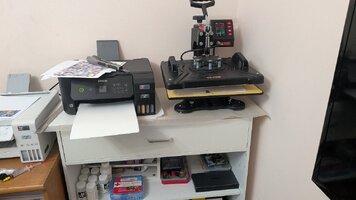
From the setup, I have a Epson ET2800 Converted Sublimation with ASUB INK, Printed onto ASUB Paper and using a Vevor Press
 
Hello,

Nice to see you have purchased the CR-30 too. I am not sure it does well on reflective surfaces. Anyhow what you have to do is to print a target that is printed on your ASUB printer and you wil have to sublimate on the final digimon cards. This is the final colour you want to read. I am not sure those cards are large enough (let's say A4) in order to put enough patches (at least 192-225 for a usable target) on it. If not you will have to divide the patches over several cards and read each card to obtain about 192-225 patches. If you want a better quality target: choose 300 as a minimum, but I think 192-225 should be ok for your digimon cards.
 
Thanks for the fast reply!

What I actually did is wiped 9 of them off and then taped them onto something structurally sound (like photo paper). Then sublimated onto all at once. The theory works but there are other kinks I need to work out.

That being said, we when taking measurements with the CR-30, I'm pretty sure the reflections play with the sensor to much and it's more or less only receiving black during calibration. I stopped at only a few measurements but they all looked the same and all were more or less the same brown black color
 
Hi! Can you maybe add some photos / screenshot to showcase what exactly you are trying to do and what steps you took so far?
Maybe that way it is easier for us to see where things might have gone wrong and to give a few tips.
 
1. Lay the Reflective Foil Cards onto a piece of paper and tape it down (image 1)
2. Set the Vevor Heat Press to 350 at 30 seconds (image 2)
3. Print the Targen Sheet (Chrom IQ Step 2)
4. Attach Targen Sheet to Paper using some masking tape
5. Sublimate (image 3)
6. Measure using CR-30
7. See the measurements look weird on the ChromIQ (image 4/ ChromIQ Step 3)
 

Attachments

  • PXL_20261013_113031948.MP.jpg
    PXL_20261013_113031948.MP.jpg
    74.4 KB · Views: 12
  • PXL_20261013_113325380.MP.jpg
    PXL_20261013_113325380.MP.jpg
    123.9 KB · Views: 14
  • PXL_20261013_113703270.MP.jpg
    PXL_20261013_113703270.MP.jpg
    118.1 KB · Views: 14
  • Screenshot 2026-10-13 074424.png
    Screenshot 2026-10-13 074424.png
    293.3 KB · Views: 15
@pharmacist
Hi Nelson, do you have some experience with this? Is this about what is to be expected from this kind of material and process or is some special treatment required?
I mean the measured patches do look pretty dark but still show their color to a degree. Could this work?
One thing that might be difficult for measurement either way are the tiny gaps between the cards I guess.
 
The problem is the underlying reflection of the metallic material (mirror), this throws a scattering pulse into the spectro, making it practically impossible to profile.

The only thing I can suggest (not ideal) is to sublimate on a white cardboard (something white and opaque). It is cheating because I presume there is no white ink. So white is actually is nothing printed: this means a shiny reflection giving a false reading in the spectro, destroying the white point on which the profile should calculated on/based on together with the black point (less of a problem). If the material is just white and opaque it would be fine, but this is almost impossible to achieve.

The other problem is that with light colours you can see the shiny metallic structure is shining through the colour patch while saturated colours are completely covering the metallic shine: there is no consistency.
 
Last edited:
Yeah that's what I did first. I calibrated the printer using photo paper. The results are pretty good to be honest, but the yellow look really green. I was hoping there may be some pre coat or something I could use to remove the reflections so I can just maintain the color, or use a different not as reflective material to get something similar

It is harder though because there is no white, so it needs to print it out. For images I maybe able to bypass that by using "absolute" intent rather than "relative"

Could I set the white point of the CR-30 to be the foil instead? Tbh I'm unsure on how you'd even create the ICC profile for this type of item, but apparently you can create on for aluminum and other metals
 
The greenish look is the combination of the metallic material + yellow, which gives a shattering effect which is seen as a greenish reflection. This is inherent to the material you are printing on and cannot be corrected, unless there is a white layer on the metal material on which the yellow is printed on. The secret is: you need a white ink layer on this material.
 
I figured, is there such a thing as a white ink?
 
Back
Top