
Epson SureColor P600 - Persistent 0x53 startup error

Rick76

Print Lurker
Joined
Jul 16, 2026
Messages
1
Reaction score
0
Points
1
Printer Model
Epson SureColor P600
Hi everyone,

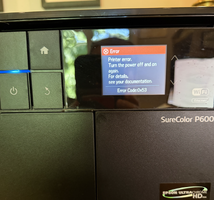
I'm hoping someone familiar with the Epson SureColor P600 can help point me in the right direction. My beloved P600 has suddenly developed a persistent startup error after 7 years of flawless performance.

Symptoms:
  • Error code is 0x53 about 99% of the time (occasionally 0x01).
  • Printer powers up normally.
  • Print carriage initializes and travels across the printer.
  • During initialization the carriage moves in several small, slightly jerky increments before moving normally at full speed.
  • The carriage is not physically stuck.
  • After the carriage initialization, I hear the paper feed motor initialize.
  • Immediately afterwards the printer stops with error 0x53.
Things I've already checked:
  • Carriage slides smoothly by hand with the printer powered off.
  • No paper scraps or foreign objects.
  • Carriage guide rod is clean.
  • Timing belt looks normal.
  • Encoder strip has been cleaned.
  • Maintenance station appears clean and doesn't appear jammed.
  • Cycling power and leaving the printer unplugged has no effect.
The printer has never been dropped or transported roughly.

At this point I'm trying to determine whether this is more likely to be:

  • maintenance station drive
  • maintenance station position sensor
  • carriage encoder sensor
  • home sensor
  • main board
  • something else
Has anyone seen a P600 consistently produce 0x53 with these symptoms?

I'd really appreciate any advice before I start replacing expensive assemblies.

Thank you!
 

Attachments

  • Screenshot 2026-07-16 at 3.33.44 PM.png
    Screenshot 2026-07-16 at 3.33.44 PM.png
    1.6 MB · Views: 25

rjanowsky

Getting Fingers Dirty
Joined
Jul 1, 2026
Messages
35
Reaction score
14
Points
25
Location
Germany - Northern Ruhr Area
Printer Model
Epson SC-P600, HP Envy 4525
Did you check the error code with ChatGPT or any other AI?

For what it's worth, see below a Gemma4 answer:

On an Epson SureColor-P600, error code **0x53** is generally indicative of a **Carriage Jam or Print Head Obstruction.**

Essentially, the printer's internal sensor has detected that the print head carriage (the part that holds the ink cartridges
and moves back and forth) cannot move freely across the rail.

### Common Causes
* **Paper Jams:** A small scrap of paper may be lodged in the path of the carriage.
* **Foreign Objects:** A piece of debris, a staple, or a clip has fallen into the printer.
* **Improperly Seated Cartridges:** An ink cartridge may not be clicked in fully, causing it to physically bump into the
side of the printer frame.
* **Dried Ink/Debris on the Rail:** Heavy buildup of dust or leaked ink on the carriage rod can create enough friction to
trigger the error.

---

### Troubleshooting Steps (How to fix it)

**Warning:** Always turn off the printer and unplug it from the power source before reaching inside to avoid electrical shock
or damaging the moving parts.

#### 1. Inspect for Obstructions
Open the printer cover and use a flashlight to look closely at the path the print head takes. Look for:
* Small torn pieces of paper.
* Dust clumps (sometimes called "paper lint").
* Any foreign objects.
If you find anything, carefully remove it with tweezers.

#### 2. Check the Ink Cartridges
Ensure all ink cartridges are properly installed.
* Remove each cartridge and re-insert it firmly until you hear/feel a click.
* If one is slightly tilted or protruding, it can catch on the internal housing of the printer as it moves, triggering error
0x53.

#### 3. Check the Carriage Movement (Manual Test)
With the power **OFF**, try to gently slide the print head carriage from one side to the other by hand.
* **If it feels stuck or hits a "hard stop" before reaching the end:** There is likely a physical obstruction you missed
during Step 1.
* **If it moves smoothly:** The error may have been a temporary glitch, or a sensor is dirty.

#### 4. Power Cycle (Hard Reset)
Sometimes the printer registers a "ghost" jam after you've already cleared it.
1. Unplug the power cord from the back of the printer.
2. Wait at least **60 seconds**.
3. Plug it back in and turn it on.

### When to call a professional
If you have checked for obstructions, reseated the cartridges, and performed a hard reset, but the error persists, the problem
may be more serious:
* **Failed Carriage Motor:** The motor that drives the belt may have failed.
* **Broken Timing Belt:** The belt that moves the carriage may have snapped or slipped.
* **Sensor Failure:** The optical encoder strip (the clear plastic strip running across the width of the printer) may be
dirty or damaged, meaning the printer doesn't know where the head is located.

If you are comfortable doing so, you can gently wipe the **encoder strip** (the thin, clear plastic ribbon behind the
carriage) with a lint-free cloth and a tiny bit of isopropyl alcohol to remove ink splatters, as this often solves movement
errors. Otherwise, it is time to contact Epson support or a certified technician.
 
Top