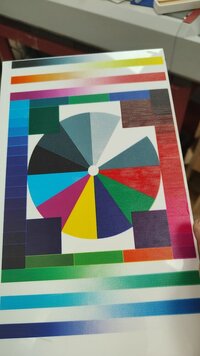
Epson L800 lines at the beginning of the print and at the end

Use the WicReset utility and the status report, the page count and other parameters are stored in the processor board of the printer
The waste ink counter counts the ink consumption, cleaning cycles etc , the page count is not relevant for the waste ink pad status - there are actually 2 - one counts the ink pumped away from the cleaning unit, and there is a 2nd counter for the overspray from borderless printing. WicReset shows the status of both counters
 
Hello
I have almost the same issue.
I can print anything but the nozzle check or the head alignment.
What might be the cause?
Can't even print the nozzle check from the printer.
I have an L800 uv printer.
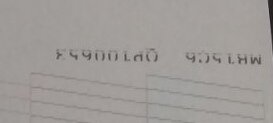
As shown in the proto is only printing the text in the upper right corner from acrorip or from epson driver, from the printer nothing happens.
 

Attachments

  • IMG_20251021_091719.jpg
    IMG_20251021_091719.jpg
    8.2 KB · Views: 125
I have some expired ink but a guy from epson told me it's om to use it only to shake it very good.
Also I have bigger dumpers with thicker tubes (4 mm tubes besides 3mm), might this be the problem or maybe the uv control board?
 
You need to do a complete printhead cleanup - flushing the nozzles.
There are various videos like this one showing the necessary steps.

 
Cleaning is not the issue, please read all. Only the nozzle check and alignment is not working, everything else is fine.
Can't print nozzle check neither from the printer or the software (acrorip, wic or epson).
 
The fuzzy print in the cropped nozzle check print above is as clear sign that some cleaning is necessary. And a printhead alignment can only be done with a clean and complete nozzle check, it does not help to fix fuzzy prints but only cleaning would.
 
I cant print nozzle check at all neither from the printer or the software.
From acrorip or from epson driver is only printing the text without any other nozzle lines on the upper right corner of the page.
 
Later i will attach some photos to better understand what issue i have.
 
This is a print i've made, so the problem is not from cleaning.
 

Attachments

  • WhatsApp Image 2025-10-17 at 01.12.38_76d06417.jpg
    WhatsApp Image 2025-10-17 at 01.12.38_76d06417.jpg
    83.7 KB · Views: 165
The only issue i have is why it dosen't print the nozzle check.
 
Back
Top