
Cryptogene
Print Lurker
- Joined
- May 9, 2026
- Messages
- 2
- Reaction score
- 0
- Points
- 1
- Printer Model
- Epson EcoTank ET-8550
Hi everyone,
I’m troubleshooting a specific horizontal banding issue on an Epson EcoTank ET-8550 (Firmware: 05.51.OP28P8, Total pages: approx. 966) and would appreciate some technical opinions.
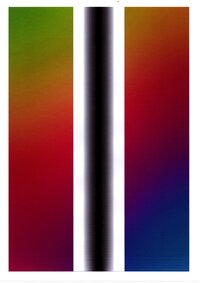
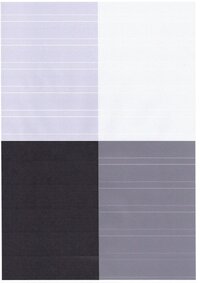
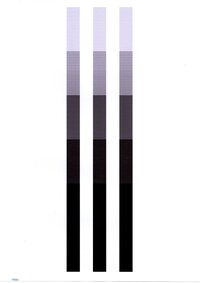
The issue is not general color banding. Pure or saturated colors are mostly clean, but neutral gray tones show very visible horizontal density bands. The problem is most obvious in light and mid gray values, especially around 10%, 25% and 50% neutral gray. Darker gray / black areas are less affected, and 100% black usually looks much cleaner.
What makes it interesting:
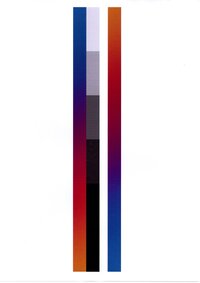
If I print color areas without any gray in the image, the colors look mostly fine. But when neutral gray areas or gray ramps are present on the same page, horizontal banding becomes visible, and some adjacent color areas show the same horizontal density pattern as well.
The printer currently uses compatible Epson 114/115 ink, not Epson OEM ink. Therefore I’m wondering whether this could be related to the Gray or Photo Black ink behavior, especially under midtone rastering load.
What I have tested so far:
Print settings tested:
Additional test results:
My current thoughts:
Could compatible GY/PB ink cause horizontal banding only in neutral gray midtones, even with a perfect nozzle check?
Or does this look more like a printhead firing / paper feed / micro-weave / internal calibration problem?
Clean-Test:
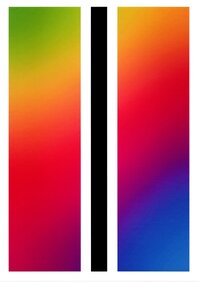
Stripes because of adding gray in the middle:
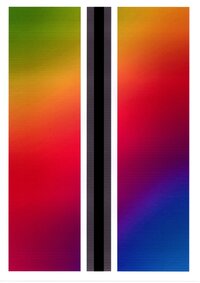
Gradient also affects colors massively:
I’m troubleshooting a specific horizontal banding issue on an Epson EcoTank ET-8550 (Firmware: 05.51.OP28P8, Total pages: approx. 966) and would appreciate some technical opinions.
The issue is not general color banding. Pure or saturated colors are mostly clean, but neutral gray tones show very visible horizontal density bands. The problem is most obvious in light and mid gray values, especially around 10%, 25% and 50% neutral gray. Darker gray / black areas are less affected, and 100% black usually looks much cleaner.
What makes it interesting:
If I print color areas without any gray in the image, the colors look mostly fine. But when neutral gray areas or gray ramps are present on the same page, horizontal banding becomes visible, and some adjacent color areas show the same horizontal density pattern as well.
The printer currently uses compatible Epson 114/115 ink, not Epson OEM ink. Therefore I’m wondering whether this could be related to the Gray or Photo Black ink behavior, especially under midtone rastering load.
What I have tested so far:
- Multiple photo papers tested: no relevant difference
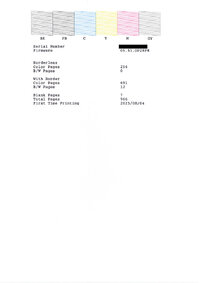
- Nozzle check looks complete for BK, PB, C, Y, M and GY
- Head alignment performed, both vertical and horizontal
- Paper path cleaning performed
- Translucent encoder film inspected and gently cleaned; it looked clean
- PB and GY channels/nozzles cleaned with Epson-compatible printhead cleaner
- Maintenance box C9345 replaced
- Power Cleaning performed
- Printer left powered off / unplugged for about 12 hours afterward
- Nozzle check still looks clean
- The gray banding remains
Print settings tested:
- Higher quality / slower printing improves the result, but only makes the bands finer
- Bidirectional/high-speed printing off improves it slightly, but does not remove it
- Disabling color correction does not solve it
- Different media settings change the appearance slightly, but the problem remains
Additional test results:
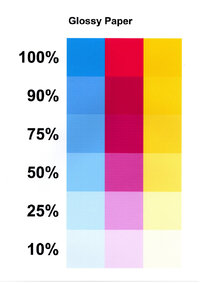
- CMY test patches on glossy paper:
- Cyan, Magenta and Yellow patches are much cleaner than neutral gray.
- There may be very slight horizontal texture, but nothing as severe as in the gray patches.
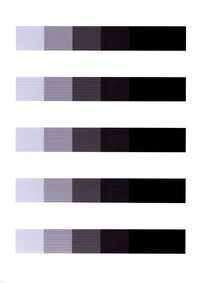
- Repeated gray bars:
- The same horizontal banding appears consistently in light and mid grays.
- 100% black is much cleaner.
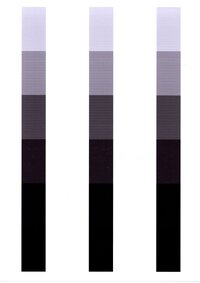
- Three identical gray bars printed at left / center / right positions:
- The banding appears across all positions, not just one area of the page.
- This seems to rule out a purely local platen or paper path issue.
My current thoughts:
- It does not look like a classic clogged nozzle, because the nozzle check is clean even after the issue appears.
- It does not seem to be paper-specific.
- It may be related to Gray / Photo Black ink behavior, neutral gray rastering, or midtone microbanding.
- A general paper feed / pass overlap issue might also be present, but CMY patches are much cleaner than neutral gray, so the gray rendering path seems especially suspicious.
Could compatible GY/PB ink cause horizontal banding only in neutral gray midtones, even with a perfect nozzle check?
Or does this look more like a printhead firing / paper feed / micro-weave / internal calibration problem?
Clean-Test:
Stripes because of adding gray in the middle:
Gradient also affects colors massively:

