

ChromIQ profile - soft proofs fine but prints are off

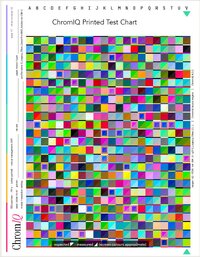
Ok, went back and re-printed the target thru ColorSync as outlined as well as making sure the protocol was correct. The print matched that printed out with Adobe Print Utility as well as Canon's print utility. However they differed slightly from the one printed out thru ChromIQ, but nothing HUGELY different on a visual level. Created profiles from both the ColorSync and the ChromIQ targets. Soft proofing in Ps, they looked very similar and as expected. The resulting print from the ColorSync print/profile pretty much matched it's soft proof. The print from the ChromIQ print/profile was way off with an overall yellow/slight green dirty tint to it.

Strangely, when viewing the soft proof with the ColorSync built profile, if you check Preserve RGB Numbers, it turns yellowish much like the ChromIQ print, however doing the same with the ChromIQ profile only brightens and opens it up with very little if any color shift. Go figure???? Not sure what that means.

Created 2 new profiles re-measuring both test charts and ran prints again. This time, both ColorSync profiles/prints pretty much matched each other with no changes. The new ChromIQ produced a much closer file to it's soft proof, though still tinged a little with a yellow/grenish cast but an improvement over the first one; still a little muddied with the color cast but not as bad as the first one.

Note: Printing from ChromIQ Canon Pro-1000 - When first presented dialog boxes for Printer Options / Quality & Media I had the option of choosing Rend Intent: Perceptual or No Color Management. I closed the print dialog and when re-opened it those options were grayed out. Printed the test chart with the second print window.

So, unsure what to make of all this other than building the profiles 2x with the ColorSync workflow produced the same visual results in both the soft proofing and prints. Seems building out profiles from ChormIQ's prints I tended to get wildly different results despite measuring the same chart multiple times. I've attached screen shots showing the differences between the two readings.
 

Attachments

  • ChromIQ3.jpg
    ChromIQ3.jpg
    275.8 KB · Views: 16
  • Colorsyn2.jpg
    Colorsyn2.jpg
    274.8 KB · Views: 15
I had similar issues with my Pro 300 as well when printing. Using the exact same driver settings on different applications I got different results. Claude diagnosed that sometimes the driver does not send the correct paper profile to the printer but could not reproduce what exactly triggered this.
And although I tried my best to lock all the settings in the printer driver it does not work reliably (especially for Canon printers - though I only have Epson for comparison). One more thing I found so far is that when the printer you print the test chart on is not your default printer there is a higher chance for issues. My Epson was the the default printer and when I switched to Canon in the same printer dialog window I actually printed on then Claude noticed macOS was sending some Epson keys to that Canon printer. This did not happen when the Canon was already selected when opening the printing window.

I made this video where I tried to show my personal issues but Canon was not very helpful to be honest.

 
Ok, went back and re-printed the target thru ColorSync as outlined as well as making sure the protocol was correct. The print matched that printed out with Adobe Print Utility as well as Canon's print utility. However they differed slightly from the one printed out thru ChromIQ, but nothing HUGELY different on a visual level. Created profiles from both the ColorSync and the ChromIQ targets. Soft proofing in Ps, they looked very similar and as expected. The resulting print from the ColorSync print/profile pretty much matched it's soft proof. The print from the ChromIQ print/profile was way off with an overall yellow/slight green dirty tint to it.

Strangely, when viewing the soft proof with the ColorSync built profile, if you check Preserve RGB Numbers, it turns yellowish much like the ChromIQ print, however doing the same with the ChromIQ profile only brightens and opens it up with very little if any color shift. Go figure???? Not sure what that means.

Created 2 new profiles re-measuring both test charts and ran prints again. This time, both ColorSync profiles/prints pretty much matched each other with no changes. The new ChromIQ produced a much closer file to it's soft proof, though still tinged a little with a yellow/grenish cast but an improvement over the first one; still a little muddied with the color cast but not as bad as the first one.

Note: Printing from ChromIQ Canon Pro-1000 - When first presented dialog boxes for Printer Options / Quality & Media I had the option of choosing Rend Intent: Perceptual or No Color Management. I closed the print dialog and when re-opened it those options were grayed out. Printed the test chart with the second print window.

So, unsure what to make of all this other than building the profiles 2x with the ColorSync workflow produced the same visual results in both the soft proofing and prints. Seems building out profiles from ChormIQ's prints I tended to get wildly different results despite measuring the same chart multiple times. I've attached screen shots showing the differences between the two readings.
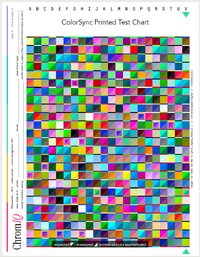
Actually, I see huge differences between the ChromIQ and the ColorSync print at least in the images your provided particuarly in the lower left triangle of each sample. Not sure this GIF animation will come through or not:
Colorsyn-vs-ChromIQ.gif
 
Nice gif; does the job!

To summerize: I'm profiling Epson Legacy Fiber to use on the Canon. The closest commercial profile that seems correct is Canson's Photographique Rag - not the Rag II. It’s soft proof matches the resulting print very closely.

The profile built with the Colorsync target also is a match between it's soft proof and print, as well as close enough to the Photographique Rag to be splitting hairs, which really surprised me.

Based on that, I would conclude that ColorSync and Photoshop are ultimately using the same printer pathway. There doesn’t appear to be any unexpected color-management “wrench” being thrown in between creating the target and then using the resulting profile to print. The workflow also appears to follow the best practices for creating and using an ICC profile.

What I still can’t explain is the substantial mismatch when ChromIQ is used to print the profiling target. If the ColorSync-generated target and profile behave as expected, and the commercial Canson profile also behaves as expected, something specific to the ChromIQ target-printing pathway appears to be altering the color data or the way the printer is being driven. I’m not sure what exactly is going on under the hood in ChromIQ, but that seems to be where the problem is occurring.
 
Nice gif; does the job!

To summerize: I'm profiling Epson Legacy Fiber to use on the Canon. The closest commercial profile that seems correct is Canson's Photographique Rag - not the Rag II. It’s soft proof matches the resulting print very closely.

The profile built with the Colorsync target also is a match between it's soft proof and print, as well as close enough to the Photographique Rag to be splitting hairs, which really surprised me.

Based on that, I would conclude that ColorSync and Photoshop are ultimately using the same printer pathway. There doesn’t appear to be any unexpected color-management “wrench” being thrown in between creating the target and then using the resulting profile to print. The workflow also appears to follow the best practices for creating and using an ICC profile.

What I still can’t explain is the substantial mismatch when ChromIQ is used to print the profiling target. If the ColorSync-generated target and profile behave as expected, and the commercial Canson profile also behaves as expected, something specific to the ChromIQ target-printing pathway appears to be altering the color data or the way the printer is being driven. I’m not sure what exactly is going on under the hood in ChromIQ, but that seems to be where the problem is occurring.
I am not quite sure which data path you are using: ColorSync vs. ChromIQ. What I do know is that 3rd-party apps have often not worked well with the Mac Print Driver system to ensure all color management is turned off.

To confirm whether printing with ChromIQ is the issue, save the ChromIQ output to a 16-bit TIFF file, then import that TIFF into ColorSync and print it as a Color Target. If that gives a good print while printing from ChromIQ is different, then it is how ChromIQ is interfacing with the Mac Print System. Other 3rd party apps have the same problem.

John Wheeler
 
I think my last round of testing confirmed the issue is with printing the test target from within ChromIQ. The app generates a .tif which can be used to print out thru other apps besides ChromIQ, hence the ColorSync workflow, Adobe Print Utility and Canon's, all without color management in terms of printing straight wtihout any applied profiles etc..
 
I just remembered one thing. Because of being not confident in printing with ChromIQ on macOS myself I implemented a few different options.
Can you turn off the one I have marked red and turn on the 2 green ones and then give it a try again? No guarantee though... This then does not use the Apple printer dialog but sends the commands via CUPS to the printer and might highlight other issues... But since you have printed the chart so many times now this might be a good comparison.


Bildschirmfoto 2026-10-06 um 23.15.54.png
 
Back
Top