Canon refill inks not compatible anymore?

sheepy

Newbie to Printing
Joined
Dec 7, 2025
Messages
4
Reaction score
0
Points
8
Printer Model
canon pixma 8720
Hey guys,

I’ve been buying canon refill inks for my canon pixma 8720 for years. Recently the computer stopped printing my refilled ink cartridges. A firmware update maybe? I bought a new printer thinking it was faulty but once the factory inks got low I tried refilling and suddenly it wouldn’t print in certain colors again. Is there a new OEM chip resetter I can buy or way to override this? My old resetter isn't helpful anymore. I still have hundreds of dollars of refillable ink backlog. I can’t contact canon about this as I'm afraid it will void my warranty. Thanks for any ideas you might have on this matter!

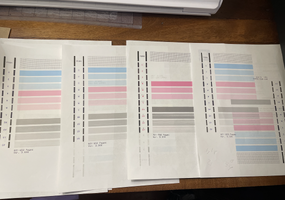
Further info: It wouldn't print the refill inks pink, yellow but would print grey (though stripey). I put in a factory pink one and still wouldn't print until I reset it on my Mac. Now it will print the factory pink but still no yellow, and still stripey grey.
 

PeterBJ

Printer VIP
Platinum Printer Member
Joined
Nov 27, 2010
Messages
5,223
Reaction score
5,126
Points
373
Location
Copenhagen Denmark
Printer Model
Canon MP990
A problem with a printer should only be posted in one thread to avoid confusion, so: In another thread sheepy wrote:

Hello! I'm having a similar problem -- my canon 8720 has been using refill inks for years but suddenly won't print (i drilled into the original cartridge). I saw you mentioned 'disable ink levels' but i can't see any way to do that?

When a Canon ink cartridge is running low you get a warning to get a new cartridge and the printing is halted. You can resume printing by pressing the Stop/Resume button. When the cartridge is declared empty by the printer printing is halted again and you are told that the cartridge is empty.

You can override this by holding the Stop/Resume button for 5 or 10 seconds. The ink level monitoring for that cartridge is turned off and you can print with a refilled cartridge. You are warned that this action is stored in the printer and the warranty is void.

You can read more about this here and here.

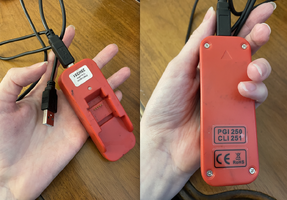
I'm totally lost to make it work after this chip change (i think that's what this thread says happened) as I have an older resetter. Thanks for your help!

Canon did not make a firmware update to block the use of a resetter on the PGI-250/CLI-251 cartridges. If they had done so it would have been on the forum. Instead I think your resetter or the chips on the cartridges might have failed. If your resetter is battery powered it might just need a new battery/ new batteries.

You will of course need the proper resetter for your cartridges. A resetter for an older cartridge generation like the PGI-225/CLI-226 cartridges will not work with your cartridges.

You can read more about batteries and resetters here.

To me your problems with printing with refilled cartridges look like they are caused by the refilled cartridges not delivering enough ink or the printhead has become clogged maybe because of a wrong refill technique or bad maybe old ink.

Could you please upload a scan or photo of a nozzle check? And how do you refill the cartridges? And what inks do you use for the refill?
 
Last edited:

sheepy

Newbie to Printing
Joined
Dec 7, 2025
Messages
4
Reaction score
0
Points
8
Printer Model
canon pixma 8720
Hel
A problem with a printer should only be posted in one thread to avoid confusion, so: In another thread sheepy wrote:


When a Canon ink cartridge is running low you get a warning to get a new cartridge and the printing is halted. You can resume printing by pressing the Stop/Resume button. When the cartridge is declared empty by the printer printing is halted again and you are told that the cartridge is empty.

You can override this by holding the Stop/Resume button for 5 or 10 seconds. The ink level monitoring for that cartridge is turned off and you can print with a refilled cartridge. You are warned that this action is stored in the printer and the warranty is void.

You can read more about this here and here.


Canon did not make a firmware update to block the use of a resetter on the PGI-250/CLI-251 cartridges. If they had done so it would have been on the forum. Instead I think your resetter or the chips on the cartridges might have failed. If your resetter is battery powered it might just need a new battery/ new batteries.

You will of course need the proper resetter for your cartridges. A resetter for an older cartridge generation like the PGI-225/CLI-226 cartridges will not work with your cartridges.

You can read more about batteries and resetters here.

To me your problems with printing with refilled cartridges look like they are caused by the refilled cartridges not delivering enough ink or the printhead has become clogged maybe because of a wrong refill technique or bad maybe old ink.

Could you please upload a scan or photo of a nozzle check? And how do you refill the cartridges? And what inks do you use for the refill?
Hello!! Thank you for your reply. The information you shared is helping me solve the mystery--or narrow it down a lot. I have a resetter from precision colors and it says PGI 250/CLI 251 on it as the only numbers and it is a USB resetter! I have some nozzle checks attatched--crazy story is I was able to get it printing perfectly for a few days until I ran out of ink and now I'm back at the start of this again (see 3rd nozzle for current status vs the other 3 from the first post I sent). I was able to get it printing by removing the printer on my computer by trying everything so a combo of things probably worked but the last thing that I remember trying was following these steps:
-powered off
-open ink tray lid
-power on
-wait for ink to come into view
-turn off (lid still open)
-close lid

note- my printer has no light flashing on the inks--they think its filled. I reset them with the red resetter I have and they have been accepted but when it goes to print they will not. The ink cartridge itself is 1-2 months old and was accepted until this new refill (I printed an hour ago, even).
-then turn on & print normally. I used to refill inks via a drilled hole in the top using precision color inks but one of the other things that helped a lot with getting the printer working again was refilling from the bottom instead. Thank you for your help! I will update you if I get it working again (here's hoping)!
 

Attachments

  • Screenshot 2025-12-12 at 10.25.47 AM.png
    Screenshot 2025-12-12 at 10.25.47 AM.png
    1.3 MB · Views: 29
  • Screenshot 2025-12-12 at 10.33.58 AM.png
    Screenshot 2025-12-12 at 10.33.58 AM.png
    1.4 MB · Views: 18
Last edited:
Top