sheepy
Newbie to Printing
- Joined
- Dec 7, 2025
- Messages
- 4
- Reaction score
- 0
- Points
- 8
- Printer Model
- canon pixma 8720
Hey guys,
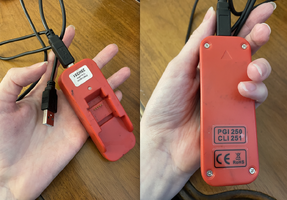
I’ve been buying canon refill inks for my canon pixma 8720 for years. Recently the computer stopped printing my refilled ink cartridges. A firmware update maybe? I bought a new printer thinking it was faulty but once the factory inks got low I tried refilling and suddenly it wouldn’t print in certain colors again. Is there a new OEM chip resetter I can buy or way to override this? My old resetter isn't helpful anymore. I still have hundreds of dollars of refillable ink backlog. I can’t contact canon about this as I'm afraid it will void my warranty. Thanks for any ideas you might have on this matter!
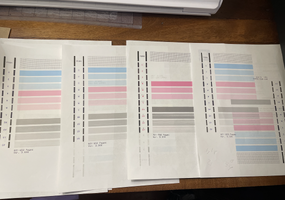
Further info: It wouldn't print the refill inks pink, yellow but would print grey (though stripey). I put in a factory pink one and still wouldn't print until I reset it on my Mac. Now it will print the factory pink but still no yellow, and still stripey grey.
I’ve been buying canon refill inks for my canon pixma 8720 for years. Recently the computer stopped printing my refilled ink cartridges. A firmware update maybe? I bought a new printer thinking it was faulty but once the factory inks got low I tried refilling and suddenly it wouldn’t print in certain colors again. Is there a new OEM chip resetter I can buy or way to override this? My old resetter isn't helpful anymore. I still have hundreds of dollars of refillable ink backlog. I can’t contact canon about this as I'm afraid it will void my warranty. Thanks for any ideas you might have on this matter!
Further info: It wouldn't print the refill inks pink, yellow but would print grey (though stripey). I put in a factory pink one and still wouldn't print until I reset it on my Mac. Now it will print the factory pink but still no yellow, and still stripey grey.