Forum member
@maximilian59 gives great advice. I'll expand on it a little. It's gray, cold and snowy so I have some time to type.

You have an ink flow issue that can be from poor flow of ink through the sponge of the cartridge, or reversible clogged nozzles in the print head, or irreversible burned out nozzles, or a combination of any or all. It could also be due insufficient ink in the cartridge.
The first thing to do is NOT print anything other than nozzle checks until the issue resolves or a member says otherwise. Canon print heads use the ink to cool the nozzles, which work by heating up the ink and then spitting it out. No cooling ink eventually results in irreversible burned up nozzles.
Secondly, when there is missing ink on the printed page, it is smart to then
try a new or known working cartridge(s) to see if that resolves the issues. Since you refill, you could also try fully flushing the cartridges at the sink with eater, let dry until the chip and its electronic board are completely dry and then reset, refill and reinstall. The idea hare is to reduce confounders in your diagnostic/treatment routine that may confuse the issue.
Third, with the new cartridges, print a nozzle check. If not fully back to normal then you can run a regular cleaning (two at most) and reprint a nozzle check. If no improvement then you may try ONE Deep Clean cycle and then retry a nozzle check. (No more than ONE Deep Clean in 24 hours and try not to do them at all as it heats the nozzles). Then let the printer sit overnight and try a nozzle check with or without 1-2 Regular Clean Cycle. You could also bypass a Deep Clean altogether if you want and wait till the next day to do a nozzle check. There is not perfect way. Each person is going to give you their own opinion.
If you see improvement at all then you are on the right road. But have patience. Sometimes the nozzles slowly unclog. You may be able to get around printing defects by either using a Photo Paper setting (so it uses the Dye-based inks for Black text) for printing text if the Pigment Black is a problem. If the Dye-based inks are causing a printing problem then using a Higher Print Quality may provide a workaround.
Most likely a new print head will resolve your issues, though they may be expensive or difficult to find. If you are in the USA then call Canon Sales as they often have the lowest prices and you are assured you will not get a counterfeit refurbished sold as new (beware sales out of China).
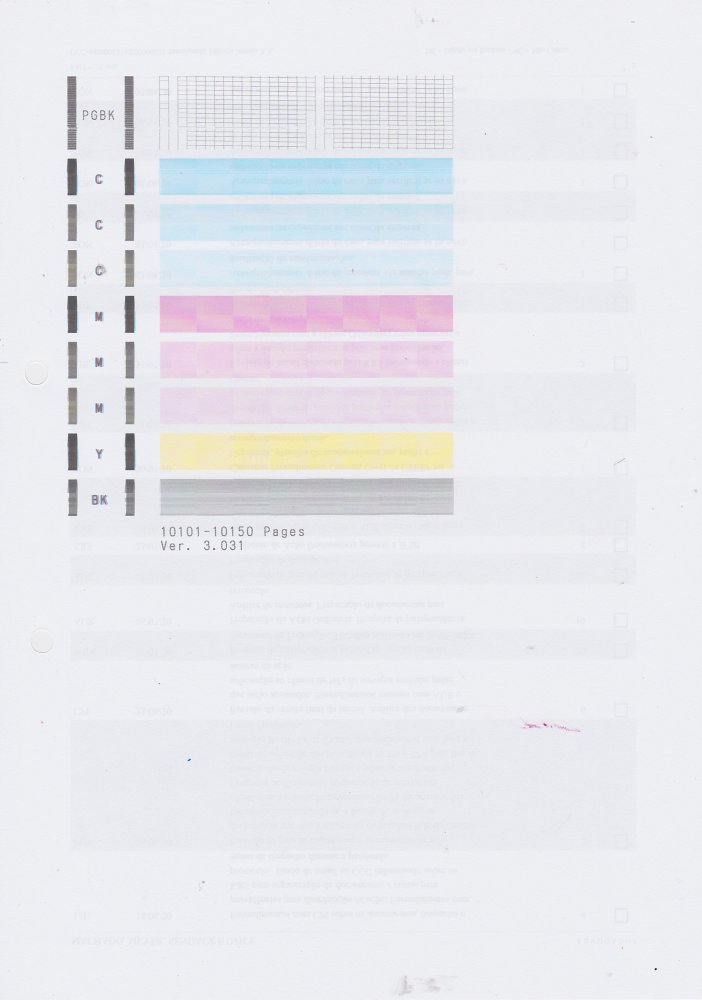
Scan, crop and post your nozzle checks so we can see if there is improvement. To decrease artifact in your scanned nozzle check, follow the scanner settings recommendation from the great forum member
@PeterBJ .