
Oups ! i did it again. Canon Pro-1

Cassiop38

Printing Apprentice
Joined
Dec 17, 2025
Messages
12
Reaction score
1
Points
10
Printer Model
Epson, Canon, HP.
Got this 35kg paper weight for 50€ !!

Bit of story first : I'm new here but long time lurker as i try to revive stuff for more than a year now. I Already purchased a Pro-10 with a B200 error a year ago and succesfully revived it by... Letting it warm up. Literally. So when the previous owner also reported a B200 error i thought that it was worth a try. I like troubleshooting stuff and learning. Printer were a real challenge as their closed ecosystem is really hard to penetrate but once you manage to get the tools, you can trully see how cool those machines are. I was worried that with a CCIS style feeding system, getting it back on tracks after few years on a shelf could be difficult. let's see how close/far to the thruth i'm standing.

So fast forward to today. I put it on my desk, initialy ended up with a B200 errors, then a 5100 error, then it booted. Inks levels are optimal except for M and C. Fortunatly the previous owner gave me a C but not a M.

First thing i did was trying to print a nozzle check pattern. Since tanks are low i believe the Pro-1 won't do a cleaning cycle as they usually do (at least, my Pro-10 did) when you fire up a print after letting it sit for more than 120/240hrs. I don't know if i was right but anyway, the page came out completely blank. Not a single dropplet of a single color ahead. The printer warned me that inks in several tanks were too low and i had to hold the resume button for 5 secs.

Here are my thoughts : Printer sat on a shelf for 5 years and the head got completely dry. I have those 2 options (+ whatever you, guys, suggests)

1 : i fire it up, unplug the printer when the head is moving so i can clean it by rolling the head over an absorber sheet soaked with Isopropyl alcoohol
Pros : Very economical
Cons : i don't know what happen when you do that on this printer. i did that on several epsons and they didn't complained.

2 : i buy a PGI-29M and try to do cleaning cycles.
Pros : Probably how it should be done. (i think it takes a cleaning cycle or two for the Pro-10 to start printing again but i can't remember)
Cons : sink ink, cost 25 bucks.

What do you think ?

Note for the futur, i'll probably destroys it trying to install a potty at some point, sooner rather than later since the printer have a low page count so the waste sponge should not be saturated. Oh and the previous owner also gave me an old IX4000 to play with. but that's for another thread.

Thanks you :)
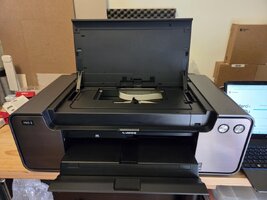
 

Attachments

  • 9a8e6f8c-ccb9-47b8-afa9-0a974aa38157.jpg
    9a8e6f8c-ccb9-47b8-afa9-0a974aa38157.jpg
    117.2 KB · Views: 32

ubyorton

Print Lurker
Joined
Dec 29, 2025
Messages
1
Reaction score
0
Points
1
Printer Model
Canon i560
Got this 35kg paper weight for 50€ !!

Bit of story first : I'm new here but long time lurker as i try to revive stuff for more than a year now. I Already purchased a Pro-10 with a B200 error a year ago and succesfully revived it by... Letting it warm up. Literally. So when the previous owner also reported a B200 error i thought that it was worth a try. I like troubleshooting stuff and learning. Printer were a real challenge as their closed ecosystem is really hard to penetrate but once you manage to get the tools, you can trully see how cool those machines are. I was worried that with a CCIS style feeding system, getting it back on tracks after few years on a shelf could be difficult. let's see how close/far to the thruth i'm standing.

So fast forward to today. I put it on my desk, initialy ended up with a B200 errors, then a 5100 error, then it booted. Inks levels are optimal except for M and C. Fortunatly the previous owner gave me a C but not a M.

First thing i did was trying to print a nozzle check pattern. Since tanks are low i believe the Pro-1 won't do a cleaning cycle as they usually do (at least, my Pro-10 did) when you fire up a print after letting it sit for more than 120/240hrs. I don't know if i was right but anyway, the page came out completely blank. Not a single dropplet of a single color ahead. The printer warned me that inks in several tanks were too low and i had to hold the resume button for 5 secs.

Here are my thoughts : Printer sat on a shelf for 5 years and the head got completely dry. I have those 2 options (+ whatever you, guys, suggests)

1 : i fire it up, unplug the printer when the head is moving so i can clean it by rolling the head over an absorber sheet soaked with Isopropyl alcoohol
Pros : Very economical
Cons : i don't know what happen when you do that on this printer. i did that on several epsons and they didn't complained.

2 : i buy a PGI-29M and try to do cleaning cycles.
Pros : Probably how it should be done. (i think it takes a cleaning cycle or two for the Pro-10 to start printing again but i can't remember)
Cons : sink ink, cost 25 bucks.

What do you think ?

Note for the futur, i'll probably destroys it trying to install a potty at some point, sooner rather than later since the printer have a low page count so the waste sponge should not be msn games saturated. Oh and the previous owner also gave me an old IX4000 to play with. but that's for another thread.

Thanks you :)
A bit of backstory first. I’m new here but a long-time lurker, and I’ve been reviving old gear for over a year now. About a year ago, I bought a Pro-10 with a B200 error and successfully brought it back to life by… letting it warm up. Literally. So when the previous owner of this printer also reported a B200 error, I thought it was worth a try. I enjoy troubleshooting and learning new things.
The first thing I tried was printing a nozzle check pattern.? Right?
 
Last edited:

PeterBJ

Printer VIP
Platinum Printer Member
Joined
Nov 27, 2010
Messages
5,218
Reaction score
5,124
Points
373
Location
Copenhagen Denmark
Printer Model
Canon MP990
The B200 error is an electronic printhead failure. It is often intermittent before becoming permanent. It cannot be reset by following some procedure. Only a new printhead will restore the printer to full working order. See this thread.
 

Cassiop38

Printing Apprentice
Joined
Dec 17, 2025
Messages
12
Reaction score
1
Points
10
Printer Model
Epson, Canon, HP.
The B200 error is an electronic printhead failure. It is often intermittent before becoming permanent. It cannot be reset by following some procedure. Only a new printhead will restore the printer to full working order. See this thread.
i'm aware of this however for the pro-10 i scavanged last year the B200 error didn't came back (yet). Which led me to think that it was a room temperature/humidity related problem. Isn't it related to a temperature sensor in the printhead meant to prevent damage printhead overheating ?

For this pro-1 i'm also quite confident it is the same as the printer was seating into a 0-10°C storage room when it was tested and it didn't show a b200 error when i first booted it myself. Of course i could be wrong but it doesn't matter this much...

Anyway the question doesn't lie there that much. My current plan is to dismantle the pro-1 to see how cursed it is to try to put a potty on it. Then scavange the ink to feed a pro-10 that i'll grab in a couple of weeks and, if proven feasible, install a potty of the 10.

Thanks to your own experiment, TheHat, and few threads like this one https://www.printerknowledge.com/threads/canon-pro-1-ink-absorber.11578/ i'm quite confident that it will be an interesting journey :)

However, your opinions does matter to me and it you think i should revive the 1 rather than the 10, please tell me so ! It just that i'm not fan of CCIS type of feeding system as cleaning the loop is FAR more complicated to me and ink consuming than regular cartridges-on-top-of-printhead ones :)

Thanks for your answers !
 

PeterBJ

Printer VIP
Platinum Printer Member
Joined
Nov 27, 2010
Messages
5,218
Reaction score
5,124
Points
373
Location
Copenhagen Denmark
Printer Model
Canon MP990
i'm aware of this however for the pro-10 i scavanged last year the B200 error didn't came back (yet). Which led me to think that it was a room temperature/humidity related problem. Isn't it related to a temperature sensor in the printhead meant to prevent damage printhead overheating ?
The printhead has got one or more temperature sensors which are P-N junctions. the voltage drop over a such junction is temperature dependent and is lower with higher temperature. I think that it cannot be ruled out that condensation has caused a false low temperature reading. After room temperature caused the condensation to evaporate the false temperature reading and the B200 error disappeared. But I think that is unlikely. If not because of a B200 error, then why was the printer dumped? It looks like you were very lucky with the find.

The printheads have both a 3.3 V logic supply and a 16, 24 or 32V driver supply for the nozzles. Condensed water or water left from rinsing the printhead might cause the destruction of the printhead by leaking the high driver voltage to the 3.3 V logic. That is why it it´s very important that a printhead is completely dry before reinstalling.
 

Cassiop38

Printing Apprentice
Joined
Dec 17, 2025
Messages
12
Reaction score
1
Points
10
Printer Model
Epson, Canon, HP.
So much knowledge *_*
Pro the Pro-10 it was dumped for, what i understood while chatting with the previous owner's wife, is that he got bored of tweaking it for accurate colors and ended up giving it's prints to a lab. (he was probably a bit too rich to bother). Also he didn't told me but he mischarged a Cyan/PC Cartridge into the CO slot. i noticed when i had to change the CO and the sponge was looking way too blueish. That's probably why he left it for 50€.
When i fired it up, back home, the printer was still cold and it led me to that B200 error. I'm not sure condensation played a huge part in that because the whole printer was sitting unopened on my desk, my room humidity was about 40% and it would have (and, actually, had) formed over the printer rather than inside. (Just like you let your photo gear sit in the bag when you comeback from cold and the water condensate on the bag rather than on the camera/lense).

It is likely that the scenario of the Pro-1 is rather similar (also got it for 50€) The guy had moved on printing its stuff on a Pro 4000 and let the Pro-1 sleep over a shelf in a storage room that was cold. That's probably why he got a B200 error when i asked him to fire it up. just like i had for the Pro-10. Anyway, we sympathise over my emphasis to buy broken stuff and repair it and i had the pleasant surprise to find 11 out of 12 totally full cartridges. Which leaves me with 30 ml of guenuine ink to plays with.

The Pro-10 had 200 prints max (so conveinient that the nozzle check give you that number), the Pro-1 also have a little print count. That's why i -- think -- given my little knowledge, that those printers will work again for a bit and that the B200 error, rather than being a sign of a short term failure. Hopefully, i sold the Pro-10 to a friend that is printing frequently and have no problems with it (yet.)

I'm still stuck with my current dilemma, which is :
The pro-1 doesn't print. it works, make noise, don't throw errors but nothing comes out the nozzle check. It is full of ink (which i understand is ~30mls in the cartridges + whaever is left in the tubes and i cant remember how much in the printhead (but i remember seeing it on this forum, something like 15ml)). My noobish opinion is that the head is dry and need to be taken cared of. I Believe i could revive it by rubbing the head against an absorber sheet full of Isopropyl alcohol just like i usually do with cheaper printer and do a couple of cleaning cycle. I Don't want to remove the printhead to clean it manually because i believe it is using a shitload of ink. If i ever remove the Pro-1 printhead it is for salvaging what's left of ink inside. and i'll probably need assistance :D.

I can get a pro-10s for 140€ + consommable, probably 100€ after negociation.

So. either i try to revive the Pro-1 but i'm stuck with this CCIS monster and i'll either succeed with minimum ink usage or i kill it, trying. Either i salvage the cartridges right now to feed the Pro-10s (which i'm rather confident will work again, if it's print count isn't too high) and i try to refill PGI-72 cartridges with PGI-29 ink. (sure we can do that, hu ?!).

I already have a redsetter for the PGI-72s and a set of cartridge to play with so i have literally nothing to invest in for the Pro-10s...

Oh and i have a IX4000 which is working perfectly with a set of full guenuine cartridges. I wonder how much i could sell it so i can finance this nonsense of a passion. maybe 50€ ? i like things to return to 0€.
 

Latest posts

Top