Cassiop38
Printing Apprentice
- Joined
- Dec 17, 2025
- Messages
- 43
- Reaction score
- 7
- Points
- 13
- Printer Model
- Epson, Canon, HP.
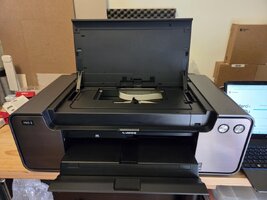
Got this 35kg paper weight for 50€ !!
Bit of story first : I'm new here but long time lurker as i try to revive stuff for more than a year now. I Already purchased a Pro-10 with a B200 error a year ago and succesfully revived it by... Letting it warm up. Literally. So when the previous owner also reported a B200 error i thought that it was worth a try. I like troubleshooting stuff and learning. Printer were a real challenge as their closed ecosystem is really hard to penetrate but once you manage to get the tools, you can trully see how cool those machines are. I was worried that with a CCIS style feeding system, getting it back on tracks after few years on a shelf could be difficult. let's see how close/far to the thruth i'm standing.
So fast forward to today. I put it on my desk, initialy ended up with a B200 errors, then a 5100 error, then it booted. Inks levels are optimal except for M and C. Fortunatly the previous owner gave me a C but not a M.
First thing i did was trying to print a nozzle check pattern. Since tanks are low i believe the Pro-1 won't do a cleaning cycle as they usually do (at least, my Pro-10 did) when you fire up a print after letting it sit for more than 120/240hrs. I don't know if i was right but anyway, the page came out completely blank. Not a single dropplet of a single color ahead. The printer warned me that inks in several tanks were too low and i had to hold the resume button for 5 secs.
Here are my thoughts : Printer sat on a shelf for 5 years and the head got completely dry. I have those 2 options (+ whatever you, guys, suggests)
1 : i fire it up, unplug the printer when the head is moving so i can clean it by rolling the head over an absorber sheet soaked with Isopropyl alcoohol
Pros : Very economical
Cons : i don't know what happen when you do that on this printer. i did that on several epsons and they didn't complained.
2 : i buy a PGI-29M and try to do cleaning cycles.
Pros : Probably how it should be done. (i think it takes a cleaning cycle or two for the Pro-10 to start printing again but i can't remember)
Cons : sink ink, cost 25 bucks.
What do you think ?
Note for the futur, i'll probably destroys it trying to install a potty at some point, sooner rather than later since the printer have a low page count so the waste sponge should not be saturated. Oh and the previous owner also gave me an old IX4000 to play with. but that's for another thread.
Thanks you
Bit of story first : I'm new here but long time lurker as i try to revive stuff for more than a year now. I Already purchased a Pro-10 with a B200 error a year ago and succesfully revived it by... Letting it warm up. Literally. So when the previous owner also reported a B200 error i thought that it was worth a try. I like troubleshooting stuff and learning. Printer were a real challenge as their closed ecosystem is really hard to penetrate but once you manage to get the tools, you can trully see how cool those machines are. I was worried that with a CCIS style feeding system, getting it back on tracks after few years on a shelf could be difficult. let's see how close/far to the thruth i'm standing.
So fast forward to today. I put it on my desk, initialy ended up with a B200 errors, then a 5100 error, then it booted. Inks levels are optimal except for M and C. Fortunatly the previous owner gave me a C but not a M.
First thing i did was trying to print a nozzle check pattern. Since tanks are low i believe the Pro-1 won't do a cleaning cycle as they usually do (at least, my Pro-10 did) when you fire up a print after letting it sit for more than 120/240hrs. I don't know if i was right but anyway, the page came out completely blank. Not a single dropplet of a single color ahead. The printer warned me that inks in several tanks were too low and i had to hold the resume button for 5 secs.
Here are my thoughts : Printer sat on a shelf for 5 years and the head got completely dry. I have those 2 options (+ whatever you, guys, suggests)
1 : i fire it up, unplug the printer when the head is moving so i can clean it by rolling the head over an absorber sheet soaked with Isopropyl alcoohol
Pros : Very economical
Cons : i don't know what happen when you do that on this printer. i did that on several epsons and they didn't complained.
2 : i buy a PGI-29M and try to do cleaning cycles.
Pros : Probably how it should be done. (i think it takes a cleaning cycle or two for the Pro-10 to start printing again but i can't remember)
Cons : sink ink, cost 25 bucks.
What do you think ?
Note for the futur, i'll probably destroys it trying to install a potty at some point, sooner rather than later since the printer have a low page count so the waste sponge should not be saturated. Oh and the previous owner also gave me an old IX4000 to play with. but that's for another thread.
Thanks you