Ink counter reset. HOWEVER frustration at first when printer not going into svc mode. Then I realised that (from another source I had seen) the instruction for enter svc mode should have said - with power turned off
press and hold down power AND STOP BUTTONS then turn on mains power at plug.
When green power light comes on, with power still pressed down release stop then press and release stop twice.
My set up also allowed me to select which tray the paper for the EPROM settings print came from.
---------------------------------------------------------------------------------------------------------------------------
So for completeness:-
To get the printer into service mode:
i. With the machine power turned off at the plug, press and hold the ON button and the STOP button. (DO NOT release the buttons.)
Then switch mains plug on.
ii. When the green Power LED lights, while still holding down the ON button, release the STOP then press
and release the Stop button 2 times, and release the ON button. (Each time the Stop button is pressed, the Alarm and Power LEDs light alternately.
NO they did not, first press of stop orange came on and stayed on till power released and green on
iii. When the Power LED shows a constant light, the machine is ready for the service mode operations.
iv. The display will now show "Service mode" and "Idle"
now follow this procedure for the reset:
When the printer has entered service mode Windows will probably install a new printer or a "device". just allow this.
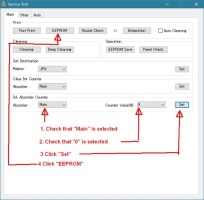
Now open the service tool. Check that "Main" is selected in the ink absorber counter, and "0" is selected in the "Counter value%" setting and then click "Set".
A small window "A function was finished" opens. Close this window by clicking OK.
(Make sure there is paper in both the cassette and the rear paper feed as you cannot predict which paper source the printer will use.)
My SVC program allowed selection of rear or cassette for print out paper.
Now click the EEPROM button to get a print that verifies that the absorber counter has been reset. D should now be 000.0 or very close to 0.
So again big thanks to all for getting me this far.
Just got to pluck up courage to start the dismantle with photos during process.
Here is a screen shot with explanations:




 ..one on my printer is the square one with small diagonal corners on one side and a second is much larger with an extended bit on one side....Ho-Hum got there in the end.