itsab1989
Newbie to Printing
- Joined
- Feb 11, 2026
- Messages
- 3
- Reaction score
- 0
- Points
- 8
- Printer Model
- Epson ET 8550, Canon Pro 300
Hey everyone,
I’d like to share a small project I’ve been working on:
ChromIQ – a macOS app that puts a graphical interface around ArgyllCMS for creating custom ICC profiles for RGB inkjet printers.
The motivation was simple:
ArgyllCMS is excellent, but chaining targen, printtarg, chartread, colprof and profcheck from the command line is a real barrier. ChromIQ tries to remove that friction with a guided five-step workflow:
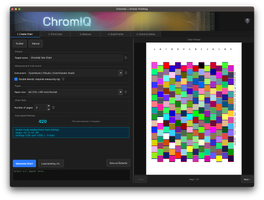
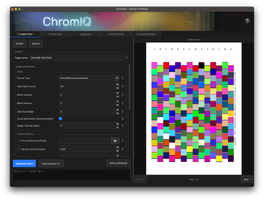
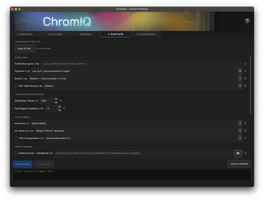
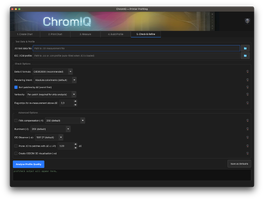
1. Create chart – guided mode looks up the optimal patch count for your instrument and paper size from an empirical database and sets sensible defaults automatically; manual mode exposes all targen/printtarg parameters directly
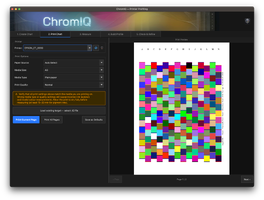
2. Print chart – sent directly to your printer via CUPS, bypassing ColorSync to avoid any colour management interference during printing (this part still needs some work)
3. Measure chart – drives chartread with your spectrophotometer; the app handles calibration prompts, strip navigation, wrong-strip warnings, and retry dialogs so you’re not staring at a terminal
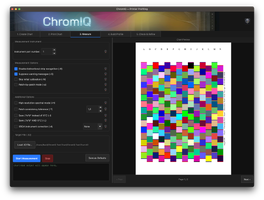
4. Build profile – runs colprof with the full option set including FWA compensation, gamut mapping and rendering intent overrides
5. Check & Refine – runs profcheck on the finished profile, shows per-patch ΔE results, and lets you selectively re-measure only the worst-performing patches with guided strip-by-strip instructions
Supported instruments:
X-Rite i1Pro 1/2/3, i1Pro 3 Plus, ColorMunki, i1Studio, SpectroScan.
Runs on macOS 12+, Apple Silicon and Intel (universal binary).
Honest caveat:
The project is only a couple of days old. The core workflow runs end-to-end and a number of early issues have already been fixed, but I haven’t been able to test every printer, paper and instrument combination out there. There will be edge cases I haven’t caught yet.
I’m sharing it because I spent a long time looking for something that covered this workflow properly and came up empty. If it helps anyone who’s been stuck at the same point, that’s reason enough.
GitHub: https://github.com/itsab1989/ChromIQ
Any feedback – what works, what breaks, what’s missing – is very welcome.
A big thank you to @soul-traveller – your script pointed me in the right direction, and I’ve learned a great deal from your work. This project wouldn’t exist without it.
I’d like to share a small project I’ve been working on:
ChromIQ – a macOS app that puts a graphical interface around ArgyllCMS for creating custom ICC profiles for RGB inkjet printers.
The motivation was simple:
ArgyllCMS is excellent, but chaining targen, printtarg, chartread, colprof and profcheck from the command line is a real barrier. ChromIQ tries to remove that friction with a guided five-step workflow:
1. Create chart – guided mode looks up the optimal patch count for your instrument and paper size from an empirical database and sets sensible defaults automatically; manual mode exposes all targen/printtarg parameters directly
2. Print chart – sent directly to your printer via CUPS, bypassing ColorSync to avoid any colour management interference during printing (this part still needs some work)
3. Measure chart – drives chartread with your spectrophotometer; the app handles calibration prompts, strip navigation, wrong-strip warnings, and retry dialogs so you’re not staring at a terminal
4. Build profile – runs colprof with the full option set including FWA compensation, gamut mapping and rendering intent overrides
5. Check & Refine – runs profcheck on the finished profile, shows per-patch ΔE results, and lets you selectively re-measure only the worst-performing patches with guided strip-by-strip instructions
Supported instruments:
X-Rite i1Pro 1/2/3, i1Pro 3 Plus, ColorMunki, i1Studio, SpectroScan.
Runs on macOS 12+, Apple Silicon and Intel (universal binary).
Honest caveat:
The project is only a couple of days old. The core workflow runs end-to-end and a number of early issues have already been fixed, but I haven’t been able to test every printer, paper and instrument combination out there. There will be edge cases I haven’t caught yet.
I’m sharing it because I spent a long time looking for something that covered this workflow properly and came up empty. If it helps anyone who’s been stuck at the same point, that’s reason enough.
GitHub: https://github.com/itsab1989/ChromIQ
Any feedback – what works, what breaks, what’s missing – is very welcome.
A big thank you to @soul-traveller – your script pointed me in the right direction, and I’ve learned a great deal from your work. This project wouldn’t exist without it.