[Tool] ChromIQ – a macOS and Windows GUI for ArgyllCMS printer profiling (v4.2.0)

Last edited:
ok maybe i succeded to install the driver

@itsab1989 why chromiq keeps a lot of seconds before starts on windows 11 ?

really strange, sometimes i open it 2-3 times thinking it is not starting
 
@mavtop
Regarding your connection issues it would be nice if you could provide your log file so I can let Claude look into it.
in the measure tab my fist thought was that you clikced the wrong symbol to open the ti2 file. The load button (LEFT) opens the correct browser for me. The reveal button (RIGHT) opens finder.
On the windows version there should be an option in ChromIQs settings that helps with installing the driver because I had problems myself. I remember it worked for me but it has been a while since I tried last.
 
ok maybe i succeded to install the driver

@itsab1989 why chromiq keeps a lot of seconds before starts on windows 11 ?

really strange, sometimes i open it 2-3 times thinking it is not starting
Good question i will let it make improvements based on Knuts feedback and then let it investigate. MacOS should be very slightly faster with the latest versions
 
ok i think my problem are USB power related,

also on windows machine, if i try to use chromiq it says press a key to start calibration but when i press a key it say

No response from chartread after sending a key

but if i use spotread -v on command line,

the first time it say calibration error (on first time i press a key)

the second time it say is ok and i can make a spot read, this on my first device

instead the second device with its own cable the first time it says white reference is out of tollerance, the other times it say light level is too low

i will have to test with an usb powered hub

and on my old mac notebook but only using argyl cms (on that old notebook i didn't try, it was where i created my old profiles without problems)
 
@mavtop
Regarding your connection issues it would be nice if you could provide your log file so I can let Claude look into it.
in the measure tab my fist thought was that you clikced the wrong symbol to open the ti2 file. The load button (LEFT) opens the correct browser for me. The reveal button (RIGHT) opens finder.
On the windows version there should be an option in ChromIQs settings that helps with installing the driver because I had problems myself. I remember it worked for me but it has been a while since I tried last.
where i found the log files ?
 
@mavtop
Regarding your connection issues it would be nice if you could provide your log file so I can let Claude look into it.
in the measure tab my fist thought was that you clikced the wrong symbol to open the ti2 file. The load button (LEFT) opens the correct browser for me. The reveal button (RIGHT) opens finder.
On the windows version there should be an option in ChromIQs settings that helps with installing the driver because I had problems myself. I remember it worked for me but it has been a while since I tried last.
ok for the symbol to click to open the ti2 file you are correct, but maybe it is better to have uniform icons, so the same of create chart (first menu on the left) and maybe in the same position (just my guess)
 
My first thought was that I wanted the same grid icon with the 9 patches like in the print chart tab for the measure tab as well because the y both do the same but for now Knut and I agreed on this. Maybe you can convince him with a better idea.

the easiest way to fin the log file is via the settings window and reveal the folder from there:
Bildschirmfoto 2026-07-20 um 12.34.34.png


Beta 24 will take around 20 minutes to be ready I guess. I managed to speed up the start on Windows by 2 seconds. The first start however will always be longer than the following ones because of Windows Defender scanning the files.
 
I suggest to start with the 3 sheets target: Either the A4/Letter 1944 patch target (both 3 sheets).

Alan G has very good results with this target (He has compared to his previous 2 step workflow with a preconditioning profile followed with a secondary final target and both are very similar, but the 1944 patch target only needs one run, so saving paper and for most time, due to to the massive sampling of the neutral and near neutral axis to accurate determine the neutral axis of a given printer/ink/combination in one run.
Thanks. I will go with this target and make some prints afterwards.
 
Good and bad news (also if i don't know if they are really bad)

i got an old USB2.0 hub with the port to power it, it says 5V 2,5Ampere, but i found only a 5V 1.0A power switch and i used it

Finally the i1pro1 now seems to work, but i don't know if it is working good or not.

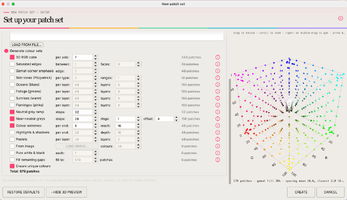
I succeded to pass the calibration test and the patch reading i used a new profile created for my office Kyocera Printer with Plain Paper (and maybe the problem if it exists is the type of paper used) and a new patches set that i created based on @pharmacist for grey gradients and neutral (scrrenshoot attached).

Before reading all the patches i tested spotread to read the white of the paper more times and each time the value changed, but i don't know if the differences between them are important (to indicate still no enough power from usb hub) or are just normal.

I used chartread from ArgyllCMS later i will try to reread it with the Chromiq engine and its chartread just to compare the two reading and the two profile.

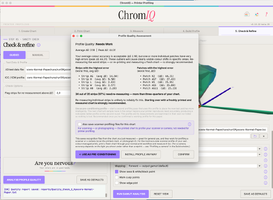
Finished the reading i built the profile (i didn't change anything) and analyzed it

The answer was that 97% of the strips need re-mesuring (screenshoot attached).

Anyway i went on and runned the gamut analysis how showed in the screenshoot attached.

I attached also all the project files so if someone could give it a look just to verify if my spectro is running good or not.

the low black value i suppose is normal for plain paper like also for matte paper.

Now i will clone the project to read it again with Chromiq engine and its chartread, just to see if the measurement and the final ICC profile are the same or very similar.

Anyway i will try to find a power adapter with more than 1Ampere, just to verify the spectro has enough power to operate.

 

Attachments

  • Screenshot 2026-07-21 at 13.40.13.png
    Screenshot 2026-07-21 at 13.40.13.png
    498.5 KB · Views: 86
  • Screenshot 2026-07-21 at 13.39.41.png
    Screenshot 2026-07-21 at 13.39.41.png
    282 KB · Views: 80
  • kyocera-plain-paper.zip
    kyocera-plain-paper.zip
    1.2 MB · Views: 64
  • Screenshot 2026-07-21 at 13.56.53.png
    Screenshot 2026-07-21 at 13.56.53.png
    379.8 KB · Views: 77
Last edited:
Back
Top