
[Tool] ChromIQ – a macOS and Windows GUI for ArgyllCMS printer profiling (v3.0.0 beta 10)

itsab1989

Getting Fingers Dirty
Joined
Feb 11, 2026
Messages
37
Reaction score
18
Points
23
Printer Model
Epson ET 8550, Canon Pro 300
@pharmacist
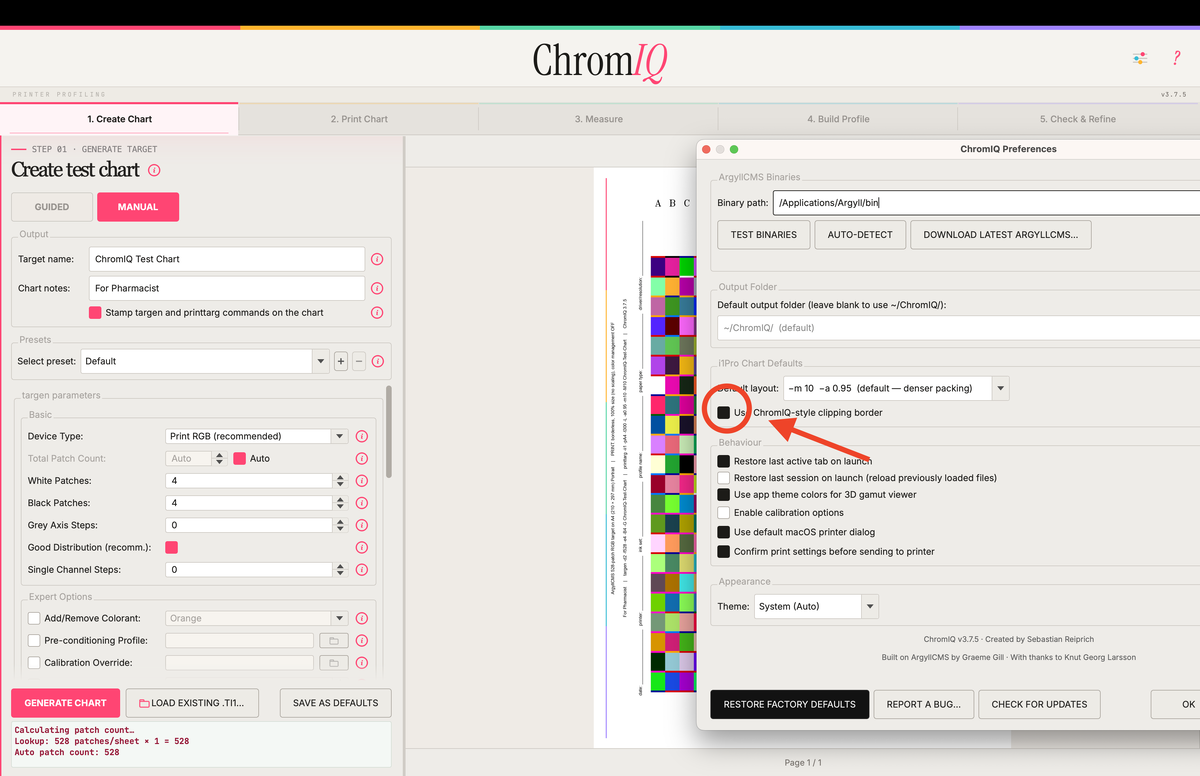
New release is on its way. You have to enable this new feature in the settings window as I did not want to make it a default yet. Please put it through its paces to find out if it breaks somewhere. Are all of the patches completely on the target? Is something cut off? Does the highlighter work?
For my few tests everything seemed fine but I cant test every possible combination. If something breaks please tell me exactly what you did so I can reproduce it.
And thanks a lot for the work you put into this. I really like this new addition. It makes the app feel more unique.
I'll tackle the other thing later. It is related, but I am taking a break for now.
Bildschirmfoto 2026-05-20 um 08.32.40.png
 
Last edited:

pharmacist

Printer VIP
Platinum Printer Member
Joined
May 29, 2007
Messages
3,060
Reaction score
1,783
Points
333
Location
Ghent, Belgium
Printer Model
SC-900 ET-8550 WF-7840 TS705
Hello,

Thanks for te update: unfortunately with my busy job I can only have look at it from time to time, but I will report back and will suggest improvements and check if there are any flaws in the design. Keep up the good job 👍.

What you can program is that you can have some entry form like: date (automatically from system time), printer (manual or list derived from the installed printers you have), media setting (for example: Epson Premium Glossy - quality=standard or Epson Enhanced Matte - quality=high), ink set (for example: Epson Claria HD), paper name/type and the profile name. These parameters can be automatically printed onto the generated target (tif).

Also for multiple page targets (for example 3 sheets of A4), I would suggest to print: "This is page 1 of 3 "
Can be programmed to be printed automatically.

For the exact dimensions for the i1Pro2 scanning jig/guider including the amount of paper surface taken by the clamp and the maximum row distance (for the scanning eye to start from white to white) and the exact positioning on the paper surface I will have a look later on. If this would be implementated that would make ChromeIQ very unique, not even seen on i1profiler. Maybe I will also measure for Letter format paper as well and report back.

Also for the Colormunki/i1Studio an alternative patch layout would be nice. I think I can get about 325 patches on a single A4:

1779267276197.png


Also with some tricks and PS, but I think AI can fit the patch distribution into this configuration (notice the entry form on the left)

Another tip: there are some conflicting choices beneath: either you can choose with or without spacers, or colored or black/white spacers: somehow I can choose both simultaneously, which in this case the colored spacers are chosen by printtarg. So when you choose black/white spacers the ability to disable spacers/colored spacers must be greyed out, because this is conflicting.
 
Last edited:

itsab1989

Getting Fingers Dirty
Joined
Feb 11, 2026
Messages
37
Reaction score
18
Points
23
Printer Model
Epson ET 8550, Canon Pro 300
I will have a look into this later. Thanks for mentioning the conflicting options. I will make it so one is greyed out when the other is activated. For now I have fixed the issue with how the commands are printed on the target. It is now directly below the printttarg tex. Or at least it should be.

Edit:
I will automate the date and page number. However I think the printer and media type settings should not be automated because this is something you set AFTER creating the chart.
For the Colormunki I think the simplest approach would be to use the regulara setting (no double density) and descrease the patch size scale drastically. Might this work? In this case you could already do that.
 
Last edited:

pharmacist

Printer VIP
Platinum Printer Member
Joined
May 29, 2007
Messages
3,060
Reaction score
1,783
Points
333
Location
Ghent, Belgium
Printer Model
SC-900 ET-8550 WF-7840 TS705
Printer and media setting can be indeed placed on the target after creating the chart: I am not sure it would be possible when calling the printing windows and after selecting the media setting/printer this extra information can placed on the target. I see there is a free entry form in beginning of the targen/printtarg section for extra information: maybe this can placed there and moved accordingly on the target that will be generated by targen ?
 

itsab1989

Getting Fingers Dirty
Joined
Feb 11, 2026
Messages
37
Reaction score
18
Points
23
Printer Model
Epson ET 8550, Canon Pro 300
You need the target to already be generelated to have something to print. I am not sure on this one really. What if you created a target and want to use it again later? In that case the free space to write the information by hand is much more useful I think.
 

itsab1989

Getting Fingers Dirty
Joined
Feb 11, 2026
Messages
37
Reaction score
18
Points
23
Printer Model
Epson ET 8550, Canon Pro 300
@pharmacist

New update on the way. The behaviour of the spacer settings should be fixed. I also changed the behaviour of the user presets in the manual modules. Those are now stored at an accessible location on the harddrive. So you can choose good settings and share them with others if you want to.
Your idea with the Colormunki patches seems a little to execute than expected. If you just scale down the patches they are less high but still too wide you would have to modify them a little more which I am not sure is a good idea to do. Or maybe one could use the patch design of an i1Pro and make this bigger instead? would that be a good solution maybe? I could add an extra checkbox for the colormunki for maximum density and under the hood use the commands for the i1Pro...

Bildschirmfoto 2026-05-20 um 12.59.57.png


Edit:

I tried my idea with the i1Pro patch layout. I think that might work. The guide I have is for the Colormunki, it works for the device, I have tested it. And the opening is big enough for the patches.
So 324 patches for 1,30 scale and margin 5 or 336 patches for the same scale with even lower margin (I think it works until margin 2) but you would have to print it borderless.

Bildschirmfoto 2026-05-20 um 13.32.23.png

Bildschirmfoto 2026-05-20 um 13.37.58.png


IMG_0271.jpg


Edit 2:

Triple density is added. It uses the i1Pro layout, margin 5, patch size scale 1.3, don't limit strip lenght, forces suppress left clipping border. The produced ti2 file is modified so it has the Clormunki as measurement device in it. I have not tried if it works though but I guess it should. It also can be saved as part of a preset in manual mode in case you want to refine it.

Bildschirmfoto 2026-05-20 um 20.02.27.png
 
Last edited:

pharmacist

Printer VIP
Platinum Printer Member
Joined
May 29, 2007
Messages
3,060
Reaction score
1,783
Points
333
Location
Ghent, Belgium
Printer Model
SC-900 ET-8550 WF-7840 TS705
Still possible to choose colored and b/w spacer simultaneously:

1779302457513.png


Thus the setting "force colored spacers" will prevail. When choosing one of them the other should be unchecked.

Not sure what I have doing wrong: I have checked "use ChromIQ=style clipping border", but the generated target still looks the same:

1779302926196.png


Waiting for input what is causing this.
 
Top