Cassiop38
Printing Apprentice
- Joined
- Dec 17, 2025
- Messages
- 47
- Reaction score
- 9
- Points
- 13
- Printer Model
- Epson, Canon, HP.
After the successfully save of a pro 10, i got my dirty hands over a pro 10s that was sitting idle for 2 years. Most cartridges weren't empty but some were very low. I didn't installed a potty yet so i don't know if the printer attempted anything, headcleaning related, when i fired it up. and still not sure how much ink is soaked when you change the cartridges. Anyway i swapped all cartridges with inktek refilled ones, from printout24, and gave it a try.
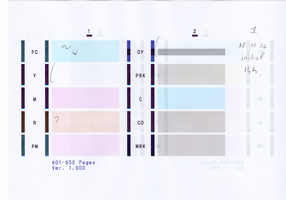
Right After the swap, the printer perform some kind of purge that restarted most of the colors but not all. Y was missing, R is not perfect, PC a small band and GY was drunk.
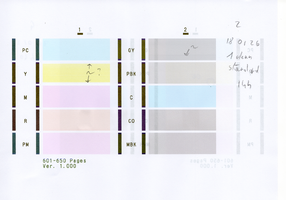
immediatly after a head cleaning Y came back but not entirely, GY was better but not perfect, PC and R are now fine.
I let the printer sit for 2 hours and now GY is completely fine, Y was still missing the bottom.
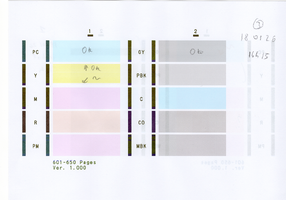
I let the printer sit for 2 days and the Y is now fine.
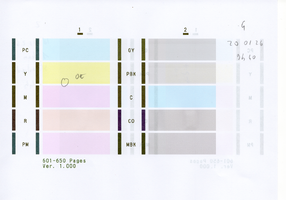
Conclusions : Time is an ally, a single head cleaning was enough to recover this pro 10s that was sitting idle for 2 years. I wasn't that experienced with the pro-10 but it roughly went the same. The most expensive part was mostly investing in ink and resetter. And finding a second set of empty cartridge wasn't that easy either but now that i have it i'm fine.
Next step is salvaging ink from a pro-1 and try that ink in the pro-10s over the inktek one (that i don't like) and see how it goes. the step after that might be trying octoink ink. Oh and i want to find a pro 100 !
Right After the swap, the printer perform some kind of purge that restarted most of the colors but not all. Y was missing, R is not perfect, PC a small band and GY was drunk.
immediatly after a head cleaning Y came back but not entirely, GY was better but not perfect, PC and R are now fine.
I let the printer sit for 2 hours and now GY is completely fine, Y was still missing the bottom.
I let the printer sit for 2 days and the Y is now fine.
Conclusions : Time is an ally, a single head cleaning was enough to recover this pro 10s that was sitting idle for 2 years. I wasn't that experienced with the pro-10 but it roughly went the same. The most expensive part was mostly investing in ink and resetter. And finding a second set of empty cartridge wasn't that easy either but now that i have it i'm fine.
Next step is salvaging ink from a pro-1 and try that ink in the pro-10s over the inktek one (that i don't like) and see how it goes. the step after that might be trying octoink ink. Oh and i want to find a pro 100 !