alpac1t
Print Lurker
- Joined
- Aug 27, 2026
- Messages
- 2
- Reaction score
- 1
- Points
- 1
- Printer Model
- Epson ET-2760
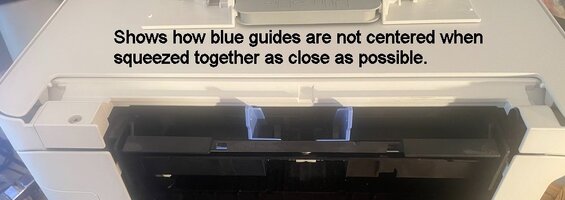
All of a sudden, and for no apparent reason, the paper-feed guides on the rear of my printer are out of alignment. When the two guides are squeezed together to the smallest possible opening, about two inches, they are visibly NOT CENTERED. Consquently, when fully expanded, the left guide stops about 1/2 inch short of where it should. The printer will no longer accept standard (8.5 x 11 inch) paper, and everything it prints on small paper is mis-aligned.
I have only printed about 4000 pages on this printer over the 6+ years that I've had it. Up until yesterday, all 4000 of those pages, including many greeting cards, printed exactly as they should.
Epson support was not helpful, said only that there's a hardware problem requiring shop repair. I'm suspicious of that.
Nothing about how I'm printing has changed. I've used three different printing programs and various sizes of paper, have turned printer off/on several times. Print Preview in the apps shows the documents properly centered/aligned, but everything gets shifted on the actual printed paper due to the mis-alignment of the paper guides.
Attached pictures show how the paper guides are not centered. and how, consequently, the guide on the right (of the picture) will not extend as far as it should.
Any help, suggestions, ideas, etc., would be much appreciated!
I have only printed about 4000 pages on this printer over the 6+ years that I've had it. Up until yesterday, all 4000 of those pages, including many greeting cards, printed exactly as they should.
Epson support was not helpful, said only that there's a hardware problem requiring shop repair. I'm suspicious of that.
Nothing about how I'm printing has changed. I've used three different printing programs and various sizes of paper, have turned printer off/on several times. Print Preview in the apps shows the documents properly centered/aligned, but everything gets shifted on the actual printed paper due to the mis-alignment of the paper guides.
Attached pictures show how the paper guides are not centered. and how, consequently, the guide on the right (of the picture) will not extend as far as it should.
Any help, suggestions, ideas, etc., would be much appreciated!