Epson Photo 1500W - lights blinking for paper and ink, nothing I can do (CISS installed)

avenuedelapoesie

Newbie to Printing
Joined
Jun 6, 2023
Messages
5
Reaction score
0
Points
6
Printer Model
Brother
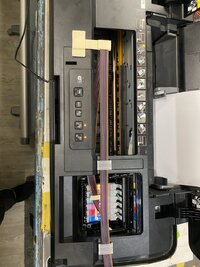
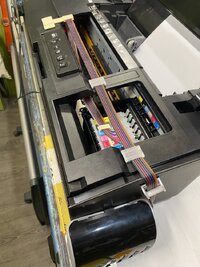
I've just installed this CISS, and the ink light keeps on blinking, but now also the paper light (which wasn't blinking before)
When pushing the buttons, nothing happens.
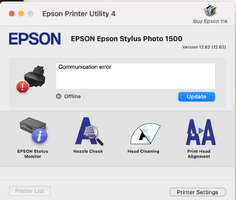
The printerutility says 'communication error'.
What can I do?
 

Attachments

  • Screenshot 2025-03-11 at 22.52.46.png
    Screenshot 2025-03-11 at 22.52.46.png
    174.2 KB · Views: 386
  • IMG_8839.JPG
    IMG_8839.JPG
    167.4 KB · Views: 304
  • IMG_8840.JPG
    IMG_8840.JPG
    159.6 KB · Views: 322
I have a service manual for that, if it'd help. Table 3-2 is titled "Troubleshooting of Communication error".
 
Did the service manual help?
 
Oddly enough,
I had put the printer on the side, and unpowered for a week, and when I tried again, the lights didn't blink anymore,

however, now the printer is still not printing,
it's taking paper, and seems to be printing,
but there is no ink,
out comes a blank page..
 
Oddly enough,
I had put the printer on the side, and unpowered for a week, and when I tried again, the lights didn't blink anymore,

however, now the printer is still not printing,
it's taking paper, and seems to be printing,
but there is no ink,
out comes a blank page..
Did you prepare the cartridges before installation? You have to pull some ink into each cartridge with a syringe in order for the ciss to continuously refill it.
 
Yes, I did that, untill there was a bit of ink in the syringe, even, so the cartridges should be full..
 
Sounds like the printer may not be recognising the CISS chips properly. I’d power it off, reseat the cartridges/chip contacts and check the ribbon isn’t stopping the carriage moving freely. If both ink and paper lights are flashing together it can also indicate a general error, so I’d sort that before chasing the communication error in the utility.
 
Back
Top