

imdbest
Print Lurker
- Joined
- Nov 1, 2026
- Messages
- 1
- Reaction score
- 0
- Points
- 1
- Printer Model
- Epson dtf
Hello everyone,
I ordered a DTF printer with a configuration of 5 printheads from a reputed company. The company delayed the printer shipment for a long time, citing the unavailability of the Powder Shaker.
Later, we requested them to dispatch the printer separately and send the Powder Shaker whenever it became available. However, we still haven't received the Powder Shaker.
When the printer arrived and we opened the package for installation, we discovered that the printheads were missing. After we complained, the company admitted that they had forgotten to include the printheads. After another considerable delay, they finally sent us 5 printheads separately.
However, after receiving them, we noticed some concerning issues:
Despite these issues, the company insists that all five printheads are genuine, brand-new Epson products supplied directly by Epson.
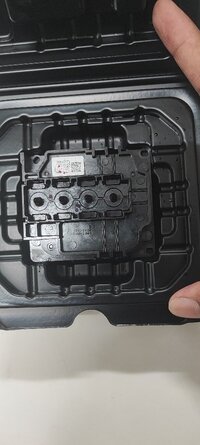
For now, I am uploading photos and a video of only one printhead. I will upload photos and videos of the remaining four printheads later.
I would appreciate expert opinions on the following:
I am deliberately not disclosing the supplier's company name because I do not want to damage its reputation or business. My intention is purely to have an objective technical discussion and get opinions from experienced professionals.
I would especially appreciate feedback from people experienced in Epson printhead manufacturing, distribution, sales, and repair.
Please examine the attached photos and video and share your honest technical opinions.
Thank you for your help and valuable experience!
I ordered a DTF printer with a configuration of 5 printheads from a reputed company. The company delayed the printer shipment for a long time, citing the unavailability of the Powder Shaker.
Later, we requested them to dispatch the printer separately and send the Powder Shaker whenever it became available. However, we still haven't received the Powder Shaker.
When the printer arrived and we opened the package for installation, we discovered that the printheads were missing. After we complained, the company admitted that they had forgotten to include the printheads. After another considerable delay, they finally sent us 5 printheads separately.
However, after receiving them, we noticed some concerning issues:
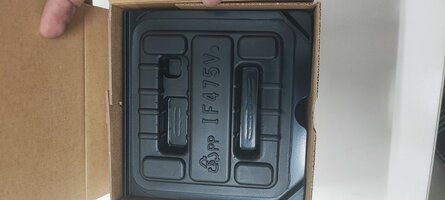
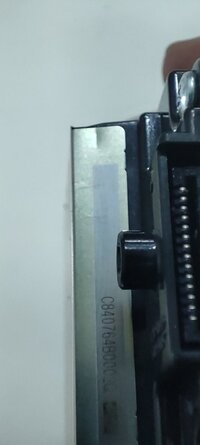
- The serial number on the printhead box does not match the number printed on the printhead body. The company claims that the printheads were accidentally packed in the wrong boxes.
- When the printhead is placed on tissue paper, a magenta-colored liquid appears. The company claims that this is cleaning liquid injected into the printhead.
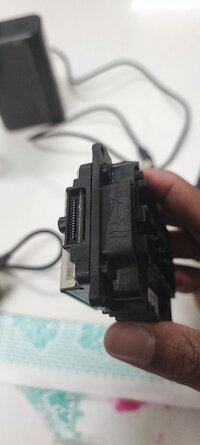
- There are visible scratches, marks, and some signs of possible physical damage on the printhead body.
Despite these issues, the company insists that all five printheads are genuine, brand-new Epson products supplied directly by Epson.
For now, I am uploading photos and a video of only one printhead. I will upload photos and videos of the remaining four printheads later.
I would appreciate expert opinions on the following:
- Do these printheads appear to be genuine, brand-new Epson products?
- Are mismatched box and printhead serial numbers normal?
- Is the company's explanation technically reasonable?
- Could these printheads be refurbished, previously used, or repackaged units?
I am deliberately not disclosing the supplier's company name because I do not want to damage its reputation or business. My intention is purely to have an objective technical discussion and get opinions from experienced professionals.
I would especially appreciate feedback from people experienced in Epson printhead manufacturing, distribution, sales, and repair.
Please examine the attached photos and video and share your honest technical opinions.
Thank you for your help and valuable experience!
Attachments
-
 IMG_20261031_201654.jpg73.1 KB · Views: 23
-
 IMG_20261031_201750.jpg67.8 KB · Views: 23
-
 IMG_20261031_201825_2.jpg43.4 KB · Views: 19
-
 IMG_20261031_201728.jpg80.9 KB · Views: 19
-
 IMG_20261031_201707.jpg79.7 KB · Views: 19
-
 IMG_20261031_201830_2.jpg33.1 KB · Views: 18
-
 IMG_20261031_201947_1.jpg44.9 KB · Views: 18
-
 IMG_20261031_202708.jpg50.3 KB · Views: 20
-
 IMG_20261031_202624.jpg69.1 KB · Views: 23


