Lines - Canon Pro 1000 Printing Issue

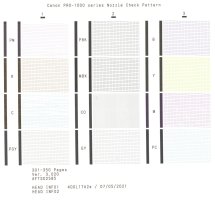
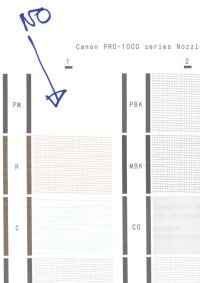
After Deep Cleaning ...
Cyan and PM both have problems.
 

Attachments

  • Scan2024-03-08_063027.jpg
    Scan2024-03-08_063027.jpg
    151.1 KB · Views: 338
Last edited:
You’ve got something going seriously wrong inside you printer..

The PM has improved but the Cyan is still terrible, but you now have the Magenta back, with a normal cleaning cycle all of the colour blocks should improve and be 100%, so you need to do something else as well..

Try running the Ink Quality Maintenance and then another deep cleaning cycle and that should bring all the colours back to 100%, are all the inks in the printer OEM or third party ?.. Wasting ink is the least of your problems..
 
Hi, Thank you for helping.
Just attempted a "Deep Clean" .... it has filled the new Maintenance Cartridge.
Cannot proceed until that is changed.
What a nuisance.
Will order another, and return here in a week.
 
Last edited:
OK. New Waste Tank installed.

No further cleaning attempted.

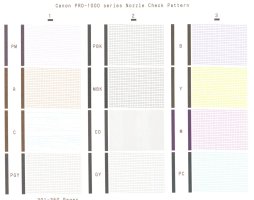
It seems dumping my ink during the cleaning process, has in fact worked.

Things are not perfect, but to my eyes, there is improvement.

Therefore, I suppose my question is ... Will the slight problem with Cyan, and the smaller problem with PM sort themselves out as the printer is used, or do you suggest a further cleaning?

This thing with the ink usage, as it cleans is incredible. Is there a better printer available, with similar number of inks, with a different system of dealing with blockages?

Note - I have read the "Waste Tank" holds about $180 of ink. (Full in one week due to cleanings).
 

Attachments

  • Scan2024-03-14_140425_000.jpg
    Scan2024-03-14_140425_000.jpg
    153.9 KB · Views: 313
  • Scan2024-03-14_140425_001-2.jpg
    Scan2024-03-14_140425_001-2.jpg
    226.5 KB · Views: 329
Last edited:
Try running that scan test print again on ten plain paper sheets, then run another nozzle check and see if there’s a big difference..
Note - I have read the "Waste Tank" holds about $180 of ink. (Full in one week due to cleanings).
Al printers use a lot of ink when you try to unclog them, the answer is don’t let them clog in the first place, run a test print weekly..
 
Update.
Another normal cleaning.
Printed test image on a few sheets of paper.
Printed test page (below).
Improved a bit, still a few weak patches.
Next?
 

Attachments

  • Scan2024-03-15_133650-2.jpg
    Scan2024-03-15_133650-2.jpg
    171 KB · Views: 305
Thanks to your expertise, my printer now has fewer blockages and is in better condition than ever before. This leads me to question the necessity of aiming for absolute perfection. Perhaps the current state suffices. I wonder if the difference between prints with slightly defective ink and those under perfect conditions is even detectable.

Your knowledge has been invaluable. Thank you once again for sharing it with me.
 

Attachments

  • printer-test-SMALL-ddd-0339572.jpg
    printer-test-SMALL-ddd-0339572.jpg
    598.7 KB · Views: 322
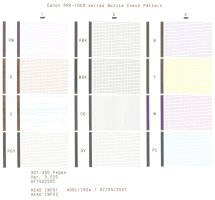
PM zero again.
I was hoping this problem was over.
If it were a car, I would guess a tiny air leak.
Any suggestions? (Other than dumping another 200 euro worth of ink) ...
 

Attachments

  • Scan2024-03-19_180500-2.jpg
    Scan2024-03-19_180500-2.jpg
    91.4 KB · Views: 301
Back
Top